Mastering Primavera P6 for Facilities Management
Advanced Scheduling Techniques
Beyond a Single Critical Path
In most projects, you're trained to find the one critical path—the longest sequence of tasks that dictates the project's end date. Any delay on this path directly delays the project. But in complex facilities management projects, focusing on a single critical path is like navigating a city by only watching one major highway. You're ignoring all the other busy streets that could just as easily cause a traffic jam.
This is where the concept of multiple float paths comes in. A project can have several paths of activities that are almost as long as the critical path. These are called near-critical paths. While they have a small amount of float (flexibility), it doesn't take much for a minor delay to turn one of them into the new critical path.
Identifying these near-critical paths is crucial. It gives you a more realistic view of project risk and helps you focus your attention on all the tasks that could realistically delay completion.
Primavera P6 has a built-in feature to handle this. When you run the scheduler, you can ask it to calculate multiple float paths. Instead of just seeing one path with zero float, you can define other paths based on their float value. For example, you can see the critical path (total float of 0), a sub-critical path (total float of 1-5 days), and so on. This allows you to monitor several sequences of activities, not just one.
Compressing the Timeline
Imagine a key tenant needs to move into a facility sooner than planned. The original schedule won't work. You need to shorten the project duration without compromising its scope. This is called schedule compression, and there are two main strategies to achieve it: crashing and fast-tracking.
| Technique | How It Works | Impact on Cost | Impact on Risk |
|---|---|---|---|
| Crashing | Adding more resources to critical path activities. | Increases direct costs (overtime, more staff, expedited materials). | Can increase risk of errors or burnout. |
| Fast-Tracking | Performing activities in parallel that were originally planned in sequence. | Doesn't always increase direct costs. | Significantly increases risk of rework and communication issues. |
Choosing the right technique depends on the situation. Crashing is a good option when you have access to additional budget and need to shorten specific, resource-intensive tasks. For example, paying an electrical crew for weekend overtime to finish wiring a new server room.
Fast-tracking is riskier but can be effective when tasks can realistically overlap. For instance, you might start installing fixtures in a completed section of a building while painting is still underway in another section. This requires careful coordination to avoid conflicts, like painters getting paint on the new fixtures.
Always use Retained Logic as the scheduling method in Primavera P6 for activities with progress.
Advanced P6 Scheduling Options
Beyond compression techniques, Primavera P6 offers several settings that give you granular control over how the schedule is calculated. Understanding these options is key to building a robust and realistic project plan.
One of the most important settings is the logic option for activities in progress. P6 gives you two main choices:
- Retained Logic: This is the standard approach. The remaining duration of an in-progress task is still dependent on its predecessors. If a preceding task is delayed, the start of the remaining portion of the current task is pushed out.
- Progress Override: This option breaks the relationship with predecessors once an activity has started. The remaining work on the task can be scheduled to start as early as possible, ignoring the original logic. This can be useful in some recovery scenarios but can also create unrealistic schedules if not used carefully.
Another key setting relates to how float is calculated. You can choose to calculate float based on the finish dates of activities within different calendars. This helps provide a more accurate picture of flexibility, especially in projects where teams in different locations or departments work on different schedules.
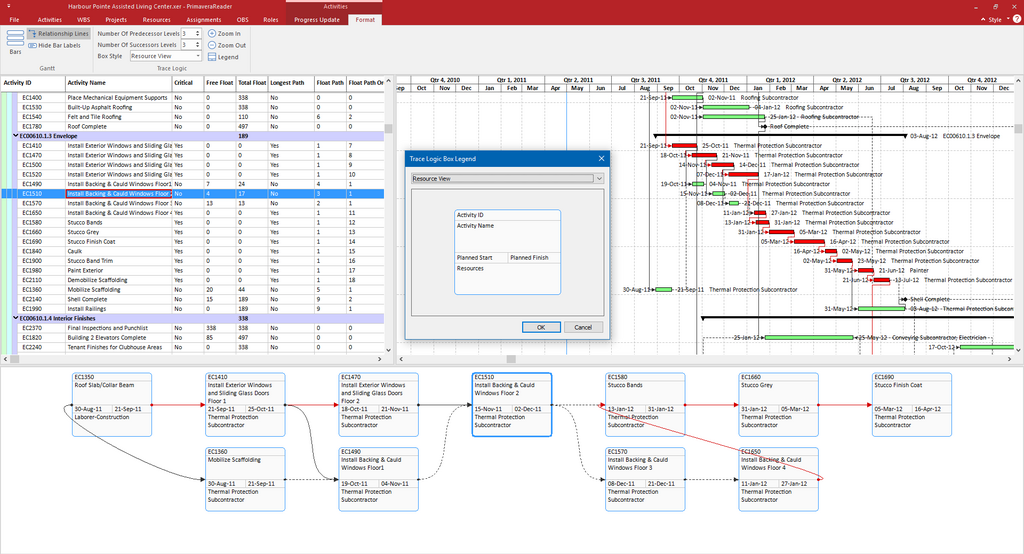
These advanced options allow you to tailor the scheduling engine to the specific realities of your project. They help you create a dynamic schedule that reflects real-world constraints and provides a more accurate forecast for completion.
In complex facilities management, why is it crucial to monitor multiple float paths instead of just the single critical path?
A project manager decides to pay an electrical crew for weekend overtime to finish wiring a new server room ahead of schedule. This is an example of which schedule compression technique?
By moving beyond a single critical path and using advanced P6 features, you can better anticipate risks and control your project's timeline.