Mastering Primavera P6
Introduction to Primavera P6
What Is Primavera P6?
Primavera P6 is a powerful software tool designed for managing large, complex projects. It stands for Primavera P6 Enterprise Project Portfolio Management, or EPPM. Think of it as a command center for everything from massive construction projects and manufacturing runs to major IT deployments.
Unlike simpler project management tools that might track a task list for a small team, Primavera P6 is built to handle thousands of activities, resources, and costs. It helps managers plan every step, schedule the work, and monitor progress to make sure everything stays on track.
It's the industry standard for planning and executing projects where delays can have significant financial consequences.
Core Features
Primavera P6 is packed with features that give project managers granular control. Here are some of the most important ones:
- Project Planning & Scheduling: At its heart, P6 is a scheduling engine. It allows managers to break down large projects into smaller tasks, estimate how long each will take, and define the relationships between them. It can then calculate the most efficient path to completion.
- Resource and Cost Management: The software helps assign people, equipment, and materials to tasks. It also tracks budgets and costs, giving a clear picture of a project's financial health.
- Risk and Issue Tracking: Projects rarely go exactly as planned. P6 provides tools to identify potential risks, track issues as they arise, and manage changes to the project plan.
- Reporting and Analytics: With so much data, P6 can generate detailed reports and visual dashboards. This helps stakeholders understand project status at a glance and make informed decisions.
The User Interface
Opening Primavera P6 for the first time can feel overwhelming, but the interface is logically structured around the project management process. The main screen typically features a dashboard with high-level summaries of your projects.
When you dive into a specific project, you'll spend most of your time in the Projects or Activities windows. These areas use layouts familiar to project managers, such as Gantt charts, which visually represent the project timeline with horizontal bars. This view makes it easy to see task durations, dependencies, and overall progress.
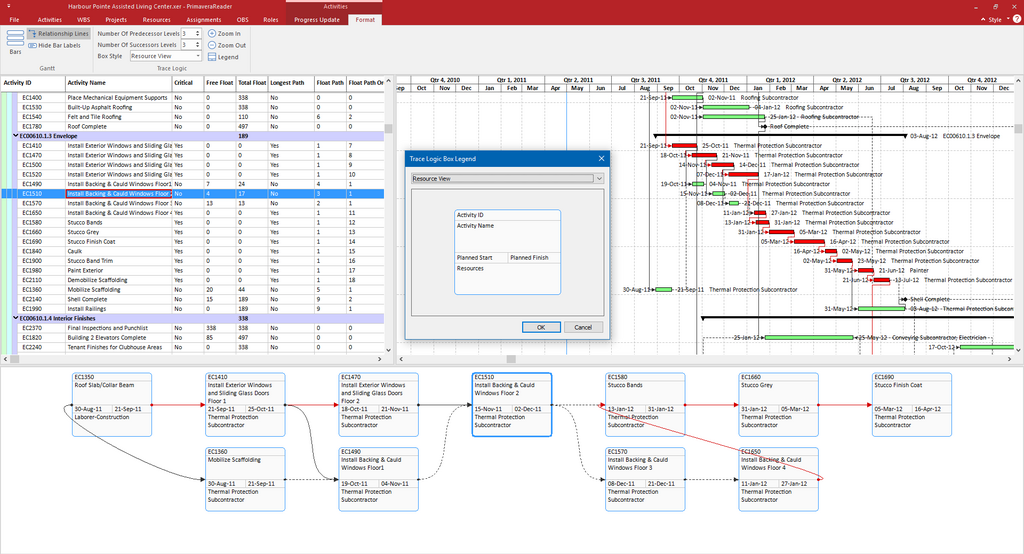
The interface is customizable, allowing different users to see the information most relevant to their roles, whether they are a project manager, a team member, or an executive.
Why Use Primavera P6?
Organizations invest in Primavera P6 for several key reasons. First, it brings a high level of discipline and standardization to project management. Everyone works from the same plan, which reduces confusion and improves coordination.
It also provides unparalleled visibility into project performance. Managers can spot potential delays or budget overruns early, giving them time to correct the course before problems escalate. By centralizing all project information, P6 creates a single source of truth that helps teams collaborate more effectively and keeps stakeholders aligned on goals and progress.
Ready to check your understanding? This quiz will cover the basics of what Primavera P6 is and why it's used.
What does the acronym EPPM in Primavera P6 EPPM stand for?
Which of the following is NOT listed as a core feature of Primavera P6?
Understanding Primavera P6 is the first step in learning how to manage large-scale projects with precision and control.