Mastering OAuth 2.0
Introduction to OAuth 2.0
The Valet Key for Your Apps
Imagine you want a new photo-editing app to access your pictures stored in a cloud service. In the early days of the internet, your only option was to give the photo app your username and password for the cloud service. This was a huge security risk. If the photo app was compromised, your entire cloud account, including emails and documents, would be exposed.
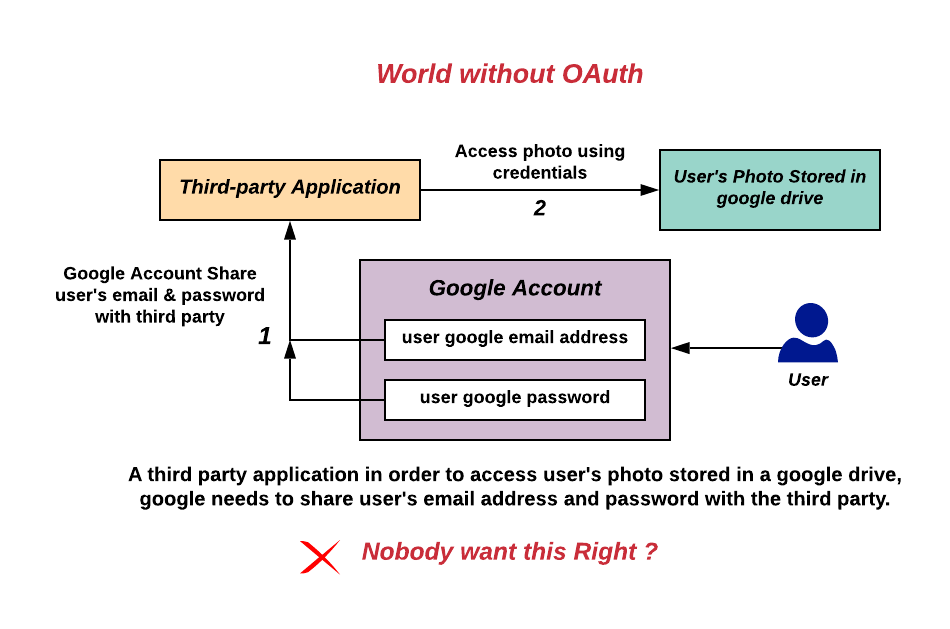
This is the problem OAuth 2.0 was designed to solve. OAuth is an open standard for authorization that allows applications to obtain limited access to user accounts on an HTTP service. It works like a valet key for your car. A valet key can start the engine and move the car, but it can't open the trunk or the glove compartment. Similarly, OAuth lets you grant an application specific permissions to access your data without ever handing over your password.
OAuth allows a third-party application to access your data from another service on your behalf, without you giving it your password.
How It Works
The process is designed to be secure and transparent, keeping you in control. Instead of sharing your credentials, the interaction is handled through a system of redirects and tokens.
Let's walk through a typical scenario. You're using an app, let's call it "PhotoPrinter," and you want it to print photos from your "CloudPics" account.
- You click a button in PhotoPrinter that says "Connect to CloudPics."
- PhotoPrinter immediately redirects you to the CloudPics website. You'll see a familiar login screen.
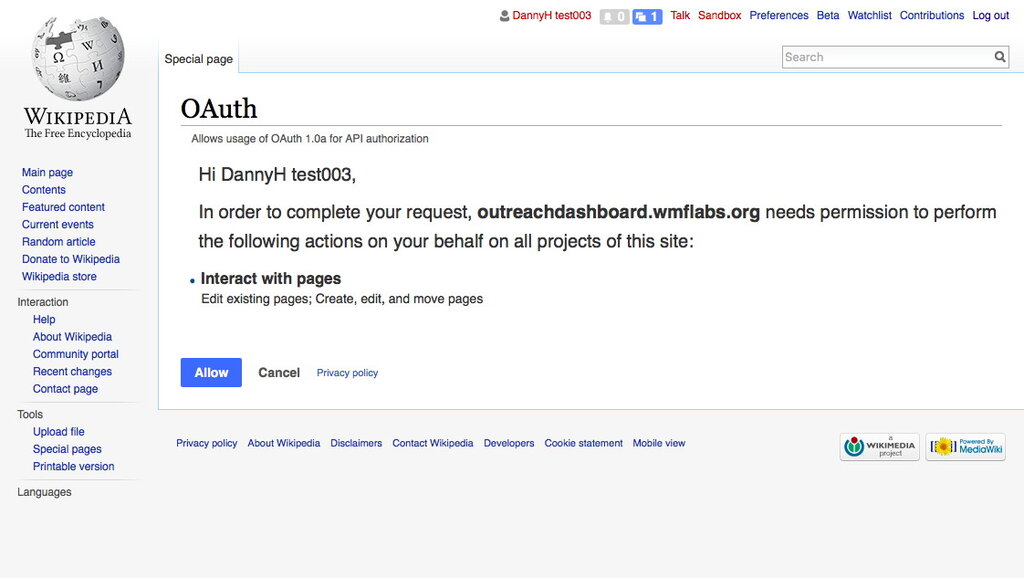
- After you sign in to CloudPics, it will present you with a consent screen. This screen explicitly asks if you want to grant PhotoPrinter permission to perform specific actions, such as "view your photo albums."
- If you click "Allow," CloudPics generates a special, short-lived digital key called an access token. It sends this token directly to the PhotoPrinter app.
- PhotoPrinter then uses this access token to request your photos from CloudPics. CloudPics verifies the token and, if it's valid, provides the data.
Crucially, PhotoPrinter never sees your CloudPics password. It only has the temporary token, which has limited permissions and usually expires after a short time. You can also revoke its access at any time from your CloudPics account settings.
Why OAuth is Essential
OAuth 2.0 has become the industry standard for a reason. It provides a secure and flexible way to delegate access, which is fundamental to how modern web and mobile applications work.
The key benefits are:
- Enhanced Security: Your password is never shared with third-party applications, dramatically reducing the risk of your credentials being stolen if that application is breached.
- Granular Permissions: Applications can be granted very specific, limited permissions. For example, an app might be allowed to read your contacts but not delete them. This is known as the principle of least privilege.
- Better User Experience: It allows for seamless integration between services. You can easily connect different tools and platforms without having to create new accounts or share passwords everywhere.
- User Control: You have a central place (the service that holds your data, like Google or Facebook) to see all the applications you've granted access to and can revoke that access with a single click.
This framework is the backbone of features like "Log in with Google" or "Sign in with Apple," which make it easy and safe to use countless online services.
What is the primary problem OAuth 2.0 was designed to solve?
In the OAuth 2.0 flow, what does a third-party application (like 'PhotoPrinter') receive directly from the service (like 'CloudPics') after the user grants permission?
OAuth 2.0 provides a secure and standardized way for applications to interact, all while keeping user credentials safe and putting control firmly in the hands of the user.