Mastering Nmap for Network Exploration
Introduction to Nmap
What is Nmap?
Nmap, short for Network Mapper, is a free, open-source tool used to explore computer networks. Think of it as a scout you send out to map a digital territory. It can discover which devices are connected to a network, what services (like websites or file servers) they are running, and what operating systems they use.
Network administrators use Nmap to check for open doors—or ports—on their systems, manage software upgrade schedules, and monitor the health of devices. Security professionals use it to find potential vulnerabilities before attackers do. It's a fundamental tool for understanding what’s happening on a network.
A Tool for Good and Bad
Like any powerful tool, Nmap can be used for both constructive and destructive purposes. A network administrator scanning their own company's network to find security holes is using it ethically. This is often called "white hat" hacking.
However, an unauthorized person scanning someone else's network to find weaknesses to exploit is using it unethically and illegally. This is "black hat" hacking. The key difference is permission.
Always have explicit, written permission before you scan any network or device that you do not own. Unauthorized scanning is illegal and can have serious consequences.
Getting Nmap Running
Nmap works on all major operating systems. The installation process is straightforward.
On Windows:
The easiest way is to download the official installer from the Nmap website (nmap.org). The installer, called nmap-<version>-setup.exe, includes a graphical interface called Zenmap, which is helpful for beginners.
On macOS: If you use the package manager Homebrew, you can install Nmap with a simple command in your terminal.
brew install nmap
On Linux:
For Debian-based systems like Ubuntu, you can use the apt package manager. You'll likely need administrative privileges, so you'll use sudo.
sudo apt-get update
sudo apt-get install nmap
Your First Scan
Nmap is primarily a command-line tool. You interact with it by typing commands into a terminal or command prompt. The basic structure of a command is simple: nmap [options] <target>.
The <target> can be a domain name (like google.com), an IP address (like 8.8.8.8), or a range of IP addresses.
For practice, Nmap provides a website specifically for testing your scans: scanme.nmap.org. Let's run a basic scan to see what we can find out.
nmap scanme.nmap.org
After running the command, Nmap will send packets to the target and analyze the responses. The output shows you which ports are open, the services running on those ports, and sometimes even the operating system.
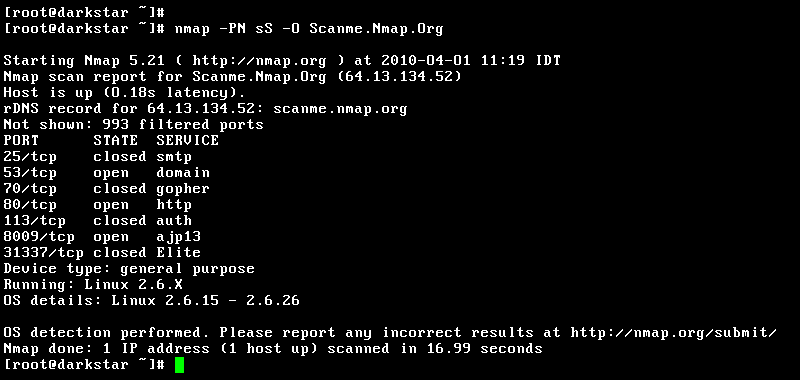
In this example output, you can see that ports 22 (SSH), 80 (HTTP), and 9929 are open. This tells us the server is likely running a web server and allows secure shell access. Nmap also makes a guess that the operating system is a version of Linux. This is the kind of foundational information a security audit begins with.
What is the primary function of Nmap?
What is the key factor that distinguishes ethical ("white hat") from unethical ("black hat") use of Nmap?
Now you have a grasp of what Nmap is, why it's used, and how to get started. It's a critical first step in exploring and securing networks.