Mastering n8n Workflows
Introduction to n8n
Meet Your Automation Assistant
Imagine you have a series of repetitive digital tasks. Every time a customer fills out a form on your website, you have to manually copy their information into a spreadsheet, send them a welcome email, and then post a notification in your team's chat channel. Each step is simple, but doing it over and over again is time-consuming and prone to error.
This is where n8n comes in. It's a tool that automates these kinds of multi-step tasks for you.
n8n is a powerful workflow automation tool that connects your apps and services, allowing you to automate repetitive tasks without coding knowledge.
Instead of you performing each action, n8n does it automatically. It watches for a trigger, like a new form submission, and then follows a set of instructions you've created. This set of instructions is called a workflow.
Building with Nodes
Workflows in n8n are built visually on a canvas. You don't write code; you connect building blocks called nodes. Each node represents a single action or step in your process. One node might read data from a spreadsheet, another might send an email, and a third could post a message to Slack.
Think of nodes like LEGO bricks. Each brick has a specific purpose, and you connect them to build something bigger and more complex.
A workflow starts with a trigger node. This is the event that kicks everything off. After the trigger, you add more nodes to define the sequence of actions. You connect them with lines, showing how data flows from one step to the next. The output of one node becomes the input for the next one.
This visual, node-based approach makes it easy to see exactly how your automation works. You can add, remove, or rearrange nodes to change the workflow without getting lost in lines of code.
What Can You Build?
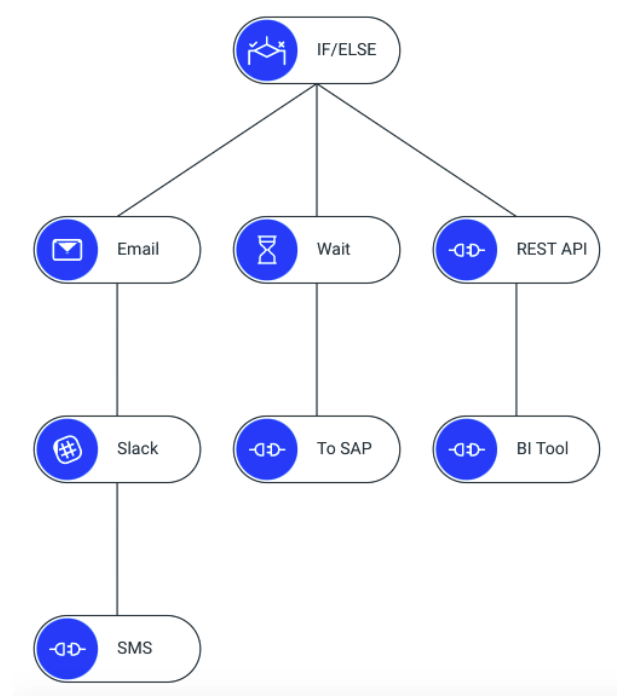
The possibilities with n8n are broad. You can create simple, linear workflows that perform a few tasks in a row, or you can build complex systems with branching logic.
For example, an IF node can check for a certain condition and send the workflow down different paths. If a new customer is from a specific country, you might send them a welcome email in their local language. If not, they get the standard English version. This allows you to build smarter, more responsive automations.
Here are a few common applications:
- Marketing Automation: Automatically post new blog articles to social media or add new leads from Facebook Ads to your CRM.
- Sales & CRM: Sync contacts between different systems, get notifications for new deals, or automate follow-up emails.
- Customer Support: Create tickets from new emails or automatically assign support requests to team members.
- Personal Productivity: Get a daily summary of your tasks sent to your phone or automatically save attachments from your email to a cloud drive.
By connecting the tools you already use, n8n acts as the glue that holds your digital processes together.
Let's check your understanding of these core concepts.
What is the primary purpose of n8n?
In n8n, what is the set of instructions that defines an automated process called?
Now you know the basics of what n8n is and how it uses a visual, node-based system to build automated workflows. With these fundamentals, you're ready to start thinking about the repetitive tasks in your own life that could be automated.