Mastering Modern HTML
Semantic HTML5
Giving Your Content Meaning
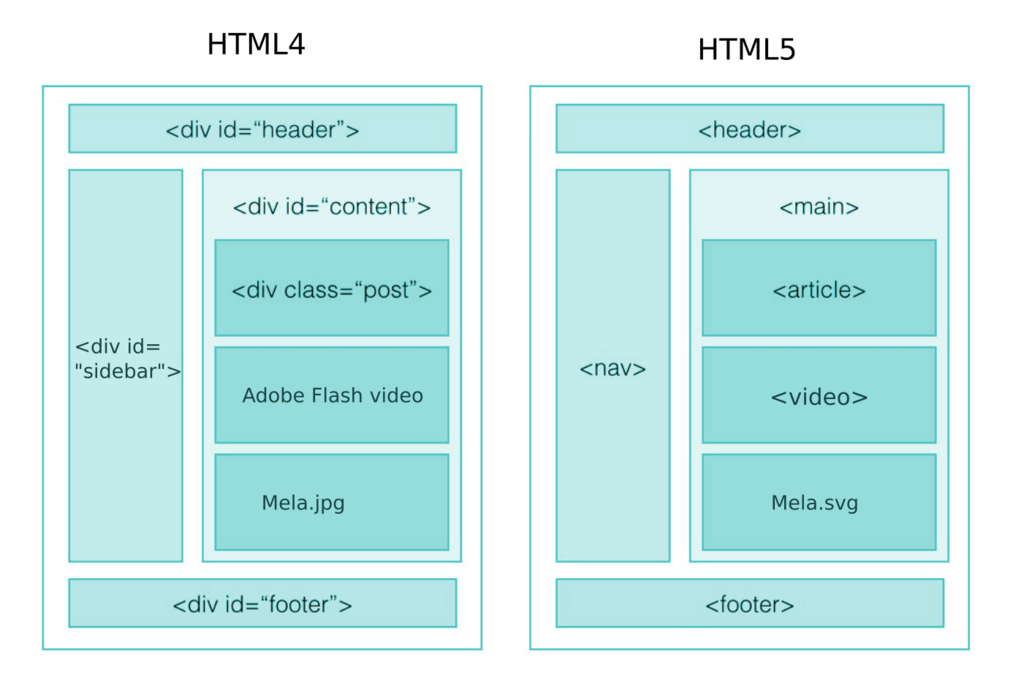
Imagine trying to understand a book with no chapter titles, headings, or even page numbers. It would be a wall of text, difficult to navigate and understand. Early websites were a bit like that. Developers often used generic containers, like the <div> tag, for everything from headers to footers to the main content.
Semantic HTML solves this problem. It's the practice of using HTML tags that convey the meaning and structure of the content within them. Instead of a generic <div>, you use tags that explicitly say, "This is a header," "This is the main article," or "This is the navigation menu."
This makes your code not only easier for other developers to read but also clearer for browsers, screen readers, and search engines to interpret.
Using a non-semantic tag like
<div>is like putting your belongings in an unlabeled cardboard box. Using a semantic tag like<article>is like putting them in a box clearly marked "Important Documents."
The Layout Building Blocks
HTML5 introduced a set of tags designed specifically to structure a webpage. These elements form the skeleton of most modern websites.
Here's a quick rundown of these core elements:
<header>: Contains introductory content or navigational links for a page or a section. Think logos, site navigation, and search bars.<nav>: Specifically for major navigation blocks. This tells assistive technologies, "Here's how you can get around the site."<main>: The star of the show. This tag wraps the dominant content of the page. There should only be one<main>element per page.<article>: Represents a self-contained piece of content that could, in theory, be distributed on its own, like a blog post, a news story, or a forum comment.<section>: A thematic grouping of content, typically with a heading. Think of it as a chapter in your<main>content area.<aside>: For content that's tangentially related to the main content, like a sidebar with related links, author bios, or advertisements.<footer>: Contains information for the bottom of a page or section, such as copyright information, contact details, or links to related pages.
<body>
<header>
<h1>My Awesome Blog</h1>
<nav>
<ul>
<li><a href="/">Home</a></li>
<li><a href="/about">About</a></li>
</ul>
</nav>
</header>
<main>
<article>
<h2>The Importance of Semantic HTML</h2>
<p>This is the main content of my blog post...</p>
</article>
<section>
<h3>Comments</h3>
<p>This is a reader's comment.</p>
</section>
</main>
<aside>
<h3>Related Posts</h3>
<ul>
<li><a href="/post2">Another Great Post</a></li>
</ul>
</aside>
<footer>
<p>© 2024 My Awesome Blog</p>
</footer>
</body>
The Payoff: Accessibility and SEO
Using semantic tags isn't just about writing cleaner code; it has two huge real-world benefits.
First, accessibility. People who use screen readers to browse the web rely on a page's structure to navigate. Semantic HTML provides landmarks. A user can tell their screen reader to jump directly to the <main> content, skipping the header and navigation, or to list all the links in the <nav> element. With a site built only of <div>s, the page is a flat, confusing landscape.
Second, Search Engine Optimization (SEO). Search engines like Google are constantly trying to understand the content and structure of your website. By using tags like <article> and <h1>, you give them clear signals about what your content is and which parts are most important. This helps them index your site more effectively, which can lead to better rankings in search results.
Semantic HTML plays a critical role in both SEO (Search Engine Optimization) and web accessibility.
Using Semantics Wisely
Just knowing the tags isn't enough. Using them correctly is key. One of the most important rules is to maintain a proper heading hierarchy.
Your page should have only one <h1>, which serves as the main title. Subsections should use <h2>, subsections within those use <h3>, and so on. Never skip a level, for example, by jumping from an <h1> to an <h3>. This logical structure is crucial for both screen readers and search engines to follow the flow of your content.
Also, don't feel the need to eliminate <div> and <span> entirely. They still have a role. If you need a container purely for styling purposes and no semantic tag fits, a <div> is the right choice. The goal is to use semantic elements where they make sense, not to force them everywhere.
By structuring your documents with meaning, you create a better experience for everyone.
What is the primary purpose of using semantic HTML tags?
Which HTML tag is intended for a self-contained piece of content that could be distributed independently, like a blog post or a news story?