Mastering Learning Management Systems
Introduction to LMS
What Is a Learning Management System?
A Learning Management System, or LMS, is a software application for the administration, documentation, tracking, reporting, and delivery of educational courses or training programs. Think of it as a central hub for all things learning. Instead of juggling emails, shared drives, and paper handouts, an LMS brings everything into one organized, online space.
Learning management systems (LMSs) have become essential in higher education and play an important role in helping educational institutions to promote student success.
Whether you're a student in a university or an employee undergoing corporate training, you've likely used an LMS. It’s the platform where you find your syllabus, download lecture notes, submit assignments, and check your grades. For instructors and administrators, it’s the tool they use to build courses, manage student enrollment, and monitor progress.
From Digital Binders to Smart Classrooms
The earliest versions of the LMS weren't much more than digital filing cabinets. They were places to store and share documents online. It was a step up from paper, but not by much. Instructors could upload readings, and students could download them. That was about it.
Over time, these platforms evolved. They started adding tools for interaction, like discussion forums and basic quizzes. This was a big leap forward. Learning became less about just consuming information and more about engaging with it and with others.
Today's LMS are sophisticated, all-in-one environments. They integrate video conferencing, automated grading, detailed analytics, and personalized learning paths. They are the digital backbone of modern education, supporting everything from fully online courses to blended learning models that mix in-person and online activities.
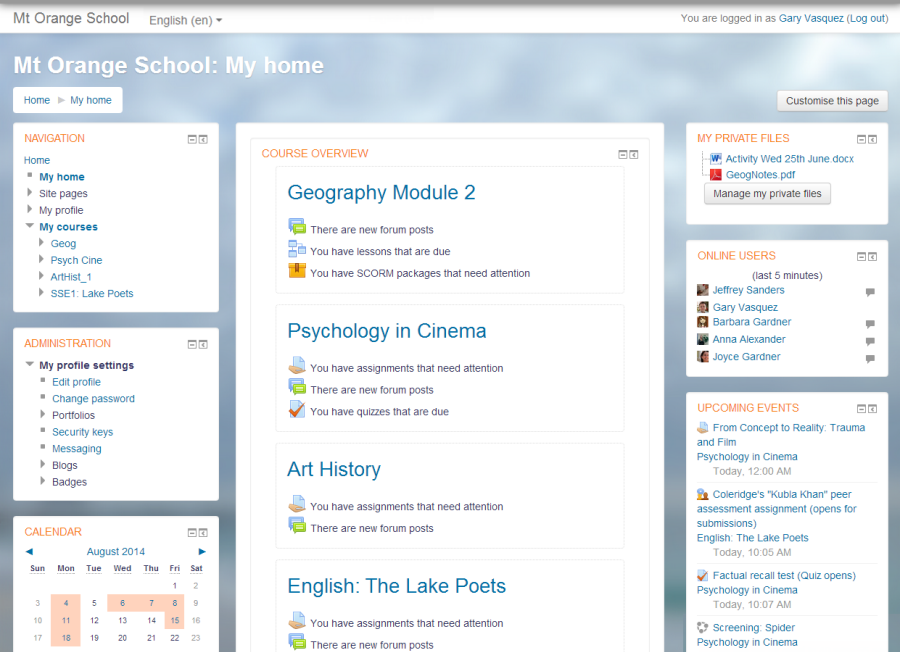
The Core Components
While features vary, nearly every LMS is built on three fundamental pillars: content management, user management, and assessment tools. These components work together to create a cohesive learning experience.
First, there's Content Management. This is how instructors upload and structure course materials—from PDFs and videos to interactive modules. A good LMS makes it easy to organize this content logically, perhaps by week or topic.
Next is User Management. This involves everything related to the people using the system. It allows administrators to enroll students in courses, assign roles like 'teacher' or 'student assistant,' and create groups for collaborative projects. It also tracks who has completed which activities.
Finally, Assessment Tools are crucial for measuring learning. This includes features for creating quizzes, collecting assignments, and providing feedback. These tools often automate grading for multiple-choice questions and manage gradebooks, saving instructors significant time.
Open-Source vs. Proprietary
When an organization decides to use an LMS, one of the first big decisions is whether to go with an open-source or a proprietary system.
Open-source software has source code that anyone can inspect, modify, and enhance. Moodle is a well-known example. These platforms are often free to install, but they require technical expertise to set up and maintain.
Proprietary systems, like Canvas or Blackboard, are owned and managed by a company. They are typically easier to use out of the box and come with dedicated customer support, but they operate on a subscription model. The differences can be significant.
| Feature | Open-Source LMS | Proprietary LMS |
|---|---|---|
| Cost | Free to acquire; costs for hosting, support, and customization. | Subscription fees, often per user. |
| Customization | Highly customizable, but requires technical skills. | Limited customization options set by the vendor. |
| Support | Community-based support (forums, documentation). | Dedicated customer support from the vendor. |
| Ease of Use | Can have a steeper learning curve for administrators. | Generally more user-friendly and intuitive to set up. |
The choice between them depends on an organization's budget, technical resources, and specific needs. A large university with an IT department might favor the control of an open-source system, while a small company might prefer the simplicity and support of a proprietary one. Both paths can lead to a powerful learning environment.
What is the primary function of a Learning Management System (LMS)?
The earliest versions of the LMS were sophisticated platforms with interactive tools like video conferencing and personalized learning paths.