Mastering Knowledge Acquisition with Oboe.fyi
Oboe.fyi Essentials
Your Second Brain
Think of Oboe.fyi as a digital extension of your mind. It’s not just another note-taking app or a place to bookmark links. It’s a workspace designed to help you capture, connect, and retrieve valuable information from the web and your own thoughts. While other tools focus on storing documents or writing notes in isolation, Oboe.fyi is built to create a network of knowledge that grows with you.
The goal isn't to hoard information, but to build a personal knowledge base you can actually use.
Getting Set Up
Getting started is straightforward. After creating an account, you'll land on your main dashboard. The interface is built around a few simple concepts:
- Cards: The basic unit in Oboe.fyi. A card can be a simple note, a quote you liked, a thought, or a clipped web page.
- Boards: These are like folders or collections. You use boards to group related cards together by project, topic, or area of interest. For example, you might have boards for "Quantum Physics," "Project X," or "Recipe Ideas."
This structure helps you keep your thoughts organized from the very beginning. You can move cards between boards or have a card exist in multiple places if it spans different topics.
Capture Everything
The real power of Oboe.fyi starts when you connect it to your web browser. The browser extension, or "clipper," lets you instantly save anything you find online. Read an interesting article? Clip the whole page. Find a powerful quote? Just highlight the text and save it directly to a board.
This is where Oboe.fyi stands apart. When you save something, it doesn't just grab the text. It automatically captures metadata:
- The original source URL
- The date and time you saved it
- The text you highlighted
This context is invaluable. Months later, you won't have to wonder where a random quote came from or when you found it. The link back to the original source is always attached to your note.
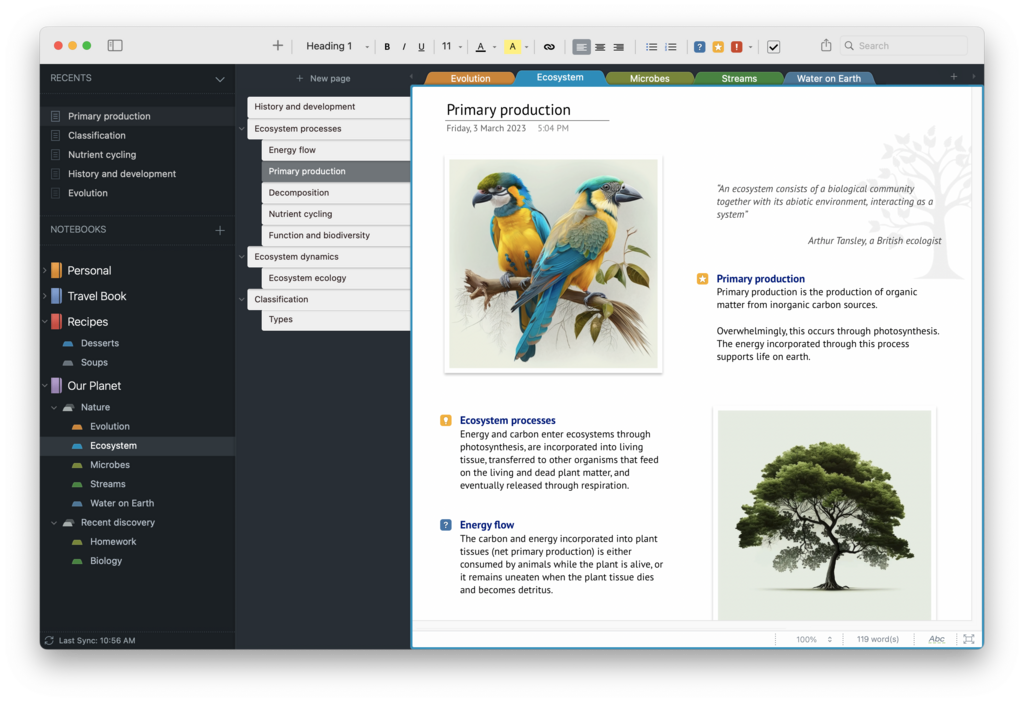
Once content is in Oboe.fyi, you can organize it. Tags are a flexible way to add another layer of organization. While a card can only be on one board at a time, you can add as many tags as you want. You could tag a card with #productivity, #research, and #must-read all at once.
| Organizer | Best For | Example |
|---|---|---|
| Boards | Broad categories, projects | "Marketing Q3", "History of Rome" |
| Tags | Specific keywords, status | #idea, #quote, #to-process |
This combination of boards and tags, along with the rich metadata, makes finding things a breeze. You can search for keywords, filter by tag, or browse a specific board. It's designed so you can find what you need, even if you saved it years ago.
Streamline Your Workflow
To make capturing information seamless, it's worth setting up the browser clipper and learning a few keyboard shortcuts. The clipper installs in your browser in a few clicks. Once it's there, you can configure a shortcut to instantly clip a page or a highlight without ever leaving your keyboard.
For example, you could set
Cmd+Shift+Sto save a selection. The less friction there is to save an idea, the more likely you are to do it.
Oboe.fyi is not a locked box. You can easily get your information in and out. The platform supports importing from common formats like Markdown, which is great if you're coming from another note-taking system. You can also export your data, ensuring you always own and control your knowledge.
Now you have the fundamentals. The next step is to start capturing things that spark your curiosity. Don't worry about perfect organization at first. Just build the habit of saving interesting ideas. You'll be surprised how quickly your second brain grows.