Mastering Jira for Project Management
Introduction to Jira
What Is Jira?
Jira is a powerful tool designed to help teams plan, track, and manage their work. Developed by Atlassian, it started as a bug tracker for software developers but has grown into a versatile project management tool used by all kinds of teams, from marketing and HR to finance and design.
Think of it as a shared, digital command center for your team's projects. Instead of relying on scattered emails, spreadsheets, and sticky notes, Jira brings everything into one organized space. Every task, idea, or problem is captured as an "issue," which can then be assigned, tracked, and worked on until it's complete.
In Jira, an 'issue' is simply a unit of work. It could be a bug that needs fixing, a feature to be built, or a task that needs to be done.
This system creates a single source of truth, so everyone on the team knows exactly what needs to be done, who's doing it, and what the status is.
Key Features
Jira is packed with features, but they all revolve around a few core concepts that make it so effective.
Issue Tracking: Every piece of work is an issue. Each issue has a unique key (like MKTG-123), a status (like To Do, In Progress, or Done), an assignee, and other details. This makes it easy to follow a task from the moment it's created to the moment it's finished.
Project Boards: Jira uses visual boards to help teams see their workflow. The two most common types are Kanban and Scrum boards. A Kanban board is a simple, visual way to manage work in progress. It typically has columns representing stages of the workflow.
Scrum boards are similar but are designed for teams that work in sprints, which are short, time-boxed periods where a set amount of work is completed.
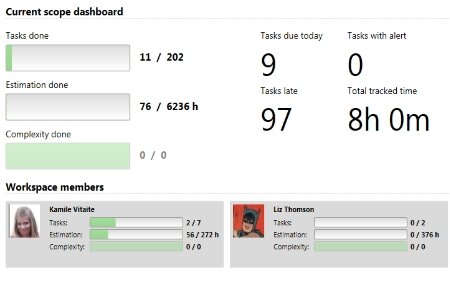
Reporting: Data is useless if you can't understand it. Jira comes with a variety of built-in reports that help teams track their performance and identify bottlenecks. Dashboards provide a high-level, real-time overview of what's happening across projects.
Why Teams Use Jira
Teams adopt Jira for many reasons, but it usually boils down to improving transparency, collaboration, and efficiency. When everyone uses the same tool to track their work, it eliminates confusion. It becomes clear what the priorities are and how much progress is being made.
Atlassian tools like Jira and Confluence allow you to manage projects, tasks, and workflows efficiently, ensuring all work is accurately tracked, organized, and delivered on time.
This level of transparency helps teams work together more effectively. A developer can see the designs a designer has attached to a task, a marketer can track the progress of a new feature they plan to promote, and a manager can get a quick overview without having to ask for status updates.
Finally, Jira is highly customizable. While it works great out of the box, teams can adapt it to their specific needs. They can create custom workflows that match their processes, add fields to capture important information, and integrate Jira with other tools they already use, like Slack or GitHub.
Now that you have a sense of what Jira is and what it can do, let's test your knowledge.
What was the original primary purpose of Jira when it was first developed by Atlassian?
In Jira's terminology, what is the fundamental unit used to track any piece of work, such as a task, bug, or new feature?
Jira provides a structured way to manage complex projects, helping teams stay aligned and focused on their goals.