Mastering Image Clarity and Restoration
Raw Data Pipelines
The Power of Raw Data
Every professional image enhancement pipeline begins not with a photograph, but with its raw ingredients. A JPEG file is like a pre-baked cake; the decisions about color, contrast, and sharpening have already been made and the file has been compressed to save space. A RAW file, on the other hand, is the digital equivalent of flour, eggs, and sugar. It’s the direct, unprocessed data from the camera's sensor.
Shoot RAW too to retain maximum flexibility in images; we aren’t sports shooters firing a constant stream of images to a desk, where JPEG is pretty much mandatory
Working with this 'uncooked' data gives you complete control. More importantly, it provides the maximum amount of information for intensive processes like AI-driven upscaling or deblurring. When you start with a compressed file, any subsequent edits will amplify its inherent flaws. Starting with RAW ensures you're building on a solid foundation.
Escaping Compression Artifacts
The convenience of JPEGs comes at a cost: lossy compression. To create a small file size, the JPEG algorithm discards data it deems imperceptible. This process involves two key steps that can degrade an image permanently.
First is , where subtle variations in color and tone are rounded off to simpler, less precise values. Second, the image is divided into 8x8 pixel blocks and analyzed using a . This step is great at efficiently storing smooth gradients, but it struggles with sharp edges. The result is the tell-tale blockiness and mosquito noise you see in heavily compressed images, especially around fine details.
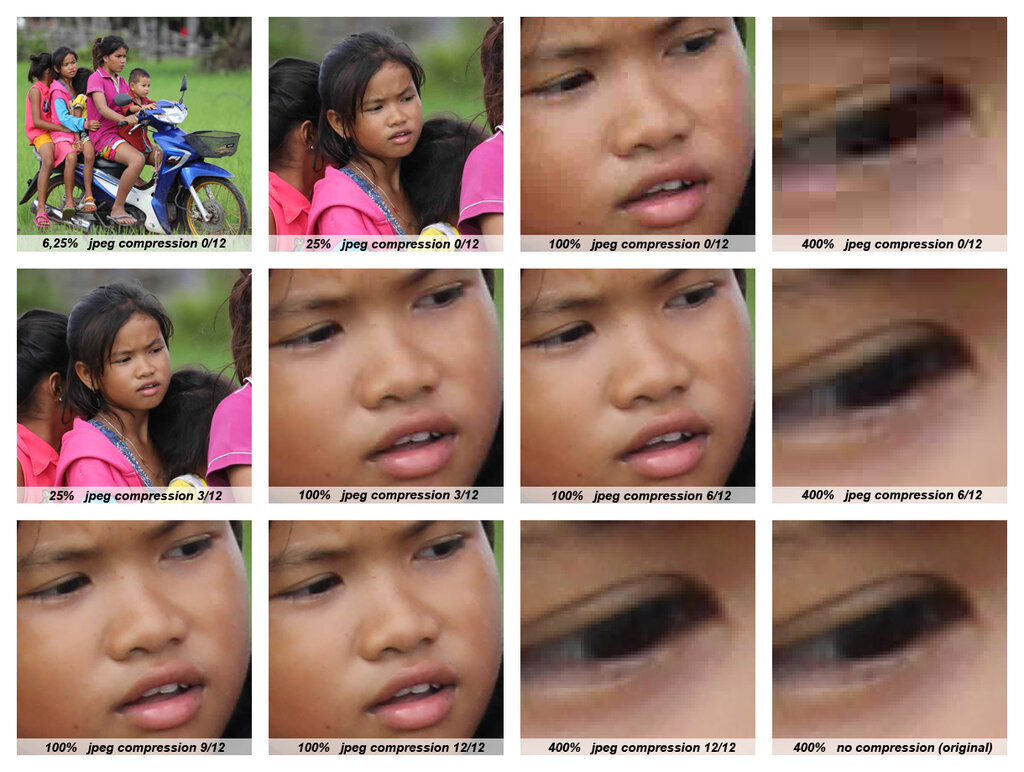
These artifacts are baked into the file. When you try to sharpen, deblur, or upscale a JPEG, you are also sharpening, deblurring, and upscaling these compression errors. RAW files bypass this entirely, giving you a clean slate free of such digital damage.
Headroom for Editing
Beyond avoiding artifacts, RAW files provide vastly more data to work with. This flexibility, often called 'headroom,' comes from two main advantages: bit depth and a linear gamma workflow.
Bit Depth
noun
The number of bits used to represent the color and tone of a single pixel. Higher bit depth allows for a greater number of possible color and tonal values.
A standard JPEG is an 8-bit file, meaning it can represent 256 different levels of brightness for each color channel (red, green, and blue). A typical RAW file is 14-bit or even 16-bit.
| Bit Depth | Tonal Values per Channel | Total Possible Colors |
|---|---|---|
| 8-bit | 256 | 16.7 million |
| 14-bit | 16,384 | 4.4 trillion |
| 16-bit | 65,536 | 281 trillion |
This exponential increase in tonal values is crucial for recovery. When you try to brighten the shadows or darken the highlights of an 8-bit JPEG, you're stretching a very limited set of data. This often leads to posterization or banding, where smooth gradients are replaced with ugly, distinct steps of color. With the massive amount of information in a 16-bit file, these adjustments are smooth and seamless.
Furthermore, RAW data is stored in a linear gamma space. This means the numerical brightness values in the file are directly proportional to the amount of light the sensor captured. JPEGs, however, are saved with a non-linear gamma curve already applied, which brightens the midtones to better match how human vision perceives brightness. While this looks good on a screen, it compresses the tonal values in the shadows and highlights.
Working with linear data gives you access to the original, unaltered tonal relationships, providing much finer control over exposure and contrast adjustments without losing detail at the extremes.
From Sensor to Screen
A RAW file isn't actually an image yet. It's a grid of brightness values captured by individual photosites on the sensor, each filtered to see only red, green, or blue light. The process of converting this mosaic of data into a full-color image is called .

The quality of the demosaicing algorithm has a significant impact on the final image's sharpness and micro-detail. A superior algorithm can better resolve fine textures and create cleaner edge transitions, providing a higher-quality source file for your enhancement workflow.
To preserve all this hard-won data, the standard professional pipeline involves exporting the processed RAW file as a 16-bit TIFF. This creates an uncompressed, high-bit-depth file that carries all the benefits of the RAW data into the next stages of editing, whether that's in Photoshop, an AI upscaler, or another specialized tool. This RAW-to-TIFF strategy is the cornerstone of any high-fidelity restoration or enhancement project.
According to the text, what is the best analogy for a RAW file compared to a JPEG?
What is the process of converting the sensor's mosaic of red, green, and blue data into a full-color image called?