Mastering HTTP Methods for Web Development
HTTP Methods Overview
The Verbs of the Web
When you browse the web, your computer (the client) is constantly talking to other computers (servers). This conversation follows a set of rules called the Hypertext Transfer Protocol, or HTTP. To make these conversations meaningful, clients need a way to tell the server what they want to do.
HTTP methods are the action words, or verbs, in these requests. They specify the desired action to be performed on a specific resource, like a webpage, an image, or a piece of data. Just like you can't have a sentence without a verb, you can't have a web request without an HTTP method.
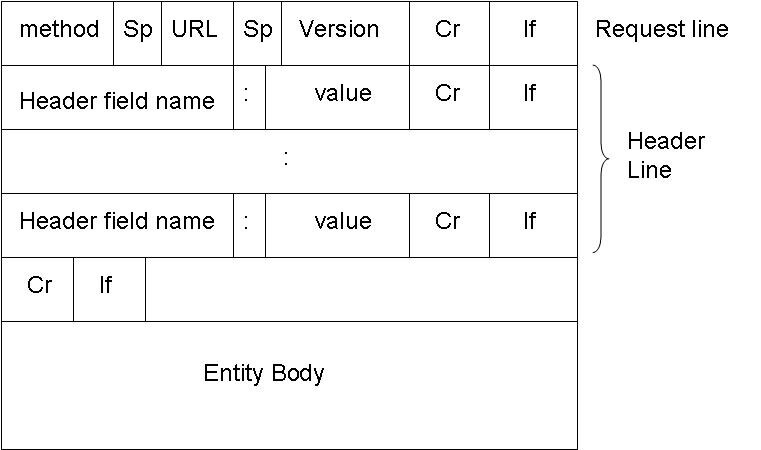
Think of it like ordering at a restaurant. You don't just point at a menu item; you say, "I want to order this," or "I want to ask about that." The methods are the instructions that give your request a clear purpose. Let's look at the most common ones.
GET: Just Looking
The GET method is the most common action on the web. It's used to retrieve data from a server. When you type a URL into your browser's address bar and hit Enter, you're sending a GET request. You're simply asking the server to "get" the webpage at that address and send it back to you.
A
GETrequest is like asking a library for a book. You're not changing the book or adding a new one; you're just requesting a copy to read.
This method is for reading information only. It shouldn't change anything on the server. You use GET to read a blog post, view a friend's profile, or see a list of products on an e-commerce site.
POST: Sending Something New
The POST method is used to send data to a server to create a new resource. Every time you fill out a sign-up form, submit a comment, or upload a photo, your browser is likely sending a POST request. The data you entered is included in the body of the request.
For example, when creating a new user account, a POST request would send the username, email, and password to the server. The server then uses this information to create a new user in its database.
Using
POSTis like mailing a letter to a company to open a new account. You're sending them new information that they will then process and store.
Updating and Deleting Data
Once a resource exists, you might need to change it or get rid of it. That's where PUT, PATCH, and DELETE come in.
PUT
verb
Replaces an existing resource entirely with new data. If the resource doesn't exist, PUT might create it.
Imagine you have a user profile with a name, email, and bio. If you use PUT to update the name, you must also send the current email and bio in the request. Anything you leave out might be deleted. It's a complete replacement.
PATCH
verb
Applies a partial modification to a resource. You only send the data you want to change.
Using PATCH is more efficient for small changes. If you just want to update a user's bio, you send only the new bio. The name and email remain untouched.
Finally, the DELETE method is exactly what it sounds like. It requests that the server remove a specific resource. You might use it to delete a blog post, a comment, or your own account.
| Method | Action | Example |
|---|---|---|
POST | Create | Submitting a sign-up form. |
GET | Read | Viewing a web page. |
PUT / PATCH | Update | Changing your profile picture. |
DELETE | Delete | Deleting a social media post. |
Other Useful Methods
While the four methods above handle most common web interactions, a few others serve important roles.
HEAD: This method is identical to
GET, but it doesn't return the body of the response. It only returns the headers. This is useful for checking if a resource exists or getting its metadata (like when it was last modified) without downloading the entire file.
OPTIONS: This method asks the server which HTTP methods it supports for a specific URL. Before trying to send a
PUTorDELETErequest, a browser might first send anOPTIONSrequest to see if those actions are even allowed.
Ready to check your understanding?
When you type a URL into your browser's address bar and press Enter, which HTTP method are you primarily using?
Which HTTP method is most appropriate for submitting a new blog comment?
Understanding these methods is key to understanding how the web works. They provide a clear, standardized language for clients to communicate their intentions to servers, making the dynamic web possible.