Mastering HTML5 Migration and Semantics
Structural Semantic Refactoring
From Generic Boxes to a Meaningful Story
In the early days of the web, developers built layouts using a single, all-purpose tool: the <div> tag. It was the digital equivalent of a generic cardboard box. You could put anything in it, label it with an id or class like header, footer, or sidebar, and call it a day. While this worked visually, it told browsers and search engines nothing about the purpose of the content inside. It was a page full of boxes with no instructions.
Semantic HTML5 changes this by providing a set of tags that describe the role of the content they contain. Refactoring a legacy site means swapping out those generic <div> boxes for more descriptive containers. This isn't just about clean code; it’s about making your content more accessible to screen readers and more understandable to search engines.
The goal is to move from a layout defined by visual containers to a document with a machine-readable structure.
The most common and impactful changes involve mapping old div identifiers to their new semantic counterparts. Think of it as a direct translation:
div id="header"becomes<header>div id="nav"becomes<nav>div id="main-content"becomes<main>div id="footer"becomes<footer>
These four tags form the primary scaffolding of a modern web page, giving assistive technologies and web crawlers clear landmarks to navigate your site.
<!-- Before: A Div-Based Layout -->
<div id="header">
<h1>My Website</h1>
<div id="nav">
<ul>
<li><a href="#">Home</a></li>
<li><a href="#">About</a></li>
</ul>
</div>
</div>
<div id="main">
<p>Welcome to the main content.</p>
</div>
<div id="footer">
<p>© 2024 My Website</p>
</div>
<!-- After: A Semantic HTML5 Layout -->
<header>
<h1>My Website</h1>
<nav>
<ul>
<li><a href="#">Home</a></li>
<li><a href="#">About</a></li>
</ul>
</nav>
</header>
<main>
<p>Welcome to the main content.</p>
</main>
<footer>
<p>© 2024 My Website</p>
</footer>
Structuring Your Content
Beyond the main page structure, HTML5 gives us tools to organize the content within the <main> element. The two most important tags for this are <article> and <section>, and knowing when to use each is key.
An <article> is for a complete, self-contained piece of content. If you could syndicate it to another website and it would still make sense on its own, it’s an article. Think of a blog post, a forum comment, or a product listing. Each one is a standalone item.
A <section>, on the other hand, is for grouping related content. It’s a thematic container. A homepage might have sections for "Latest News," "Top Products," and "About Us." Unlike an article, these pieces don't necessarily make sense in isolation. The HTML5 outline algorithm uses these tags, along with heading levels (<h1> through <h6>), to build a conceptual table of contents for the page.
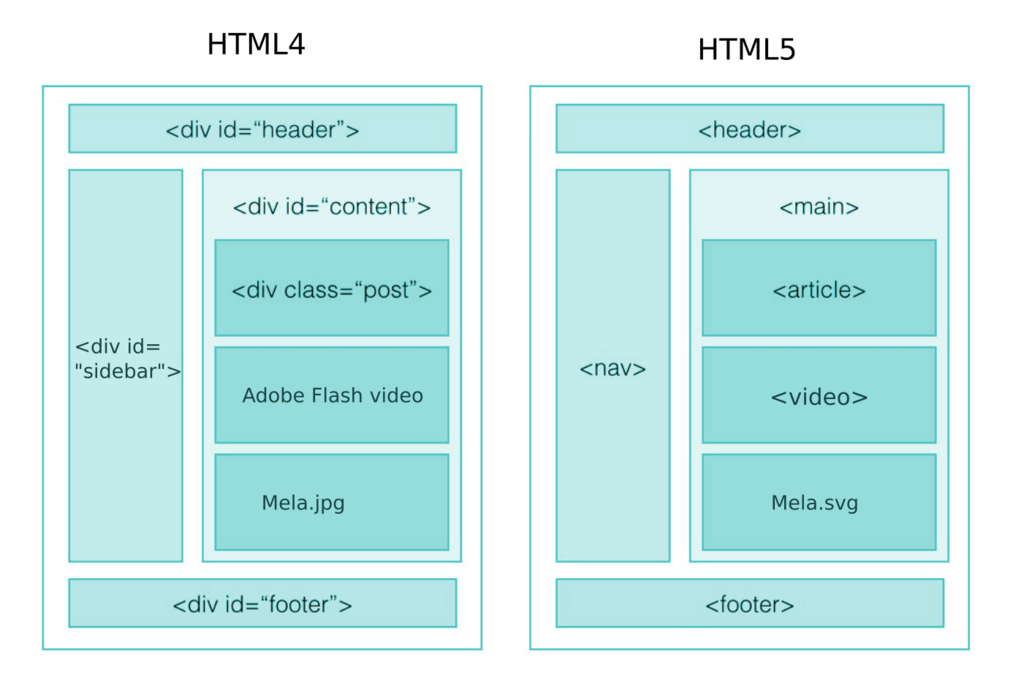
And what about sidebars? For content that's tangentially related to the main content, like a list of related links or an author bio, use the <aside> tag. This tells browsers that the content within is supplementary, not critical to understanding the main article or section it's placed in. It’s the perfect replacement for the old div id="sidebar".
Refactoring in the Real World
Refactoring legacy codebases can feel like untangling a giant knot. A common fear is that changing tags will break all the existing CSS. Fortunately, there’s a safe way to transition. You can apply the old id or class attributes directly to the new semantic tags.
For example, div id="header" can become header id="header". The CSS rule #header { ... } will still work perfectly. This allows you to update the HTML structure for better semantics without having to rewrite your entire stylesheet at the same time. You can clean up the CSS later, once the new structure is in place.
This approach also helps you move away from "div-itis"—the condition of having dozens of nested <div> tags for styling purposes. By replacing them with meaningful tags, you create a flatter, more readable document structure. A clean outline with <header>, <main>, and <footer> is far easier to understand than a sea of nested divs.
By thoughtfully converting your layout from generic divs to semantic tags, you add a rich layer of meaning to your document. This makes it more robust, accessible, and easier for both humans and machines to understand.
What is the primary benefit of replacing <div> tags with semantic HTML5 tags like <header> and <footer>?
You are refactoring an old website. Which new semantic tag is the most appropriate replacement for <div id="nav">?