Mastering HTML Template Building
HTML Structure
The Blueprint of a Web Page
Think of an HTML document as the blueprint for a house. It defines the structure: where the foundation goes, where the walls stand, and where the roof sits. Without a solid structure, the house wouldn't stand. Similarly, without well-structured HTML, a website can be confusing for browsers, search engines, and other developers to understand.
Good structure isn't just about making the page work. It’s about creating a logical, readable, and maintainable foundation. Let's look at the key principles for building a solid HTML blueprint.
Speaking a Clear Language
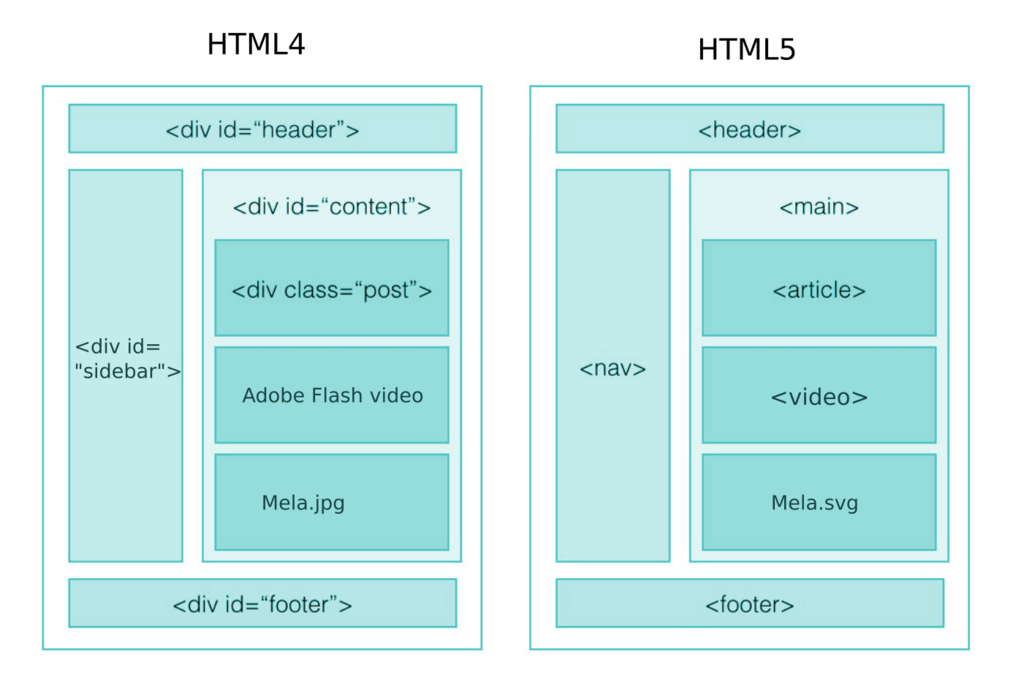
Imagine giving someone directions using only the words "thing" and "stuff." It would be confusing. Early on, web developers often used generic HTML tags like <div> for everything, from headers to footers to sidebars. This worked, but it didn't describe the meaning of the content.
Semantic HTML solves this by providing tags that describe their purpose. Instead of a generic <div>, you can use specific tags like <header>, <footer>, <nav> (for navigation), <article>, and <section>. Using these tags tells the browser, search engines, and assistive technologies exactly what each piece of content is for.
Semantic HTML not only improves the readability of your code but also enhances accessibility and SEO.
Look at the difference. The first example uses generic <div> tags. The second uses semantic tags, making the structure's purpose immediately clear.
<!-- Non-Semantic Example -->
<div id="header">
  <h1>My Website</h1>
</div>
<div id="nav">
  <ul>
    <li><a href="#">Home</a></li>
  </ul>
</div>

<!-- Semantic Example -->
<header>
  <h1>My Website</h1>
</header>
<nav>
  <ul>
    <li><a href="#">Home</a></li>
  </ul>
</nav>
This small change makes a huge difference for screen readers that help visually impaired users navigate a site, and for search engines trying to understand your content's hierarchy. It also makes your code much easier for other developers (or your future self) to read.
Everything in its Place
HTML elements are like nesting dolls—one fits inside another. The rule is simple: you must close an element before closing its parent element. The last tag you open should be the first tag you close.
<!-- INCORRECT Nesting -->
<p><strong>This text is bold and in a paragraph.</p></strong>

<!-- CORRECT Nesting -->
<p><strong>This text is bold and in a paragraph.</strong></p>
In the incorrect example, the <p> tag is closed before its child, the <strong> tag. This can confuse browsers and lead to unexpected layout issues. Correctly nested tags ensure a clear and predictable document structure.
Keeping Your Code Tidy
Beyond semantics and nesting, a few simple conventions make code clean and professional. Think of it as basic etiquette for programmers.
Use consistent indentation. Indent nested elements to visually represent the structure of your document. It doesn't change how the page looks, but it makes the code a hundred times easier to read.
<ul>
  <li>First item</li>
  <li>Second item</li>
</ul>
Here are a few more quick rules for tidy HTML:
- Use lowercase for tags and attributes. While
</P>might work,<p>is the standard convention. Consistency is key. - Always use double quotes for attribute values. For example, write
class="main-content"instead ofclass='main-content'orclass=main-content. - Keep attribute order consistent. If you have multiple attributes on an element, try to order them the same way every time. A common practice is to list
class, thenid, then other attributes likehreforsrc.
<!-- Good, consistent attribute order -->
<a class="button" id="cta-button" href="/signup">Sign Up</a>
<img class="profile-pic" id="user-avatar" src="/images/avatar.png" alt="User avatar">
These small habits don't just make your code look nice. They reduce errors, speed up debugging, and make collaboration with other developers much smoother.
Ready to test your knowledge on HTML structure?
Why is it better to use the <nav> tag for a website's main navigation menu instead of a generic <div> tag?
Which of the following code snippets demonstrates correctly nested HTML elements?
By following these principles, you create HTML that is robust, accessible, and easy to maintain. A strong foundation makes building the rest of your website much easier.