Mastering Google Workspace
Introduction to Google Workspace
Your Digital Office
Google Workspace is a collection of cloud-based tools that act like a digital office. Instead of separate programs on your computer, you get a suite of connected apps that you can access from any device with an internet connection. It’s designed to help you communicate, create, and collaborate with others, whether they’re in the next room or across the globe.
Google Workspace is built around the idea of working together in real time, with tools that let multiple users edit documents simultaneously, leave comments, and easily share files.
Think of it as having your email, calendar, files, and creation tools all living in one central, secure place online. This means you can start a document on your work computer, make edits on your phone during your commute, and finish it on your laptop at home without ever needing to save a file to a USB stick.
The Core Toolkit
The power of Google Workspace comes from its set of core applications. Each one has a specific job, but they all work together seamlessly.
Here’s a quick rundown of the main players:
-
Gmail & Calendar: The communication hub. Gmail is for email, and Calendar helps you organize your schedule, set up meetings, and share your availability with others.
-
Drive: Your personal cloud storage. It’s like a digital filing cabinet where you can store all your files—documents, photos, videos—and access them from anywhere.
-
Docs, Sheets & Slides: These are your creation tools. Docs is for writing documents, Sheets is for spreadsheets and data analysis, and Slides is for building presentations.
-
Meet & Chat: For real-time communication. Chat is for quick text-based messages and group conversations, while Meet is for video and voice calls.
Better Together
The real magic of Google Workspace isn't just the individual apps, but how they connect and work together. This integration is what makes collaboration so smooth.
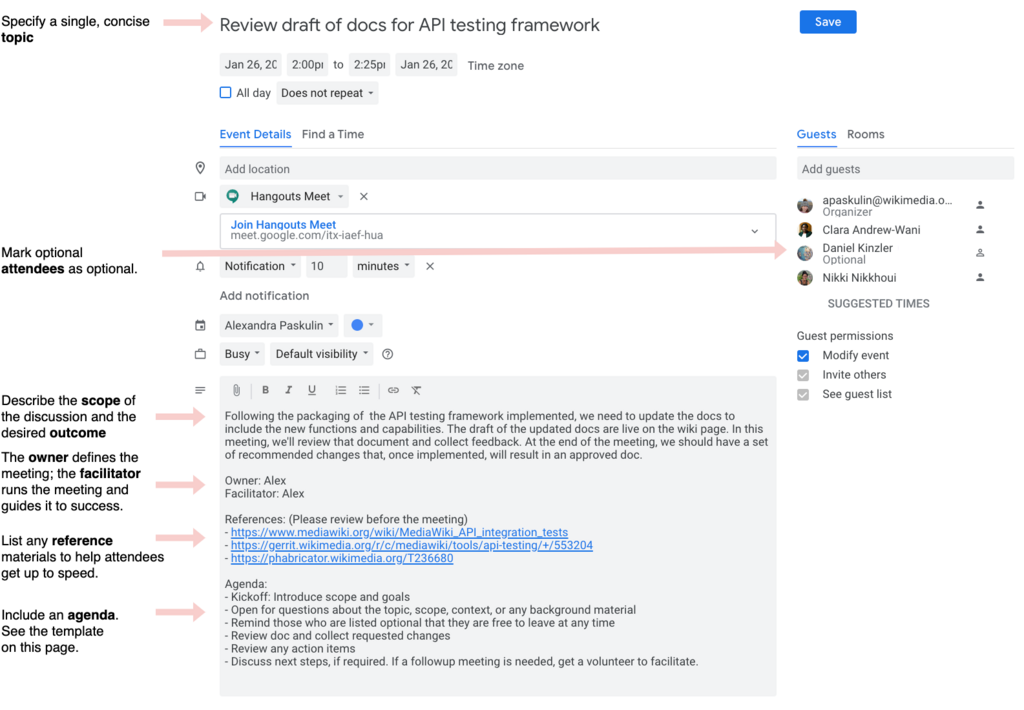
Imagine you’re planning a project. You can create an event in Google Calendar, which automatically generates a Google Meet link for a video call. You can attach a Google Doc with the meeting agenda directly to the calendar invite. During the meeting, you and your team can edit that same document in real-time, seeing each other's changes as they happen. After the meeting, you can continue the conversation in Google Chat. All the related files are stored securely in a shared folder on Google Drive.
This seamless flow removes friction. You don't need to switch between different software from different companies or worry about who has the latest version of a file. Everything is in one ecosystem, updated instantly for everyone.
This leads to three key benefits: real-time collaboration, centralized cloud storage, and cross-platform compatibility.
Because everything is stored in the cloud (on Google's servers, not your hard drive), your work is always available. You can access and edit your files from a Windows PC, a Mac, a Chromebook, an Android phone, or an iPhone. All you need is a web browser or the mobile app. This flexibility means you can be productive wherever you are.
What is the primary function of Google Drive within the Google Workspace suite?
A key benefit of Google Workspace is that your work is stored in the cloud. What does this mean for you?
This suite of integrated tools provides a powerful foundation for both personal organization and team-based projects, all accessible from a single Google account.