Mastering Google Ads
Introduction to Google Ads
What Is Google Ads?
Google Ads is an online advertising platform where businesses can display ads, service offerings, and video content to potential customers. Think of it like a smart billboard on the internet. Instead of showing your ad to everyone, it shows it to people who are actively searching for what you sell.
The main benefit is reaching customers at the exact moment they're interested. If someone searches for "emergency plumber," they likely need one right away. With Google Ads, a plumbing business can show up at the top of the results, ready to solve the problem.
Google Ads is a powerful tool for connecting with potential customers who have a high intent to purchase or take action.
How Does It Work? The PPC Model
Google Ads operates primarily on a pay-per-click (PPC) model. This means you don't pay for your ad to be shown; you only pay when someone actually clicks on it. This makes it a very efficient way to manage an advertising budget, because you're paying for engaged potential customers, not just casual viewers.
Pay-Per-Click (PPC)
noun
An internet advertising model used to drive traffic to websites, in which an advertiser pays a publisher when the ad is clicked.
Which ads appear at the top is determined by an auction. Advertisers bid on keywords relevant to their business. For instance, a shoe store might bid on "running shoes for women." However, the highest bidder doesn't always win. Google also considers the ad's quality and relevance to the searcher. A high-quality, relevant ad might win a better position for a lower price.
Google Ads allows you to reach anyone who uses Google to search for information, products and services online.
Types of Campaigns
Google Ads isn't just about text ads on the search results page. It offers several types of campaigns designed to reach customers across different platforms and at different stages of their buying journey.
Here's a quick rundown of the main campaign types:
- Search Campaigns: These are the text-based ads you see at the top of Google search results. They're great for reaching people actively searching for specific products or services.
- Display Campaigns: These are visual ads that appear on websites, apps, and videos across the Google Display Network, which includes millions of sites. They help build brand awareness and reach people earlier in the buying process.
- Video Campaigns: These ads run on YouTube and other Google Display Network sites. They are perfect for telling a story and engaging with your audience through sight, sound, and motion.
- Shopping Campaigns: If you sell products, these are for you. They show users a photo of your item, its title, price, and store name directly in the search results.
- App Campaigns: These campaigns are designed specifically to drive app installs and in-app actions across Google's network.
Navigating the Google Ads Interface
When you first log in to your Google Ads account, you'll land on the main dashboard. This is your command center for creating, managing, and analyzing your advertising campaigns.
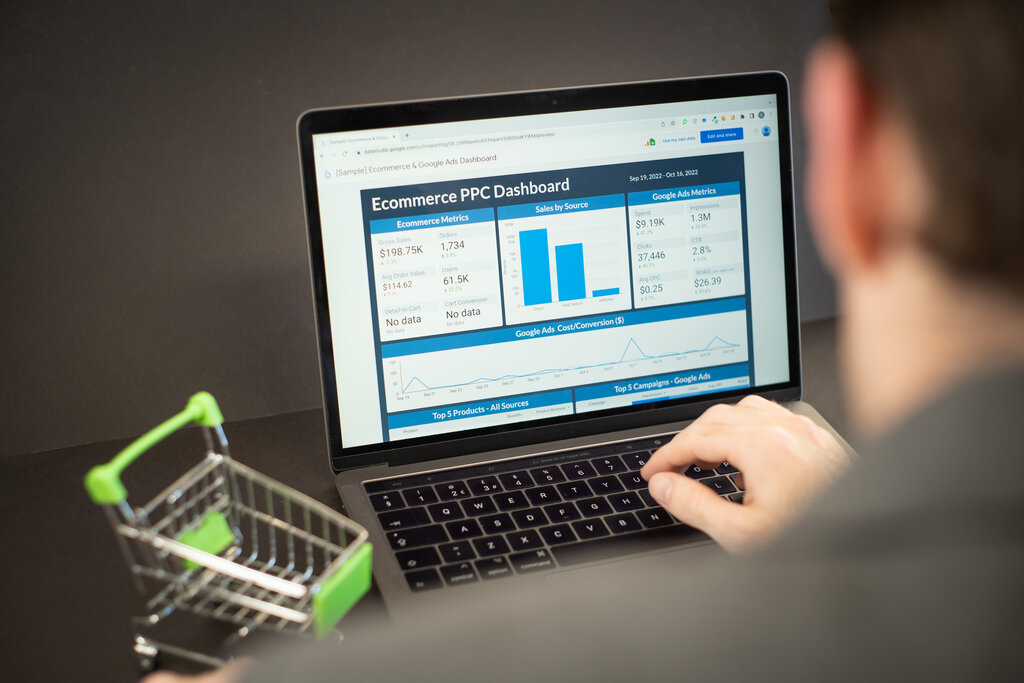
The interface is organized to give you a quick overview and easy access to more detailed information. On the left side, you'll find the main navigation menu, which lets you switch between different campaigns, ad groups, and settings. The central area is typically filled with charts and tables showing key performance metrics like clicks, impressions (how many times your ad was shown), and cost-per-click (CPC).
Don't worry about understanding every single number right away. The key is to get familiar with the layout so you can find what you need as you learn more.
Take some time to click through the different menus and sections. The more comfortable you are with the interface, the easier it will be to manage your campaigns effectively.
This overview provides a foundation for understanding what Google Ads is and how it works. In the following sections, we'll dive deeper into setting up your first campaign and making it successful.
What is the primary payment model used by Google Ads, as described in the text?
A new local bakery wants to feature its specialty cakes with photos, prices, and the store name directly in Google search results. Which campaign type is best suited for this goal?