Mastering GitHub Copilot for Efficient Coding
Introduction to GitHub Copilot
Meet Your AI Pair Programmer
GitHub Copilot is an AI-powered tool that helps you write code faster. Developed by GitHub and OpenAI, it works directly inside your code editor, suggesting lines of code and even entire functions as you type. Think of it as a knowledgeable partner who anticipates what you're trying to do and offers helpful suggestions.
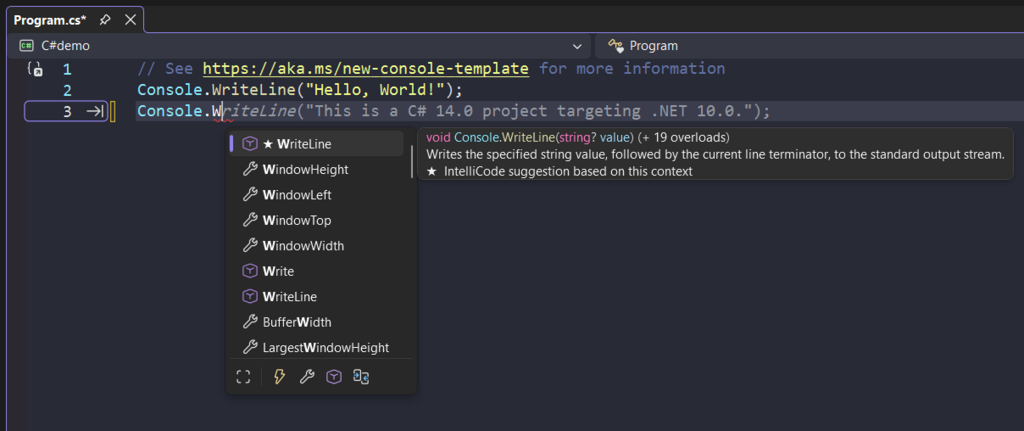
At its core, GitHub Copilot acts as an AI pair programmer, providing real-time code suggestions as developers type.
Copilot analyzes the context from your open files, including your existing code and comments, to generate relevant suggestions. It was trained on billions of lines of public code from GitHub, giving it a deep understanding of common coding patterns, libraries, and frameworks across many languages. You can write a comment describing the logic you need, and Copilot will attempt to generate the code for you.
Where It Works
Copilot isn't a standalone application. It integrates into the places where developers already work. It's available as an extension for most popular Integrated Development Environments (IDEs).
This includes Visual Studio Code, the full Visual Studio IDE, Neovim, and the suite of JetBrains IDEs like PyCharm, IntelliJ IDEA, and WebStorm.
Its language support is just as broad. While it's particularly effective with popular languages like Python, JavaScript, TypeScript, Ruby, Go, C#, and C++, it works with dozens of others. Because it learned from such a diverse dataset of code, it can often provide useful suggestions even in less common languages or for newer frameworks.
Why Use Copilot?
The primary benefit of using Copilot is a boost in productivity. It significantly cuts down the time spent writing boilerplate code, which is the repetitive, standard code that forms the structure of a project but isn't unique to the problem you're solving. Instead of typing out every line of a for loop or a standard class definition, you can often accept a suggestion and move on.
GitHub Copilot saves time by reducing manual coding, AI debugging, and searching for solutions online, letting you focus on more strategic aspects of development.
This also leads to less context switching. Instead of leaving your editor to search a web browser for syntax examples or solutions to common problems, you can often get the answer directly from Copilot's suggestions. This helps you stay focused and maintain your flow.
Finally, Copilot can be a powerful learning tool. When you're working with a new language or library, its suggestions can show you the conventional ways to use it. By seeing how certain tasks are typically coded, you can learn best practices and discover features you didn't know existed.