Mastering GitHub Copilot for Coding
Introduction to GitHub Copilot
Your AI Pair Programmer
Imagine you're coding, and a helpful partner sits beside you, anticipating what you need to write next. That's the idea behind GitHub Copilot. It's an AI-powered tool that suggests code and entire functions right inside your code editor. It acts like a knowledgeable pair programmer, speeding up development and helping you tackle repetitive tasks more efficiently.
GitHub Copilot’s AI integration provides real-time code completion, helping developers quickly move through repetitive coding tasks.
Copilot's main job is to help you write code faster. You can start typing a line of code, and it will suggest ways to complete it. Or, you can write a comment describing what you want a function to do, and Copilot will generate the code for you. This is incredibly useful for boilerplate code—the repetitive blocks of code that are necessary but tedious to write.
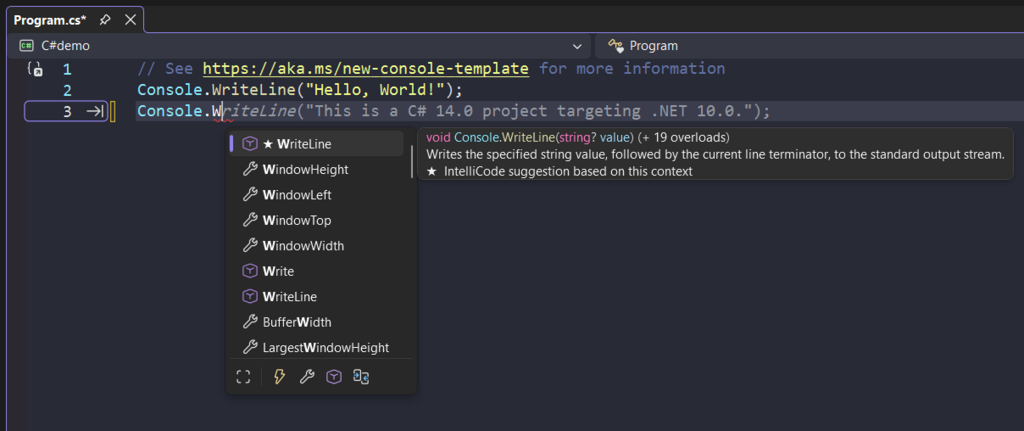
By handling the routine parts of coding, Copilot frees up developers to focus on more complex problem-solving and logic. It's not just about speed; it's also a learning tool. By analyzing its suggestions, you can discover new libraries, different programming patterns, and more efficient ways to write code.
How It Works and Where
GitHub Copilot was developed by GitHub in collaboration with OpenAI. Its initial version was powered by a model called OpenAI Codex, a descendant of GPT-3 that was specifically trained on a massive amount of public source code from GitHub and other sources.
AI-assisted coding first emerged in a big way with GitHub Copilot in 2021, and the feature saw a wide release in June 2022.
One of Copilot's greatest strengths is its versatility. It integrates seamlessly into the most popular Integrated Development Environments (IDEs), so developers don't have to change their workflow. Key supported IDEs include:
- Visual Studio Code
- Visual Studio
- JetBrains IDEs (like IntelliJ IDEA, PyCharm, and WebStorm)
- Neovim
It also boasts broad language support. While it's particularly strong with languages like Python, JavaScript, TypeScript, Ruby, and Go, it works with dozens of others. Because its training data is so vast, it can often provide useful suggestions for less common languages and frameworks as well.
Ethical and Licensing Questions
The power of GitHub Copilot also raises important questions. Since it was trained on public code repositories, concerns have emerged about code ownership and licensing. What happens when Copilot suggests a snippet of code that is nearly identical to code from a repository with a restrictive license?
Using AI-generated code isn't a free pass. The developer who accepts the suggestion is ultimately responsible for the security, quality, and licensing compliance of their final codebase.
To address this, GitHub introduced a code referencing feature. If Copilot suggests code that matches public code, it can show you where that code comes from, including its license. This allows developers to make an informed decision about whether to use the suggestion.
With code referencing turned on, Copilot won’t automatically block any matching code it generates but instead shows it to developers in a sidebar and lets them decide what to do with it.
Another ethical consideration is over-reliance. For new developers, it's crucial to first build a strong foundation in programming fundamentals before depending heavily on an AI assistant. Understanding the code you're writing is more important than just writing it quickly. As with any powerful tool, the key is to use it wisely—as a partner, not a replacement for your own thinking.
Time to check what you've learned about GitHub Copilot.
What is the primary purpose of GitHub Copilot?
GitHub Copilot was developed by GitHub in collaboration with which AI research organization?
GitHub Copilot is a transformative tool that represents a major step forward in AI-assisted development. It helps developers code faster, learn new techniques, and focus on solving bigger problems.