Mastering Git Version Control
Introduction to Version Control
What Is Version Control?
Have you ever saved a file as report_final.docx, only to create report_final_v2.docx an hour later, followed by report_REALLY_final.docx? This is a basic, manual form of version control. You're trying to keep a history of your changes so you don't lose previous work.
A Version Control System (VCS) automates this process. It's a tool that tracks and manages changes to a set of files over time. Instead of just saving new versions of a file, a VCS records snapshots of your entire project at different points. This lets you recall specific versions later, compare changes, and see who made them and when.
Think of it as a superpowered undo button for your entire project, combined with a detailed project diary.
This is crucial for software development, where teams of people often work on the same code. A VCS prevents developers from overwriting each other's work and helps merge their contributions smoothly. It acts as a single source of truth for the project's history, creating a safety net. If a new change breaks something, you can easily revert to a previous, working state.
Two Flavors of VCS
Version control systems generally come in two types: centralized and distributed.
Centralized Version Control Systems (CVCS) operate on a client-server model. The entire history of the project is stored on a single, central server. Developers "check out" the latest version of the files from this server to work on them and then "commit" their changes back.
This is simple to understand, but it has a major weakness: the central server is a single point of failure. If the server goes down, nobody can save their work or collaborate. You also need an internet connection to do almost anything.
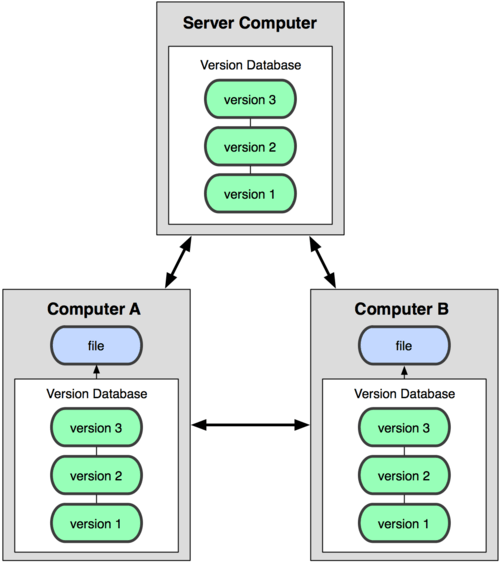
Distributed Version Control Systems (DVCS), on the other hand, give every developer a full copy of the entire project history. Instead of just checking out the latest version of the files, you "clone" the whole repository.
This means you have a complete backup of the project on your local machine. You can commit changes, view history, and create branches without being connected to a central server. Collaboration happens by "pushing" your changes to a shared repository and "pulling" changes from others. Git is the most popular example of a DVCS.
Core Concepts and Terms
As you start using a VCS like Git, you'll encounter some key terms over and over. Understanding them now will make everything else much clearer.
Repository
noun
The database containing all the files, history, and configuration for a project. It's often shortened to "repo."
Commit
noun
A snapshot of your repository at a specific point in time. When you commit, you save your staged changes along with a message describing what you did.
Branch
noun
An independent line of development. You can create a new branch to work on a feature without affecting the main codebase. It's like a parallel universe for your code.
Merge
verb
The action of taking the changes from one branch and integrating them into another. This is how you combine a completed feature back into the main project.
These concepts are the building blocks of version control. By tracking changes with commits, isolating work in branches, and then combining it with merges, teams can build complex software efficiently and safely.