Mastering Full-Stack Web Development
Introduction to Web Development
The Anatomy of a Web Page
Every website you visit, from a simple blog to a massive online store, is built on the same foundation. Two core languages work together to create what you see in your browser: HTML and CSS.
Think of it like building a house. HTML (HyperText Markup Language) is the frame and the structure. It defines the different parts of the house: this is a wall, this is a door, this is a roof. It gives the content its basic shape.
CSS (Cascading Style Sheets) is the paint, the furniture, and the landscaping. It takes the raw structure from HTML and makes it look good. It decides the color of the walls, the style of the door, and where the windows are placed. HTML provides the meaning, and CSS provides the presentation.

HTML: The Skeleton
HTML uses a system of tags to structure content. Most tags come in pairs: an opening tag and a closing tag. For example, to create a paragraph, you wrap your text in <p> and </p> tags.
Let's look at the basic structure of every HTML page. It's a blueprint that tells the browser how to read the file.
<!DOCTYPE html>
<html>
  <head>
    <title>My First Web Page</title>
  </head>
  <body>
    <h1>This is a main heading</h1>
    <p>This is a paragraph of text.</p>
  </body>
</html>
The
<!DOCTYPE html>declaration tells the browser it's an HTML5 document. The<html>tag wraps all the content. The<head>contains meta-information (like the page title), and the<body>contains all the visible content.
Inside the <body>, you use different tags to define different types of content. Headings are created with <h1> through <h6>, with <h1> being the most important. Paragraphs use <p>, as we've seen. To create a link, you use the <a> (anchor) tag with an href (hypertext reference) attribute to specify the destination.
<a href="https://www.example.com">Visit Example.com</a>
Lists are also common. An unordered list (bullets) uses <ul> with <li> (list item) tags for each item.
<ul>
  <li>First item</li>
  <li>Second item</li>
  <li>Third item</li>
</ul>
CSS: The Style
Without CSS, every web page would be a wall of black text on a white background. CSS lets us add color, change fonts, and control the layout.
CSS works by selecting an HTML element and then applying styles to it. The basic syntax is a selector followed by a block of declarations. Each declaration consists of a property and a value.
selector {
  property: value;
}
For example, to make all paragraphs blue and use a sans-serif font, you would write:
p {
  color: blue;
  font-family: sans-serif;
}
You can write CSS directly in your HTML file, but it's best practice to put it in a separate file (e.g., style.css) and link it from the HTML's <head> section. This keeps your content and presentation separate.
<head>
  <title>My Styled Page</title>
  <link rel="stylesheet" href="style.css">
</head>
To style specific elements, you can use classes and IDs. An ID is unique to one element, while a class can be applied to many. In CSS, you select IDs with a # and classes with a ..
| HTML | CSS Selector |
|---|---|
<p id="intro">... | #intro { ... } |
<p class="highlight">... | .highlight { ... } |
Layout and Responsive Design
Arranging elements on a page is a key part of web design. Every HTML element can be thought of as a box. CSS gives us control over this box's properties: its content, padding (space inside the border), border, and margin (space outside the border). This is called the Box Model.
Today, people browse the web on everything from tiny phones to massive desktop monitors. A website should look good and be usable on any screen size. This is called responsive design.
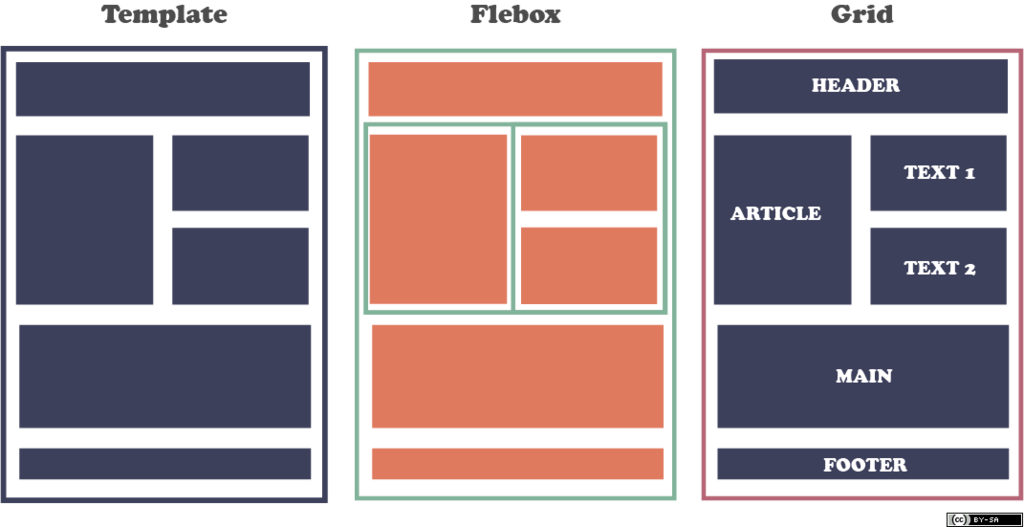
Modern CSS provides powerful tools like Flexbox and Grid to build flexible, responsive layouts that adapt automatically. Instead of setting fixed pixel widths, we can create fluid containers that rearrange content intelligently based on the available space.
With a solid grasp of HTML for structure and CSS for styling, you have the fundamental skills to build any static webpage you can imagine. These two languages are the essential starting point for any journey into web development.
Ready to test your knowledge? Let's see what you've learned about the building blocks of the web.
Using the analogy of building a house, what are the respective roles of HTML and CSS?
In the following CSS rule, which part is the 'selector'?
h1 {
  color: navy;
  font-size: 24px;
}