Mastering Framer for Web Design
Introduction to Framer
What is Framer?
Framer is a tool used to design and build websites, often without writing a single line of code. Think of it as a digital canvas where your creative ideas can become fully functional, interactive websites.
Framer bridges the gap between design and reality.
Unlike some design tools that only create static pictures of websites, Framer lets you build the real thing. It’s designed to be intuitive, allowing you to focus on how your site looks and feels rather than getting stuck on technical details. You can create everything from simple landing pages to more complex, multi-page sites with animations and interactions.
Exploring the Interface
When you first open Framer, the interface might look familiar if you've used other design software. Most of your work will happen in three main areas.
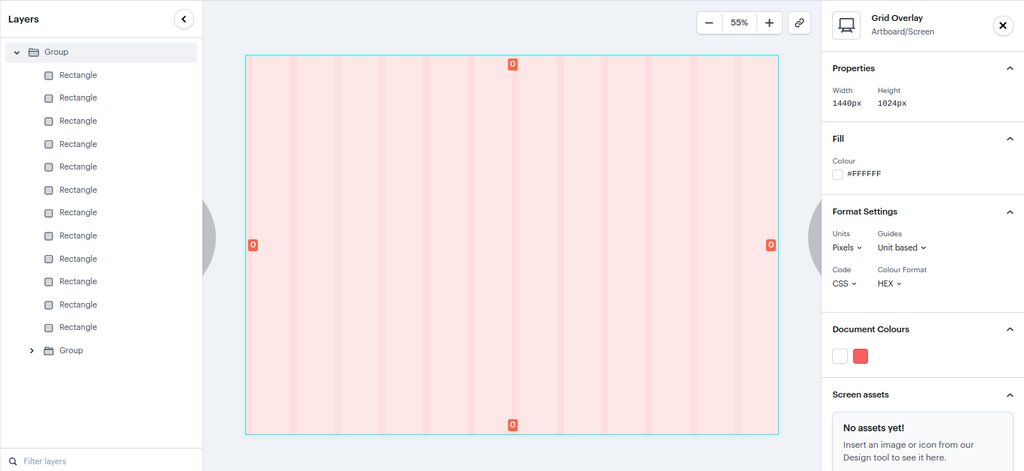
Let's break down these sections:
-
The Canvas: This is the large, central area where you'll do all your designing. It's your workspace where you add text, images, and other elements. You can drag, drop, and resize items directly on the canvas to see your website take shape in real time.
-
The Layers Panel: Typically found on the left, this panel lists every element on your page, like a table of contents. If you have text on top of an image inside a container, the Layers Panel shows you that structure. It’s essential for staying organized and selecting specific items, especially in complex designs.
-
The Properties Panel: This is your control center, located on the right. When you select an element on your canvas, this panel fills with options to customize it. You can change colors, adjust sizes, modify fonts, add effects like shadows, and set up interactions. It's context-sensitive, so the options you see will always be relevant to the item you've selected.
Designing Without Code
The core of Framer is its no-code approach. Instead of writing code to style a button, you select it and use the Properties Panel to adjust its appearance and behavior visually. This makes web design much more accessible.
Framer automatically handles the complex parts, like making sure your design looks good on different screen sizes. As you adjust elements on the canvas, Framer is writing clean, production-ready code in the background. You get the power of code without the steep learning curve.
Framer: A no-code website builder ideal for designing and publishing websites from a single platform.
This means you can build responsive layouts that adapt to desktops, tablets, and phones just by clicking and dragging. It’s a faster, more visual way to create for the web, allowing you to test ideas and publish a live site all from one place.
What is the primary function of Framer?
If you need to change the color and font size of a specific text element on your webpage, which panel would you use?
Now you have a basic understanding of what Framer is and how its interface is laid out. In the next steps, we'll start putting these tools into practice.