Mastering File Operations in C
Stream Fundamentals
Beyond the Console
So far, your programs have lived in a bubble. They take input from the keyboard and print output to the screen. Once the program finishes, any data it generated vanishes. To build anything lasting, programs need to read from and write to files, a concept called data persistence.
In C, all input and output (I/O) is handled through a uniform interface called a stream. Think of a stream as a flowing channel of data. It connects your program to a source (like a file or the keyboard) or a destination (like a file or the screen). You've already used streams without knowing it: stdin (keyboard), stdout (screen), and stderr (screen for errors) are predefined streams available in every C program.
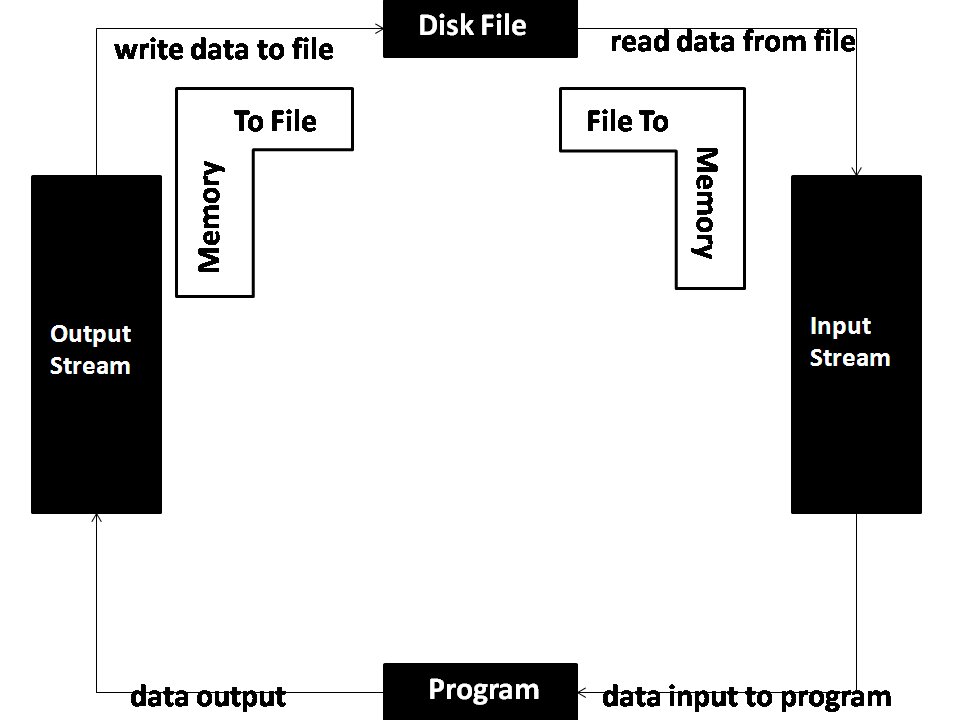
This stream-based architecture is powerful because it's abstract. Your program doesn't need to know if it's writing to a hard drive, a network connection, or the console. The code for writing data is the same; you just point it at a different stream.
The FILE Handle
To interact with a file stream, you need a special kind of variable: a pointer to a FILE structure. The FILE structure is a complex data type defined in the standard I/O library (stdio.h). It holds all the critical information about a stream, such as its current position, error status, and a buffer for temporary storage.
You almost never interact with the members of the FILE structure directly. Instead, the C standard library manages it for you. This is a design principle called an opaque data type. You use a pointer to it, often called a file handle or file pointer, as a passport to access the file through standard library functions.
// Declare a file pointer named 'log_file'.
// It doesn't point to anything yet.
FILE *log_file;
This declaration creates a pointer variable, log_file, that is capable of holding the memory address of a FILE structure. Before we can use it, we have to associate it with an actual file on the disk.
Opening and Closing Files
The bridge between your file pointer and a physical file is the fopen() function. It takes two arguments: the path to the file you want to open and a mode string that specifies what you intend to do with it.
#include <stdio.h>

int main(void) {
    // Declare the file pointer.
    FILE *output_file;

    // Attempt to open "data.txt" in write mode.
    output_file = fopen("data.txt", "w");

    // Always check if the file was opened successfully.
    if (output_file == NULL) {
        perror("Error opening file");
        return 1; // Exit with an error code.
    }

    printf("File opened successfully.\n");

    // ... we'll write to the file later ...

    // When finished, close the file to release system resources.
    fclose(output_file);

    return 0;
}
If fopen() is successful, it returns a valid FILE pointer. If it fails (e.g., the file doesn't exist in read mode, or you lack permissions), it returns NULL. It is absolutely critical to check for NULL after every call to fopen().
Just as important as opening a file is closing it. The fclose() function tells the operating system you're done. It flushes any pending data from memory buffers to the disk and frees up the resources the OS allocated for the stream. Forgetting to close files can lead to data loss and resource leaks, where your program holds onto system resources it no longer needs.
Choosing Your Access Mode
The "mode" string in fopen() is a powerful switch that controls how you can interact with the file. Choosing the right mode prevents accidental data loss and ensures your program behaves as expected.
| Mode | Meaning | If file exists... | If file doesn't exist... |
|---|---|---|---|
"r" | Read: Open for reading. | Reading starts at the beginning. | fopen() returns NULL. |
"w" | Write: Open for writing. | Content is destroyed. | A new, empty file is created. |
"a" | Append: Open for writing. | Writing starts at the end. | A new, empty file is created. |
"r+" | Read/Update: Open for reading and writing. | Reading starts at the beginning. | fopen() returns NULL. |
"w+" | Write/Update: Open for writing and reading. | Content is destroyed. | A new, empty file is created. |
"a+" | Append/Update: Open for appending and reading. | Reading starts at beginning, writing at end. | A new, empty file is created. |
The most common mistake is confusing
"w"and"a". Use"w"when you want to create a new file or completely overwrite an existing one. Use"a"when you want to add new information to the end of a log or data file without deleting what's already there.
Now that you can reliably open and close files, you have the foundation for making your programs interact with the world.