Mastering Enterprise IT Technical Support
Enterprise Ticket Workflows
The Lifecycle of an Incident
In a business environment, every IT issue, from a flickering monitor to a system-wide outage, starts its life as a ticket. The first step is logging the incident accurately. Enterprise platforms like ServiceNow or Zendesk capture crucial initial details: who is affected, what systems are involved, and what the user was doing when the issue occurred. This isn't just data entry; it's the beginning of a digital evidence trail.
Next comes categorisation. Is this a hardware failure, a software bug, or a user access request? Correctly categorising the ticket ensures it's routed to the right team from the start. A password reset request shouldn't land in the network engineering queue. This initial sorting is fundamental to efficiency, preventing delays and ensuring specialists work on the problems they're equipped to solve.
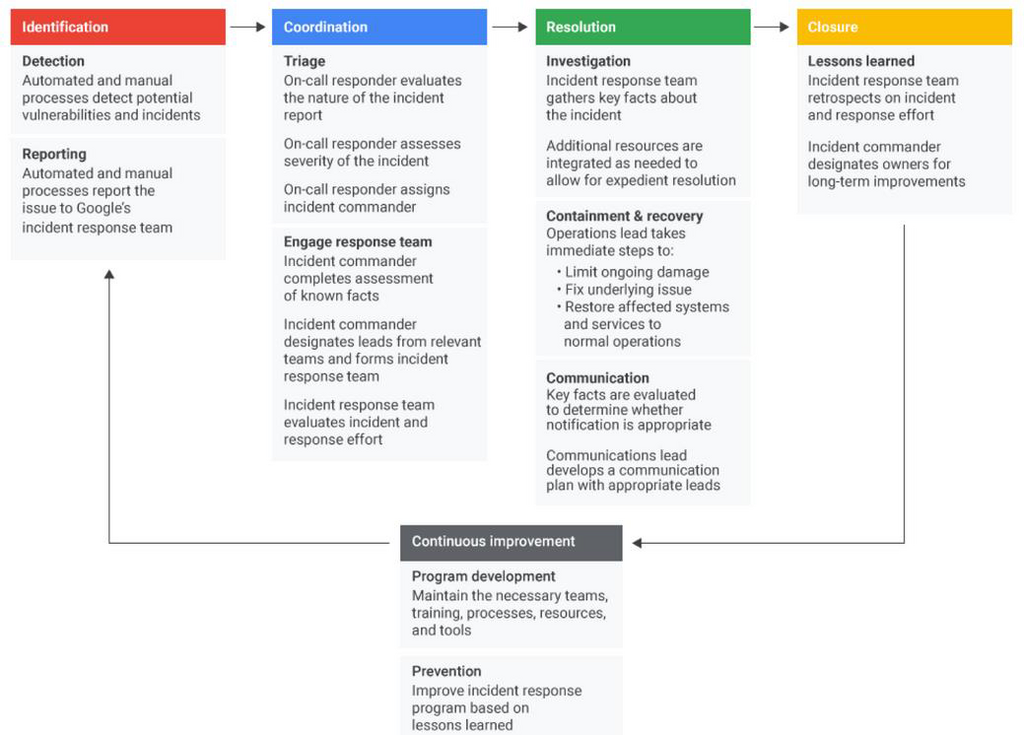
Think of it as the digital equivalent of a hospital's triage unit. A detailed, well-categorised ticket provides the full picture, allowing the support team to understand the patient's symptoms before they even start their diagnosis.
Prioritisation is Key
Not all tickets are created equal. To determine which issues to tackle first, we use a simple but powerful matrix: impact versus urgency.
- Impact measures the effect of the incident on the business. A single user unable to print is low impact. The entire sales team being unable to access the CRM during quarter-end is high impact.
- Urgency measures how quickly the incident needs to be resolved. A broken link on an internal FAQ page is low urgency. A customer-facing website being down is high urgency.
By combining these two factors, we can assign a clear priority level to every ticket.
| High Urgency | Low Urgency | |
|---|---|---|
| High Impact | 1 - Critical | 2 - High |
| Low Impact | 3 - Medium | 4 - Low |
This priority dictates the response time, which is governed by a Service Level Agreement (SLA). An SLA is a formal commitment between a service provider and a client. It defines the expected level of service, including resolution times for different priority levels. For instance, a 'Critical' ticket might have a one-hour resolution SLA, while a 'Low' priority ticket might have a 48-hour window.
Internally, teams often operate under Operational Level Agreements (OLAs). These are agreements between different departments within the same organisation that support the overarching SLAs. For example, the network team might have an OLA with the service desk to resolve any network-related escalations within 30 minutes, ensuring the service desk can meet its customer-facing SLA.
Solving the Problem
Once prioritised, how do we actually fix the issue? The traditional method is tiered escalation. A ticket starts at Tier 1 (the service desk), and if they can't solve it, it's escalated to Tier 2 (specialists), and so on. This is a linear, structured process.
However, the framework introduces a more dynamic approach for major incidents: swarming. Instead of a slow climb up the support ladder, swarming brings together a cross-functional group of experts to collaborate on the issue simultaneously. The network engineer, database administrator, and application developer all jump into a virtual war room to tackle the problem from all angles at once. This approach is designed to resolve high-impact incidents much faster by getting the right people involved from the outset.
Throughout this process, documentation is paramount. Every action taken, every communication, and every diagnostic step must be recorded in the ticket. This creates a clear audit trail, which is essential for compliance with industry regulations. It also builds a knowledge base. A well-documented ticket for a complex issue can serve as a guide for resolving similar incidents in the future, contributing to the organization's broader by improving efficiency and competence over time.
Beyond the Quick Fix
Resolving an incident means restoring service as quickly as possible. This is the primary goal of Incident Management. If a server is down, the goal is to get it back online, even if it means a temporary workaround like a reboot. The incident ticket is then closed.
But that's not always the end of the story. Why did the server go down? If it happens repeatedly, just rebooting it every time isn't a sustainable solution. This is where comes in. After the immediate fire is out, Problem Management takes over to perform a root cause analysis. Its goal isn't just to fix a symptom, but to find and eliminate the underlying cause, preventing future incidents from ever occurring.
Incident Management is about restoring service. Problem Management is about preventing recurrence.
This structured journey from logging an incident to identifying its root cause is the backbone of professional IT support. It transforms reactive firefighting into a proactive strategy for creating a more stable and reliable IT environment.
Now, let's test your understanding of these core concepts.
In IT support, what is the primary purpose of a Service Level Agreement (SLA)?
An entire sales team is unable to access their CRM platform during the last week of the quarter. How would this incident most likely be prioritised using the impact/urgency matrix?
Understanding these workflows is the first step in moving from simply fixing issues to strategically managing IT services and delivering real value to the business.