Mastering E-commerce Analytics and CRO
Introduction to Web Analytics
What Is Web Analytics?
Imagine running a physical store. You'd naturally watch how customers behave. Where do they come from? Which aisles do they spend the most time in? How many people walk in, look at one item, and leave immediately? How many end up buying something?
Web analytics is the digital version of this. It's the process of collecting and analyzing data about who visits your website and what they do once they're there. The goal is simple: to understand your online visitors so you can make your website—and your business—better.
Instead of guessing what works, analytics gives you hard data to guide your decisions.
Key Metrics to Watch
Analytics platforms track dozens of different data points, or metrics. You don't need to follow all of them, especially when you're starting out. Focusing on a few key metrics will give you a powerful snapshot of your store's performance.
Traffic Sources
noun
This metric tells you how people found your website. Did they type your address directly into their browser? Did they click a link from a social media post, an email, or another website? Or did they find you through a search engine?
Understanding your traffic sources shows you which marketing channels are working. If you see a lot of visitors coming from Instagram but very few from your email newsletter, you know where to focus your efforts.
Session Duration
noun
This measures the average amount of time a visitor spends on your site during a single visit, or "session." A session starts when someone arrives on your site and ends when they leave or are inactive for a certain period.
A longer session duration often suggests that visitors are engaged with your content. They're clicking around, reading product descriptions, and considering a purchase. A very short duration might mean they didn't find what they were looking for.
Bounce Rate
noun
The percentage of visitors who land on a page on your website and then leave without clicking on anything else or visiting a second page. They "bounce" away.
Think of it as someone walking into your store, glancing at the entrance, and immediately walking out. A high bounce rate can be a red flag. It might indicate that your site is slow to load, your design is confusing, or the page isn't relevant to what the visitor was expecting.
Conversion Rate
noun
The percentage of visitors who complete a desired action, known as a "conversion." For an online store, the most important conversion is usually making a purchase.
Other actions, like signing up for a newsletter, creating an account, or adding an item to the cart, can also be tracked as conversions. This is arguably the most crucial metric for an e-commerce site, as it directly measures how effectively your site turns visitors into customers.
Why It Matters for Your Store
Tracking these metrics isn't just about collecting numbers. It's about getting answers to important questions about your business.
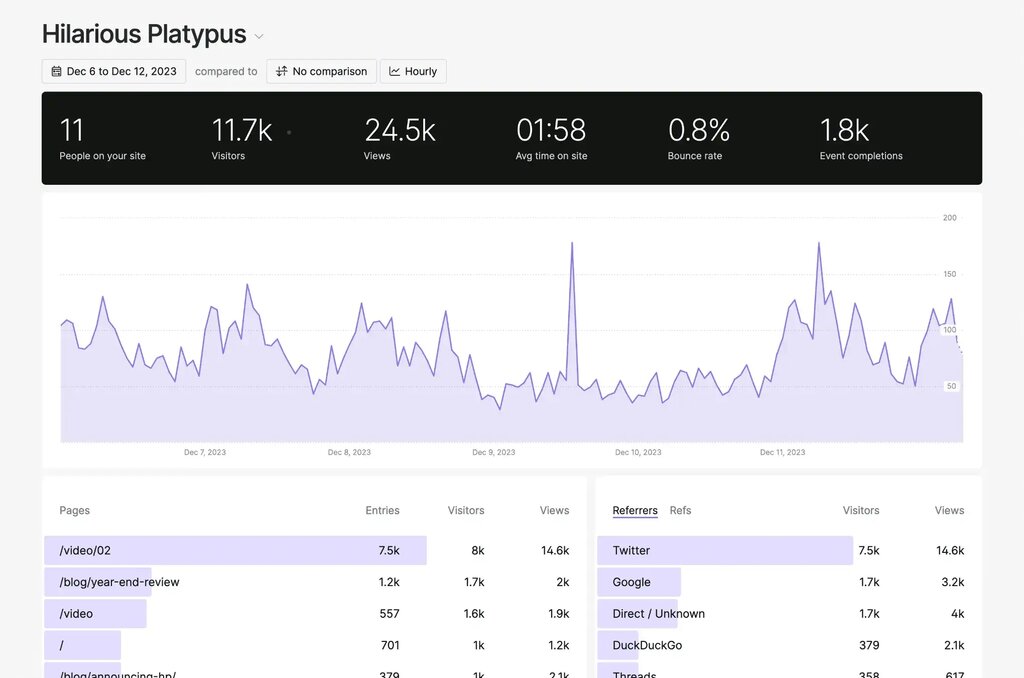
By looking at your analytics, you can understand your customers' journey. You can see which pages they visit most, where they get stuck, and what makes them decide to buy.
For example, if you notice a high bounce rate on a specific product page, you can investigate. Are the photos low quality? Is the description unclear? Is the price too high? Analytics points you to the problem so you can find a solution.
Similarly, if your conversion rate is low, you can analyze the path visitors take to the checkout. Perhaps many people add items to their cart but never complete the purchase. This might lead you to simplify your checkout process or offer different shipping options.
To enhance e-commerce websites, it's essential to grasp user engagement and factors affecting conversion rates.
Web analytics replaces guesswork with data. It provides the insights you need to make smart, informed decisions that improve your website, enhance the customer experience, and ultimately, grow your sales.