Mastering DevOps Engineering and Automation
Advanced Version Control
Beyond the Commit
You know how to commit code. Now it's time to manage it. As projects grow and teams expand, simply pushing changes to a main branch becomes chaotic. You need a system—a branching strategy—to keep development organized, prevent bugs, and ship features smoothly. A good strategy ensures your code is always in a state you can trust.
A branching strategy is a set of rules or guidelines that development teams use to manage the process of writing, merging, and deploying code with the help of a version control system like Git.
Let's compare two of the most common approaches: GitFlow and Trunk-Based Development.
Two Paths for Code
GitFlow is a highly structured model that uses several long-lived branches to manage a project. It's built around the idea of distinct releases.
main: This branch holds production-ready code. Nothing is committed here directly. It's only updated fromreleaseorhotfixbranches.develop: The primary development branch. All new feature work starts here and is merged back here.feature/*: Branches for new features. They are created fromdevelopand merged back intodevelopwhen complete.release/*: Whendevelophas enough features for a new release, you create areleasebranch. Here, you focus on bug fixes and final preparations. Once ready, it's merged into bothmainanddevelop.hotfix/*: Urgent fixes for production bugs. These branch offmainand are merged back into bothmainanddevelop.
This model is robust and provides a very clear separation of concerns. It's great for projects with scheduled versioned releases, like desktop software or mobile apps.
Trunk-Based Development (TBD) is much simpler. There is only one main branch, often called trunk or main. Developers create short-lived feature branches, do their work, and merge back into the main trunk frequently—at least once a day.
This strategy is the backbone of modern Continuous Integration and Continuous Deployment (CI/CD). Because changes are small and frequent, merge conflicts are rare and easier to solve. The main branch is always kept in a releasable state. It's the preferred model for web applications and services that deploy multiple times a day.
The key trade-off: GitFlow offers stability and predictability for scheduled releases. Trunk-Based Development offers speed and simplicity for continuous delivery.
Safe Continuous Merging
Merging incomplete features into main sounds risky. How does Trunk-Based Development stay stable? The answer is feature toggles (or feature flags).
A feature toggle is essentially an if statement in your code that wraps a new feature. This allows you to deploy the code to production but keep the feature hidden from users until it's ready.
// A simple feature toggle
function showNewDashboard(user) {
  // The 'isNewDashboardEnabled' flag could be controlled
  // by a database entry, a config file, or a third-party service.
  if (featureFlags.isNewDashboardEnabled) {
    renderNewDashboard(user);
  } else {
    renderOldDashboard(user);
  }
}
Feature toggles decouple deployment (getting code to production) from release (making features available to users). This is a powerful technique. You can test new features with internal users, perform A/B tests, or roll out a feature to a small percentage of users before a full launch. Once the feature is stable and fully released, you can clean up the code by removing the toggle and the old code path.
Keeping History Clean
When you're ready to integrate your work from a feature branch back into the main branch, you have two primary options: merge and rebase.
git merge creates a new "merge commit" in the main branch. This commit has two parents: the last commit of the main branch and the last commit of your feature branch. It preserves the exact history of your work, but it can lead to a messy, branching commit graph that's hard to follow.
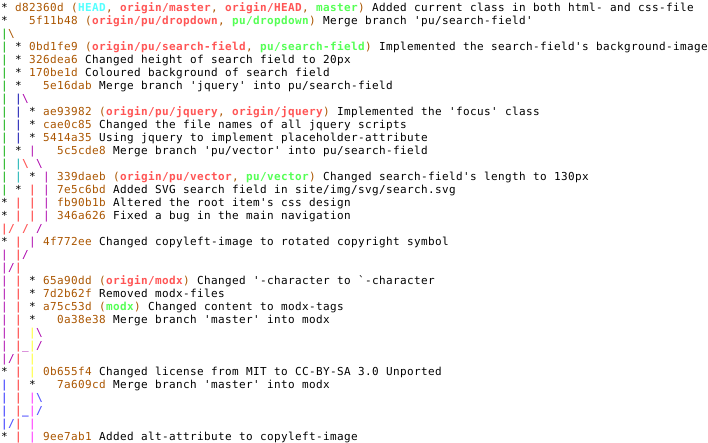
git rebase works differently. It takes your feature branch commits and reapplies them, one by one, on top of the latest changes from the main branch. This creates a perfectly linear history, as if all the work was done in a single straight line. It's much cleaner to read.
The golden rule of rebasing: Never rebase a public, shared branch like
mainordevelop. Rebasing rewrites commit history, which can cause serious problems for teammates who have pulled the old version of the branch.
A common and safe strategy is to use rebase on your local feature branches to keep them up-to-date with main. Then, when your feature is complete, you merge it into main. This gives you a clean, linear history without the risks of rebasing a shared branch.
This process is often handled through Pull Requests (or Merge Requests).
Versioning Your Releases
Once your code is merged and ready to be released, you need a way to label that specific version. This is where versioning and tagging come in. The most widely adopted standard is Semantic Versioning (SemVer).
A version number is formatted as MAJOR.MINOR.PATCH:
MAJOR: Incremented for incompatible API changes.MINOR: Incremented for new, backward-compatible functionality.PATCH: Incremented for backward-compatible bug fixes.
For example, v2.1.5.
Backward-Compatible
adjective
A change that does not break existing functionality for users of the software.
Using SemVer provides clear expectations for users of your software. A jump from 1.5.0 to 1.6.0 means new features are available, but nothing should break. A jump to 2.0.0 signals major changes that will likely require them to update their own code.
In a CI/CD pipeline, this process can be automated. The pipeline can analyze commit messages (e.g., messages starting with feat: trigger a MINOR bump, fix: a PATCH bump), automatically determine the next version number, create a Git tag (git tag v1.6.0), and push it to the repository. This tag then serves as a permanent, reliable marker of a specific release.
In the GitFlow branching model, which branch serves as the primary hub for ongoing development and is where all feature branches originate and are merged back into?
A team is building a web service that deploys multiple times per day. They want to minimize merge conflicts and maintain a single source of truth that is always releasable. Which branching strategy is best suited for their needs?
Choosing the right branching strategy and workflow is about managing complexity. These patterns provide a shared vocabulary and process for your team, enabling you to build, test, and release software with confidence.