Mastering Claude for Code Generation
Introduction to Claude for Coding
Your AI Coding Partner
Think of an AI assistant that can write code, find bugs, and explain complex topics in simple terms. That's Claude. It's a tool designed to work with you, helping you become a more efficient and knowledgeable developer. Instead of just completing tasks, it acts as a collaborator in your coding process.
Developers leverage Claude to generate, debug, and optimize code across various languages.
Whether you're stuck on a tricky algorithm, trying to understand a new library, or just want to write boilerplate code faster, Claude can help. It handles the tedious parts of programming, freeing you up to focus on problem-solving and creativity.
Getting Started
Accessing Claude is straightforward. You can interact with it through its web interface at claude.ai. There's no complex setup required to start using its coding abilities.
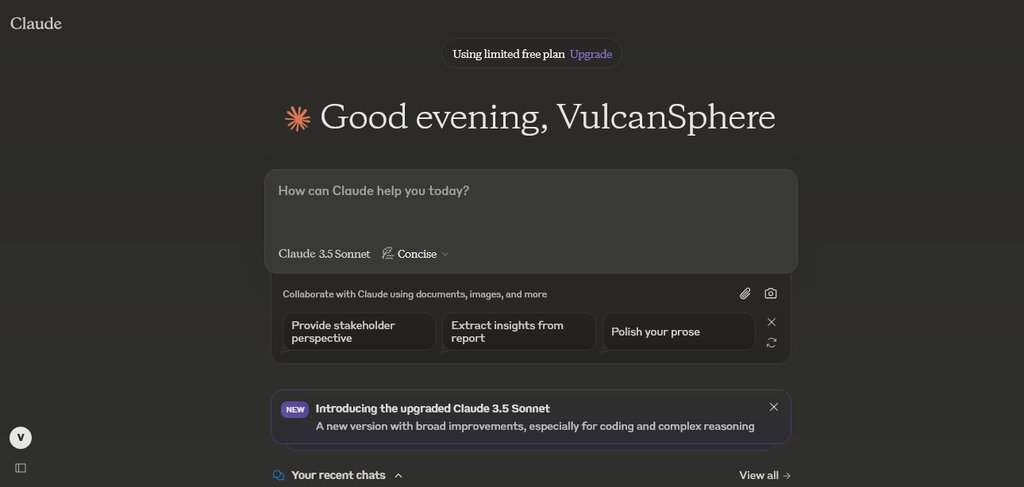
The interface is designed for conversation. You'll see a primary input box at the bottom where you type your requests, or prompts. The main area displays the conversation, with your prompts and Claude's responses appearing in sequence. You can also attach files, like code snippets or documentation, to give Claude more context for your request.
Core Coding Skills
Claude's power as a coding assistant comes from a few core capabilities. Let's look at the three most common uses: generating code, debugging, and getting explanations.
Give clear instructions. The more specific your prompt, the better Claude's output will be. Mention the programming language and any important constraints.
You can ask Claude to write code from scratch. Describe what you need in plain language, and it will generate a functional snippet. For example, if you need a simple Python function, you could ask:
"Write a Python function that takes a list of numbers and returns their sum."
def sum_list(numbers):
  """Calculates the sum of a list of numbers.

  Args:
    numbers: A list of numbers (integers or floats).

  Returns:
    The sum of the numbers in the list.
  """
  total = 0
  for number in numbers:
    total += number
  return total

# Example usage:
my_numbers = [1, 2, 3, 4, 5]
print(f"The sum is: {sum_list(my_numbers)}")
Next is debugging. When you have code that isn't working as expected, you can paste it into Claude and ask for help. Provide the code and describe the error or the unexpected behavior.
For example, imagine you have this JavaScript code that's supposed to add an item to a list, but it's not working correctly.
// Buggy code
function addItem(list, item) {
  list = list.push(item);
  return list;
}

let originalList = ['apple', 'banana'];
let newList = addItem(originalList, 'cherry');
console.log(newList); // This will not log the array as expected
You could ask: "Can you find the bug in this JavaScript code? It's supposed to add an item to an array and return the new array, but it's returning a number instead."
Claude will analyze the code, identify that Array.prototype.push() returns the new length of the array, not the array itself, and provide a corrected version.
// Corrected code
function addItem(list, item) {
  list.push(item);
  return list;
}

let originalList = ['apple', 'banana'];
let newList = addItem(originalList, 'cherry');
console.log(newList); // Logs: ['apple', 'banana', 'cherry']
Finally, Claude is excellent for learning. If you encounter a piece of code you don't understand, you can ask for an explanation. This is useful for deciphering complex algorithms, regular expressions, or syntax in an unfamiliar language.
A good prompt would be: "Explain what this line of Python code does: squares = [x**2 for x in range(10)]."
Claude would break down the concept of list comprehensions, explaining that the code creates a new list called squares by iterating from 0 to 9, squaring each number, and adding the result to the list.
What is the primary role of Claude for a developer, as described in the text?
A developer has a piece of JavaScript code that is not behaving as expected. According to the text, what is the most effective first step when using Claude for help?
By mastering these three basic interactions—generating, debugging, and explaining—you can make Claude a valuable part of your daily coding workflow.