Mastering ChatGPT Prompts
Introduction to ChatGPT
What is ChatGPT?
ChatGPT is an AI you can have a conversation with. You can ask it questions, have it write a story, help you brainstorm ideas, or even explain complex topics in simple terms. It’s designed to understand what you’re asking and respond in a way that feels natural and human-like.
ChatGPT is an artificial intelligence (AI) chatbot built on top of OpenAI's foundational large language models (LLMs) like GPT-4 and its predecessors.
Think of it as a versatile assistant. Its main purpose is to process and generate text. This means it can summarize long articles, translate languages, write different kinds of creative content, and answer your questions in an informative way. It learns from the prompts you give it to make the conversation flow.
How Does It Work?
At its core, ChatGPT is a form of Artificial Intelligence (AI). Specifically, it's a Large Language Model, or LLM. An LLM is a type of AI that has been trained on a massive amount of text data from the internet, books, and other sources. Imagine a student who has read nearly every book in a colossal library. This training allows the model to learn the patterns, grammar, context, and nuances of human language.
Prompt
noun
The instruction, question, or text input you give to an AI model to get a response.
When you type a prompt, ChatGPT uses its training to predict what the most likely sequence of words should be to form a helpful and relevant response. It isn't 'thinking' in the human sense, but rather calculating probabilities to piece together sentences that make sense in the context of your request.
The 'GPT' in its name stands for Generative Pre-trained Transformer.
- Generative means it creates new, original text instead of just pulling from a database of pre-written answers.
- Pre-trained means it did all its learning from the huge dataset before you started talking to it.
- Transformer is the name of the powerful AI architecture that allows it to understand context and the relationships between words in a sentence.

Getting Around the Interface
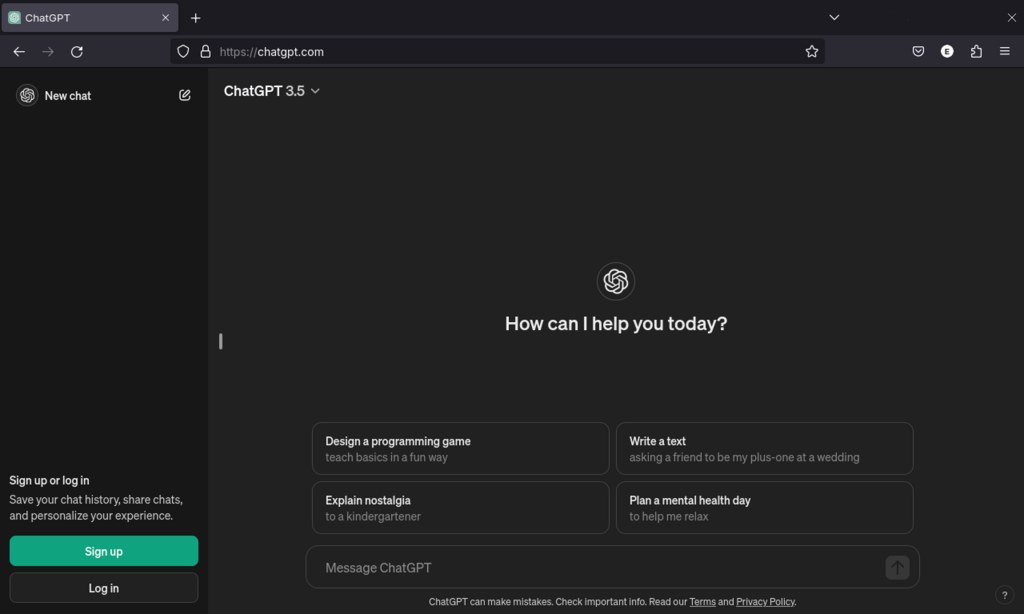
When you open ChatGPT, the interface is clean and straightforward. The main focus is on the conversation itself.
At the bottom of the screen, you'll find the most important part: the message box. This is where you type your prompt. After you send your message, ChatGPT's response will appear above it, creating a chat history.
On the side, you’ll typically see a list of your previous conversations. This is useful for revisiting past topics or continuing a discussion you started earlier. You can rename or delete these chats to keep things organized. That’s really all you need to know to get started.
The key to using ChatGPT is the prompt. A clear, specific prompt will almost always give you a better result than a vague one.
Here are some of its basic functions:
- Answering Questions: Ask it anything from 'What is the capital of Mongolia?' to 'Explain quantum physics simply.'
- Drafting Text: Ask it to write an email, a blog post, a social media caption, or a simple poem.
- Brainstorming: If you're stuck on an idea, you can describe your problem and ask for suggestions.
- Summarization: You can paste in a long piece of text and ask ChatGPT to give you the key points.
At its core, ChatGPT is a specific type of AI known as a...
The 'G' in GPT stands for 'Generative'. What does this mean in the context of how the AI works?
Now that you understand the basics of what ChatGPT is and how it functions, you're ready to start exploring it on your own.