Mastering C Programming for Engineers
Foundational C Concepts
The Building Blocks
Every program manipulates data. In C, we must tell the compiler what kind of data we're working with. This is where data types come in. They define the nature of the data a variable can hold and the operations that can be performed on it.
| Data Type | Typical Size (bytes) | Use Case in Engineering |
|---|---|---|
int | 4 | Counting iterations, sensor readings, indexing arrays. |
char | 1 | Storing single characters, command inputs ('Y'/'N'). |
float | 4 | Single-precision floating-point numbers, like temperature or pressure readings. |
double | 8 | Double-precision, for calculations requiring high accuracy, such as stress analysis or simulations. |
void | N/A | Represents the absence of a type, mainly for functions that don't return a value. |
We store this data in variables. Think of a variable as a named container for a value that can change. If a value should never change, we declare it as a constant using the const keyword. This prevents accidental modification and makes the code's intent clearer.
For example, defining the gravitational constant:
const double GRAVITY = 9.81; // m/s^2
To interact with a program, we need input and output. The simplest way is through the console using printf() to display information and scanf() to read user input. These functions are your basic toolkit for communication.
#include <stdio.h>

int main() {
    float radius;
    printf("Enter the radius of the circle: ");
    scanf("%f", &radius); // Note the '&' to pass the address

    float area = 3.14159 * radius * radius;
    printf("The area is: %f\n", area);

    return 0;
}
Making Things Happen
Data is useful, but operators are what let us perform calculations and make decisions. C provides a rich set of operators to manipulate variables. Arithmetic operators (+, -, *, /, %) handle basic math, while relational (==, !=, >, <) and logical (&&, ||, !) operators are used for comparison and forming logical expressions.
Bitwise operators (&, |, ^, ~, <<, >>) are particularly useful in engineering. They allow direct manipulation of the individual bits within a data type. This is crucial for tasks like reading sensor data from a hardware register, setting control flags, or performing efficient, low-level calculations. For example, checking if a specific bit is set in a status register can be done with a simple bitwise AND.
To check if the 3rd bit (value 4, or
0100in binary) is set in a variablestatus_reg, you can useif (status_reg & 4) { ... }.
When you combine variables and operators, you create an expression. The order in which parts of an expression are evaluated is determined by operator precedence. For instance, multiplication has higher precedence than addition. If you're ever unsure, use parentheses () to enforce the order of operations you intend. It makes the code easier to read and prevents subtle bugs.
Controlling the Flow
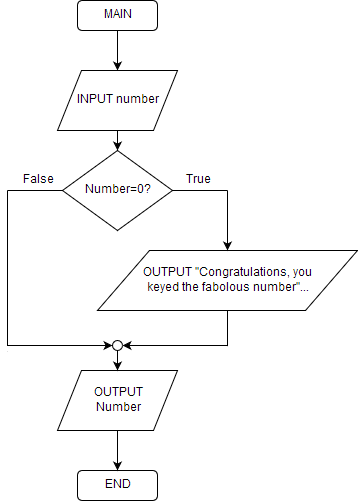
Programs rarely execute in a straight line. Control flow statements allow you to dictate the path of execution based on certain conditions. The most fundamental is the if-else statement, which executes a block of code if a condition is true, and an optional other block if it's false.
When you have multiple conditions to check against a single variable, a switch statement is often cleaner than a long chain of if-else if blocks. Each case handles a specific value, and it's vital to include a break statement to prevent fall-through to the next case.
Repetitive tasks are handled by loops. The for loop is ideal when you know the number of iterations in advance, like processing every element in an array. The while loop continues as long as a condition is true, which is perfect for situations where the number of iterations is unknown, such as waiting for a sensor value to cross a threshold. A do-while loop is similar, but it guarantees the loop body executes at least once.
You can alter a loop's behavior with break to exit the loop immediately or continue to skip the rest of the current iteration and start the next one.
Organizing Code
As programs grow, you need a way to organize code into logical, reusable units. That's the job of functions. A function is a self-contained block of code that performs a specific task. You declare a function to tell the compiler about its name, return type, and parameters. You define it to provide the actual code that runs.
When a function is called, its parameters are pushed onto the function call stack along with the return address. This stack manages the execution flow, ensuring that when one function finishes, control returns to where it was called. Understanding this concept is key to debugging and reasoning about program behavior, especially with recursion.
Variables also have a scope, which defines where they can be accessed. A is declared inside a function and can only be used within that function. A global variable is declared outside of all functions and is accessible from anywhere in the program. While convenient, excessive use of global variables can make code hard to debug and maintain, as they can be modified from anywhere.
What is the primary purpose of using the const keyword when declaring a variable in C?
In a C switch statement, what typically happens if a break statement is omitted from a case block?
With these foundational concepts refreshed, you're ready to tackle more complex engineering problems in C.