Mastering Binary Search Implementation
Introduction to Binary Search
A Smarter Way to Search
Imagine you're looking for a word in a dictionary. You probably wouldn't start at the first page and read every word until you find the one you want. Instead, you'd open the dictionary somewhere in the middle. If your word comes alphabetically after the words on that page, you know to look in the second half. If it comes before, you look in the first half. You repeat this process, narrowing down the possibilities until you land on the right page.
This is the core idea behind binary search. It's a clever and highly efficient algorithm for finding an item in a sorted list. The requirement that the list be sorted is non-negotiable. Without it, the whole strategy falls apart.
Binary search works by repeatedly dividing the search area in half. This 'divide and conquer' approach is what makes it so fast.
Linear vs. Binary Search
The most basic way to search a list is called a linear search. It's simple: you start at the very beginning and check each item, one by one, until you find your target. If you're looking for the last item in a list of a million things, you'll have to check all one million of them. It's thorough, but it can be incredibly slow, like checking every book on a disorganized shelf.
Binary search is much more strategic. Because the list is sorted, every check gives you valuable information. By jumping to the middle, you immediately eliminate half of the remaining items from your search. This difference in approach has a massive impact on performance, especially as lists get larger.
How It Works Step by Step
Let's walk through an example. Suppose we have a sorted list of numbers and we want to find the number 23.
The list: [2, 5, 8, 12, 16, 23, 38, 56, 72, 91]
-
Find the middle. The list has 10 items. The middle item is the 5th one, which is 16. We'll keep track of the boundaries of our search area, which starts as the whole list (index 0 to 9).
-
Compare. Is our target number (23) bigger or smaller than 16? It's bigger.
-
Eliminate. Since 23 is bigger than 16, we know it can't be in the left half of the list. We can completely ignore 16 and every number before it. Our new search area is
[23, 38, 56, 72, 91]. -
Repeat. Now we do the same thing with our new, smaller list. The middle item is 56. Is 23 bigger or smaller than 56? It's smaller.
-
Eliminate again. We can now throw away 56 and everything after it. Our search area shrinks again to just
[23, 38]. -
Repeat again. The middle of this small list is 23. We compare it to our target, 23. It's a match! We found our number in just three steps.
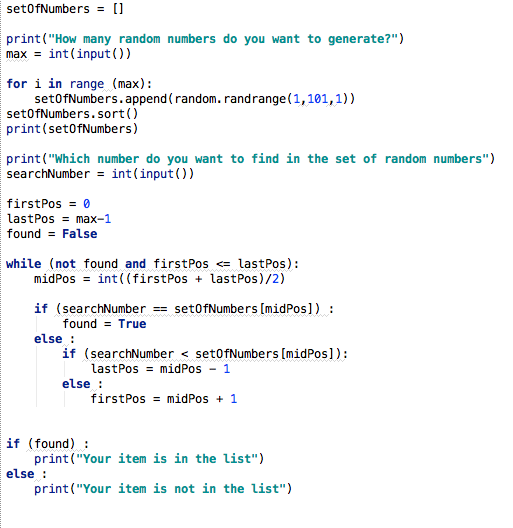
The Power of Halving
The real magic of binary search is how well it scales. Each step cuts the remaining work in half. This makes it incredibly fast for large datasets.
Consider a list with 1 million sorted items. A linear search could take up to 1 million comparisons in the worst case. How many for binary search?
- After 1 comparison, we have 500,000 items left.
- After 2 comparisons, 250,000 are left.
- After 3 comparisons, 125,000 are left.
If you keep halving the list, you'll find any item in a list of 1 million in at most 20 comparisons. That's a staggering difference.
| Number of Items | Max Linear Search Steps | Max Binary Search Steps |
|---|---|---|
| 10 | 10 | 4 |
| 100 | 100 | 7 |
| 1,000 | 1,000 | 10 |
| 1,000,000 | 1,000,000 | 20 |
Because binary search time grows so slowly, it's a go-to algorithm for searching through massive, sorted collections of data.
Ready to check your understanding of this powerful search method?
What is the most important prerequisite for a list to be searchable using a binary search algorithm?
For very large lists, a linear search will almost always be faster than a binary search.
You've now seen how binary search offers a huge leap in efficiency over simpler methods, all by cleverly using the fact that the data is sorted.