Mastering Binary Search
Introduction to Binary Search
A Smarter Way to Search
Imagine you're looking for a word in a dictionary. You probably wouldn't start at the first page and read every word until you find the one you want. That would take forever. Instead, you'd likely open the dictionary somewhere in the middle. If your word comes alphabetically after the words on that page, you know to look in the second half. If it comes before, you look in the first half. You keep repeating this process, cutting the problem in half each time, until you find your word.
This intuitive process is the core idea behind binary search.
Binary Search is a searching algorithm used in a sorted array by repeatedly dividing the search interval in half and the correct interval to find is decided based on the searched value and the mid value of the interval.
Binary search is an algorithm for finding an item from a sorted list of items. It works by repeatedly dividing the search interval in half. It’s a classic example of a "divide and conquer" strategy. The key requirement, however, is that the list must be sorted. If you try to use binary search on an unsorted list, it's like using the dictionary trick on a book with randomly ordered words—it simply won't work.
The Binary Search Process
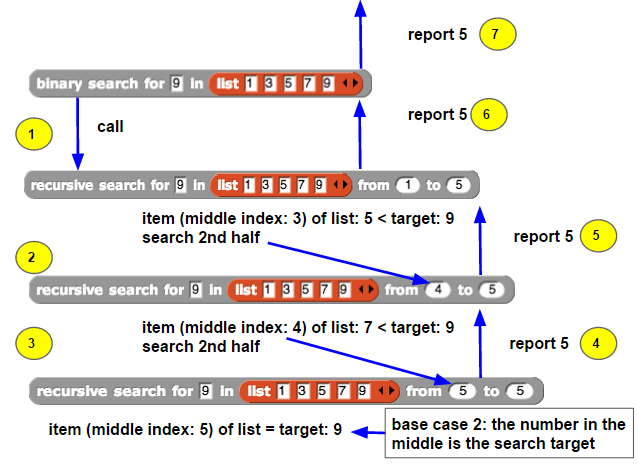
Let's walk through the steps with a simple, sorted list of numbers. Suppose we have the list [1, 3, 5, 7, 9] and we want to find the number 9.
- Find the middle element. Our list has 5 elements. The middle one is at index 2, which is the number 5. We'll call the start of our search range
lowand the endhigh. - Compare the target with the middle element. Our target is 9. Is 9 greater than, less than, or equal to 5? It's greater.
- Adjust the search range. Since 9 is greater than 5, we know it can't be in the first half of the list (or be the middle element itself). So, we can completely ignore the left side. Our new, smaller search range becomes
[7, 9]. - Repeat. Now we find the middle of our new range. The middle element is 7. We compare our target, 9, to 7. Since 9 is greater than 7, we again discard the left part of this smaller list.
- Find the target. Our search range is now just
[9]. The middle element is 9. We compare our target, 9, to this element. They're equal! We've found our number.
What if the number isn't in the list? Let's say we're looking for the number 6. We'd follow the same steps. We'd check 5, then look at the [7, 9] sublist. We'd check 7. Since 6 is less than 7, we'd adjust our search to the portion before 7. But there are no numbers there. At this point, the algorithm stops and reports that the number 6 is not in the list.
Binary vs Linear Search
The simple approach of checking every single item in a list, one by one, is called a linear search. It's like flipping through a book page by page from the very beginning. For small lists, a linear search is fine. But as the list gets larger, it becomes incredibly inefficient.
Imagine searching for a name in a phone book with a million entries. A linear search might require you to check all one million names in the worst-case scenario. With binary search, you'd find it in about 20 comparisons. That's a staggering difference.
With each step, binary search eliminates half of the remaining possibilities. This makes it exceptionally fast for large datasets.
The trade-off is the prerequisite: the data must be sorted. If you have data that is constantly changing and unsorted, the cost of sorting it first might outweigh the benefit of a faster search. But for static, sorted data, binary search is the clear winner.
| Feature | Linear Search | Binary Search |
|---|---|---|
| Data Requirement | Works on any list | Requires a sorted list |
| Method | Checks items sequentially | Jumps to the middle |
| Efficiency (Speed) | Slow for large lists | Very fast for large lists |
| Time Complexity |
The efficiency, or time complexity, tells us how the algorithm's runtime scales with the size of the input. For linear search, if you double the number of items (), you double the search time. For binary search, doubling the number of items only adds one extra step. This logarithmic scaling is what makes it so powerful.
What is the single most important requirement for a list of items before you can apply binary search to it?
Binary search is an example of a "divide and conquer" strategy.