Mastering Azure Security Technologies AZ 500
Advanced Identity Governance
Beyond Permanent Privileges
In identity management, permanent administrative access is a significant risk. An account with standing privileges, like Global Administrator, is a prime target for attackers. If compromised, it grants them the keys to the kingdom. The modern solution is to eliminate this risk by granting privileges only when they're needed, a principle known as (JIT) access.
Microsoft Entra Privileged Identity Management (PIM) is the tool that brings JIT access to your environment. It manages, controls, and monitors access to important resources in both Microsoft Entra ID and Azure. You can use PIM to govern two distinct sets of roles:
- Microsoft Entra roles: These are the directory-level roles like Global Administrator or Security Administrator.
- Azure resource roles: These are the roles you assign within subscriptions, resource groups, or individual resources, such as Owner or Contributor.
The core of PIM is the distinction between active and eligible assignments.
Privileged Identity Management (PIM): PIM helps manage, control, and monitor access within your organization, ensuring that privileged access is granted based on just-in-time and just-enough-access principles.
| Assignment Type | Description | When to Use |
|---|---|---|
| Active | The user has the permissions of the role permanently. This is the traditional assignment method. | Reserved for specific service principals or emergency 'break-glass' accounts. Avoid for daily human users. |
| Eligible | The user must perform an action to activate the role for a limited time. | This should be the default for all privileged roles assigned to administrators and operators. |
Transitioning your administrators from active to eligible assignments is a fundamental step toward securing your identity infrastructure. An admin might be eligible for the Global Administrator role, but they don't have those permissions until they go through a formal activation process.
Activating and Reviewing Access
Making a user eligible for a role is only the first step. You need to configure what happens when they try to activate it. Within the PIM settings for each role, you can enforce specific requirements to ensure the activation is legitimate and audited.
These settings include:
- Require multi-factor authentication: Forces the user to re-verify their identity with MFA at the moment of activation.
- Require justification: Prompts the user to enter a business reason for needing the elevated access.
- Require ticket information: Mandates a reference to an incident or change request ticket from your IT service management system.
- Require approval: Sends the activation request to a designated approver or group for review before the role is granted.
Combining these creates a robust, auditable trail for every instance of privileged access.
Privileged access isn't just about granting roles; it's also about validating their necessity over time. This is where access reviews come in. You can configure periodic reviews where role assignments are presented to managers, resource owners, or the users themselves to recertify. If no one attests to the need for the access, it's automatically revoked.
This continuous verification process is a cornerstone of a security model, ensuring that the principle of least privilege is consistently enforced.
Automated Identity Protection
While PIM governs intentional, requested access, Microsoft Entra ID Protection works automatically in the background to detect and respond to identity-based risks. It uses Microsoft's vast threat intelligence signals to identify suspicious activities associated with user accounts and sign-in attempts.
It categorises risk into two types:
User Risk: This is a measure of the probability that a specific user account has been compromised. It looks for signals like leaked credentials found on the dark web or sign-ins from atypical locations.
Sign-in Risk: This is calculated in real-time for a specific authentication request. It considers factors like whether the sign-in is from an anonymous IP address, an infected device, or a location inconsistent with the user's recent travel.
You can create policies that use these risk levels as conditions. For example, a high-risk sign-in can be blocked entirely, while a medium-risk sign-in might be allowed but forced to complete an MFA challenge. This allows for a dynamic security response tailored to the immediate threat level.
Advanced Conditional Access
Conditional Access policies are the primary enforcement engine in Microsoft Entra. While you're likely familiar with basic policies that grant or block access based on user, group, or location, the AZ-500 exam requires you to know more advanced configurations.
This includes using risk signals from ID Protection as a condition. You can build a policy that says, "If user risk is high, block access." Or, more granularly, "If sign-in risk is medium, grant access but require a compliant device and a password change."
Beyond risk, advanced policies can enforce session controls. These controls apply after the user has successfully authenticated and dictate what they can do within their session. For example, you can use Conditional Access App Control (powered by Microsoft Defender for Cloud Apps) to:
- Block downloads of sensitive files to unmanaged devices.
- Monitor sessions for risky activities.
- Apply labels and protection to files on download.
You can also enforce a specific authentication strength, requiring phishing-resistant MFA (like a FIDO2 key) for access to highly sensitive applications, while allowing less secure methods for others.
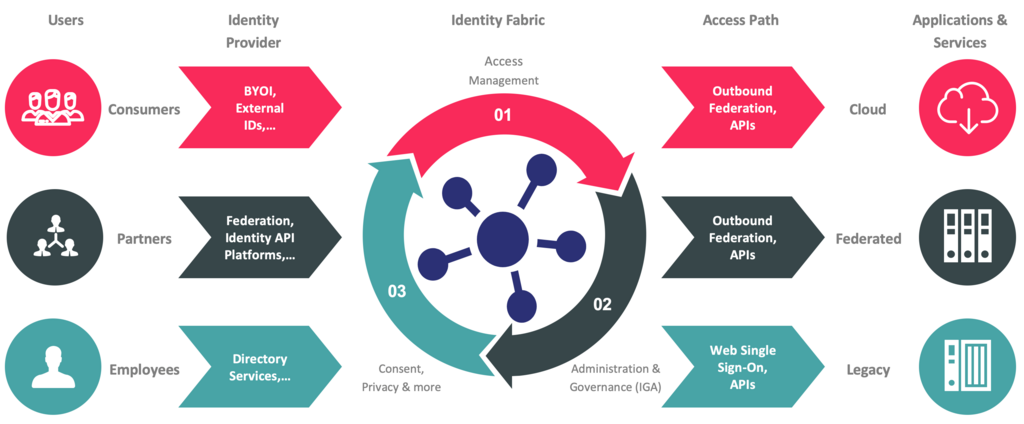
For hybrid environments, these tools are critical. You can apply PIM to administrators managing on-premises resources via Azure Arc and use Conditional Access to protect federated applications. This creates a unified governance model that secures identities, whether they exist in the cloud, on-premises, or both.
What is the primary security principle that Microsoft Entra Privileged Identity Management (PIM) is designed to implement?
An administrator is assigned the Global Administrator role in PIM as 'eligible' rather than 'active'. What does this mean?
Mastering these advanced governance features is key to building a secure and compliant identity infrastructure, and a crucial part of the AZ-500 skillset.