Mastering Affinity for Fashion Design
Technical Flat Design
Building Technical Flats
In fashion production, a technical flat is the blueprint for a garment. It's a clear, precise vector illustration that communicates every detail to the pattern maker and factory: stitch types, seam placements, and hardware. Unlike a fashion illustration, a flat is drawn without a figure, as if the garment were laid flat on a table. Accuracy is everything.
Moving beyond basic circles and squares, creating a professional flat requires mastering the Pen Tool and, more importantly, the Node Tool. These tools allow you to draw and refine the precise paths that form the silhouette and internal details of your design.
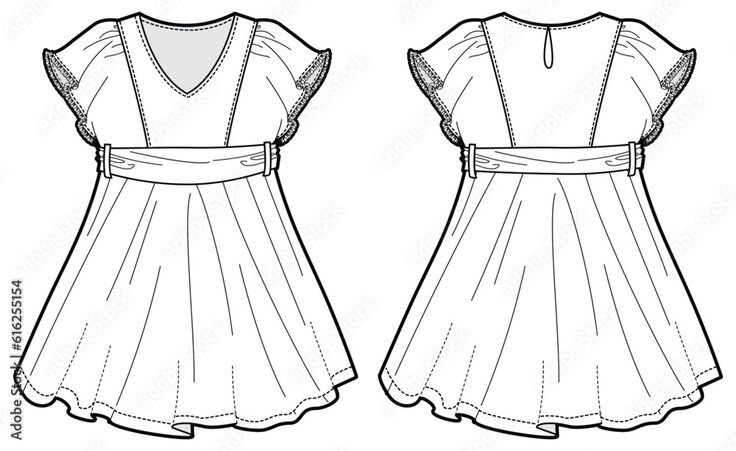
Precision Through Nodes
Every path you draw is defined by nodes. The real art of creating clean curves for necklines, armholes, and style lines lies in manipulating these nodes and their control handles. In Affinity Designer, you'll primarily work with a few types of nodes:
- Sharp Nodes: Create an abrupt change in direction, perfect for corners like the point of a collar or the corner of a patch pocket.
- Smooth Nodes: Create a continuous, flowing curve through the node. The two control handles move together, maintaining a symmetrical curve. These are ideal for gentle arcs.
- Smart Nodes: Act like smooth nodes but automatically adjust their control handles to create the best possible curve, which can be a huge time-saver for organic shapes.
The goal is to use as few nodes as possible. A clean curve has minimal nodes, which makes it easier to edit and results in a more professional-looking flat. You'll spend a lot of time with the Node Tool (shortcut 'A'), clicking and dragging nodes and their handles to perfectly match your design's proportions.
Efficient Components and Details
Drawing every single button or stitch is inefficient. For professional workflows, you need to create reusable components. This is where Symbols and custom brushes become essential tools. A Symbol is a master object; when you edit the master, every copy of that Symbol in your document updates instantly. This is perfect for hardware like buttons, zippers, or rivets.
Imagine your client wants to change the buttons from a four-hole to a two-hole style. If you used Symbols, you only need to edit one button, and all ten buttons on your flat update automatically. This workflow saves an immense amount of time and prevents errors.
For stitching, you can create custom brushes. By drawing a single stitch—whether it's a straight stitch, a zigzag, or an overlock stitch—you can save it as a new textured intensity brush in the Brush Panel. Once saved, you can apply this brush to any path to create perfect instantly. You can adjust the size and spacing in the brush settings to match your garment's specifications.
Organizing Your Design
A complete technical flat includes multiple views, typically a front and a back. Keeping these organized in a single file is crucial for a clean, workflow. Instead of creating separate files for each view, you can use Layer States. Think of Layer States as saved snapshots of your Layers Panel's visibility.
You can create one state called "Front View" with only the layers for the front of the garment visible, and another state called "Back View" with only the back layers visible. By switching between these states in the Layer States Panel, you can easily work on and export different views without managing multiple documents. This also simplifies the process of creating different colorways, as your core vector work remains untouched in one central place.
Ready to test your knowledge? This quiz will cover the key techniques for creating professional technical flats.
What is the primary purpose of a technical flat in fashion production?
When drawing a garment, which type of node is best suited for creating the abrupt corner of a square patch pocket?
By mastering these techniques—precise node manipulation, reusable symbols, custom brushes, and organized layer states—you can create technical flats that are not only accurate but also incredibly efficient to produce and revise.