Mastering Advanced Solidworks
Advanced Part Modeling
Beyond Single Bodies
So far, you've likely worked with part files that contain one continuous solid. But what if you need to design several closely related parts together? This is where multibody solids come in. A multibody part is a single SolidWorks file that contains multiple, separate solid bodies.
Think of designing a plastic bottle and its screw-on cap. You could create them as two separate parts in an assembly. However, the thread geometry is critical and must match perfectly. By designing them as two bodies within the same part file, you can use the geometry of one to create the other, ensuring they fit perfectly. This approach is often faster and more robust for components that are defined by their interaction.
Using multibody solids is ideal for weldments, plastic enclosures, or any set of parts that share common geometry and must be designed in context with one another.
You can manage these bodies using specific tools. The Combine feature lets you add, subtract, or find the common volume between bodies. The Split tool does the opposite, carving one body into several. You can also save individual bodies out of a multibody part file to create separate part files for an assembly later on. This gives you the best of both worlds: the contextual control of a single file during design and the individual part files needed for manufacturing drawings and bills of materials.
Advanced Shaping Tools
You're already familiar with basic Sweeps (a profile following a path) and Lofts (a shape blending between profiles). Now, let's add more control. Advanced sweeps and lofts allow you to create far more organic and precise shapes.
For a Sweep, the key to advanced control is using guide curves. While the path dictates the sweep's direction, guide curves control its shape and orientation along that path. Imagine the path is a monorail track. The profile is the train car. A guide curve is like an additional rail on the side that forces the train car to tilt and stretch as it moves, preventing it from staying uniform. You can use one or more guide curves to precisely define the cross-sectional shape from start to finish.
Lofts also benefit from more control. Instead of letting SolidWorks figure out how to blend between your profiles, you can specify a Centerline Path. This acts as a spine for the loft, forcing the center of each profile to follow it. This is useful for creating objects like pipes or ducts that bend in complex ways.
Additionally, you can apply Start/End Constraints to a loft. For instance, you can force the loft to be tangent to an existing face, ensuring a perfectly smooth transition from the lofted shape to the rest of your model. This is crucial for creating professional, manufacturable designs without sharp edges or discontinuities.
Building Intricate Geometry
For the most complex shapes, you'll need to move beyond standard solid features. This is where surfacing and advanced solids come into play. The Boundary feature is one of the most powerful tools in SolidWorks. It creates a solid or surface by blending curves in two directions. Think of it like a loft on steroids. While a loft connects a series of profiles in one direction, a boundary feature can connect profiles in a primary direction while also being constrained by curves running in a second, perpendicular direction. This allows you to create a patch of material that is precisely controlled on all four sides.
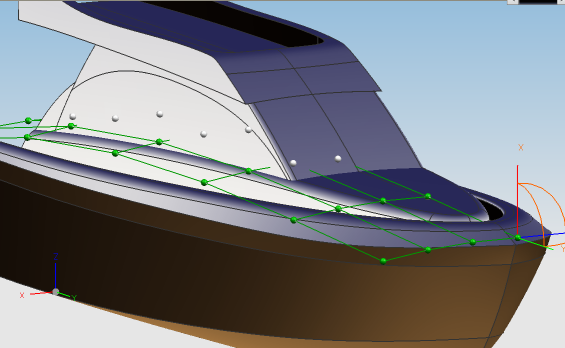
Another technique is to build a part using surfaces first. You can create a network of interconnected, zero-thickness surfaces to define a complex shape. Once the desired shape is enclosed by these surfaces, you can use tools like Thicken to turn it into a solid body or Knit Surface to stitch them together into a watertight volume that automatically becomes a solid.
Finally, the Wrap feature is excellent for adding details to curved surfaces. It allows you to take a 2D sketch and project it onto a non-planar face. You can use this to emboss text, deboss a logo, or create a pattern of cuts on a complex surface, something that would be very difficult to do with a simple extrude.
Ready to test your knowledge of these advanced techniques?
What is the primary advantage of designing two closely interacting parts, like a bottle and its cap, as a multibody part file?
In a Sweep feature, the path determines the direction of the sweep. What is the role of a guide curve?
Mastering these tools allows you to move from creating simple prismatic parts to designing complex, organic, and highly-engineered components with confidence.