Mastering Advanced PostgreSQL
PostgreSQL Architecture
How Postgres Works Under the Hood
A database isn't just a simple box where you throw data. It’s a complex system with many moving parts, all working together to store, retrieve, and protect your information efficiently. PostgreSQL, often called Postgres, has a robust architecture that balances performance with reliability. At its core, the system is divided into two main parts: memory structures that handle active work and disk storage that holds the data for the long term.
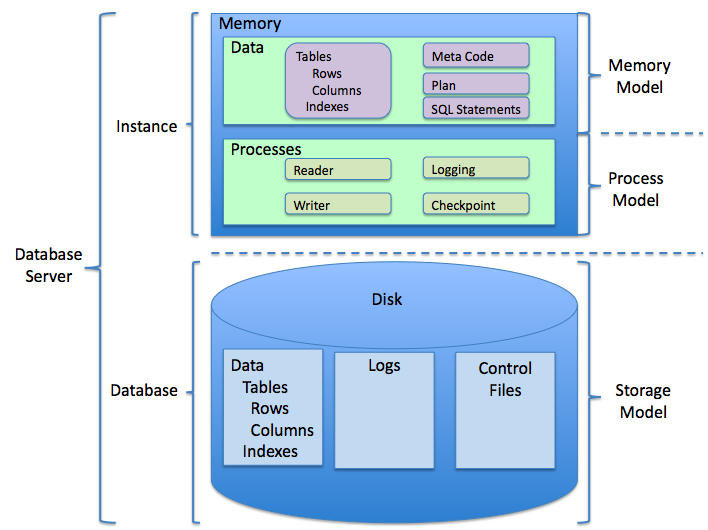
Think of it like a workshop. The workbench (memory) is where you actively build things, with easy access to tools and parts. The warehouse (disk) is where you store everything else. It's slower to fetch things from the warehouse, so you only bring what you need to the workbench. Postgres manages this back-and-forth constantly, ensuring that frequently used data is ready for action in memory while the full dataset remains safe on disk.
Storing Your Data
When you save data in Postgres, it doesn't just get dumped into one giant file. The database organizes data on disk in a highly structured way. Everything is stored in files called pages, which are typically 8 kilobytes in size. A table, for instance, is stored as a collection of these pages, known as a heap file.
Each page has a header containing metadata, followed by item pointers that act like a table of contents, telling Postgres where each row (or tuple) is located within the page. This setup allows the database to find specific rows without having to scan the entire file.
What happens if a single piece of data, like a long block of text or an image, is too big to fit in one 8 KB page? Postgres has a clever solution called TOAST (The Oversized-Attribute Storage Technique). It automatically breaks the large data into smaller chunks and stores them in a separate TOAST table, leaving a pointer in the main table. When you query the data, Postgres reassembles it behind the scenes.
Indexes, which we'll cover later, are also stored in their own set of pages, structured to make lookups incredibly fast.
Memory, Speed, and Safety
Reading from a disk is one of the slowest operations a computer performs. To keep things snappy, Postgres relies heavily on RAM. The most important memory area is the shared buffer cache.
When you request data, Postgres fetches the relevant page from the disk and copies it into a slot in the shared buffers. If you or someone else needs that same data again soon, Postgres can grab it directly from memory, which is thousands of times faster than going back to the disk. This process is handled by the buffer manager, which decides which pages to keep in memory and which to discard when space runs out.
The shared buffer cache is a powerful performance tool. If the data you need is already in memory, your query will be significantly faster.
But what happens if the server crashes before changes in memory are saved to the main data files on disk? This is where the Write-Ahead Log (WAL) comes in. The WAL is a strict rule that ensures durability.
Before Postgres modifies a data page in the shared buffers, it first writes a record of that change to a separate log file on disk—the WAL. This log entry describes exactly what the change is (e.g., "update row X in table Y"). Because the WAL is written sequentially, this operation is very fast.
If the server crashes, Postgres can replay the WAL upon restart to restore any changes that hadn't yet been written to the main data files, ensuring no data is lost. It's like a plane's black box, recording everything that happens so it can be reconstructed if needed.
Making Smart Decisions
When you send a query to Postgres, it doesn't just blindly execute it. First, it hands the query to the planner, or optimizer. The planner's job is to figure out the most efficient way to get the data you asked for.
For example, if you're joining two large tables, should Postgres scan one table completely and then look for matches in the other? Or would it be faster to use an index on both? The planner analyzes the query, considers the available indexes, and uses statistics about the data to estimate the cost of different execution plans. It then chooses the plan with the lowest estimated cost.
Query performance tuning is one of the most impactful areas for improving PostgreSQL performance.
To make these smart decisions, the planner relies on the statistics collector. This is a background process that gathers information about your data, such as how many distinct values are in a column and what the most common values are. Without accurate statistics, the planner might make poor choices, leading to slow queries.
Keeping Things Tidy
Postgres uses a system called Multi-Version Concurrency Control (MVCC) to handle simultaneous access to data. When you update a row, Postgres doesn't overwrite the old data. Instead, it creates a new version of the row and marks the old one as obsolete.
This is great for concurrency, but it means that tables can accumulate old, dead rows over time, wasting space and slowing down scans. This is where the autovacuum daemon comes in.
Autovacuum is a background process that automatically performs routine maintenance. Its main jobs are:
- Reclaiming space: It finds and removes dead rows so the space can be reused.
- Updating statistics: It triggers the
ANALYZEcommand, which updates the data statistics used by the planner.
By cleaning up old data and keeping statistics fresh, autovacuum is essential for maintaining the long-term health and performance of your database.
Let's see what you've learned about how Postgres manages its internal operations.
What is the primary purpose of the Write-Ahead Log (WAL) in PostgreSQL?
If a single piece of data is too large to fit within a standard 8 KB page, how does PostgreSQL handle it?
Understanding these core architectural components—from storage pages and the WAL to the query planner and autovacuum—is key to moving beyond basic SQL and truly mastering PostgreSQL.