Mastering Advanced C# and .NET Development
Delegates and Events
A Better Way to Communicate
In software, classes often need to talk to each other. A data processing class might need to notify a user interface class when its work is done. The simplest way to do this is for the data processor to directly call a method on the UI object. But this creates a tight bond between them. The data processor now needs to know about the UI class, making it less reusable and harder to test in isolation.
This is where delegates come in. A delegate is like a contract for a method. It defines a specific signature—the return type and the parameter types—but doesn't have an implementation itself. Instead, it acts as a placeholder, a type-safe variable that can hold a reference to any method matching that signature.
Think of a delegate as a remote control. The remote has buttons (the signature), but what happens when you press a button depends on which device (the method) it's pointed at.
// 1. Define the delegate's signature.
// It accepts a string and returns nothing (void).
public delegate void LogHandler(string message);

public class Processor
{
    // 2. Create a delegate instance.
    public LogHandler OnProcessComplete;

    public void Start()
    {
        Console.WriteLine("Processing started...");
        // ...work is done...

        // 3. Call the delegate if something is subscribed to it.
        OnProcessComplete?.Invoke("Processing finished successfully.");
    }
}
In this setup, the Processor class doesn't know or care who is listening. It just announces that it's finished by invoking its delegate. Any other part of the application can provide a method to handle this announcement.
public class Logger
{
    public void LogToConsole(string info)
    {
        Console.WriteLine($"CONSOLE: {info}");
    }
}

// In our main program:
var processor = new Processor();
var logger = new Logger();

// Point the delegate to the logger's method.
processor.OnProcessComplete = logger.LogToConsole;

processor.Start(); // Output: CONSOLE: Processing finished successfully.
What if you need to notify more than one listener? Delegates support this out of the box. You can chain multiple methods together using the += operator. These are known as —when invoked, they call every method in their list, in the order they were added.
public class FileLogger
{
    public void LogToFile(string data)
    {
        File.AppendAllText("log.txt", $"FILE LOG: {data}\n");
    }
}

var fileLogger = new FileLogger();

// Add a second method to the delegate.
processor.OnProcessComplete += fileLogger.LogToFile;

processor.Start();
// Both methods are now called.
The Generic Toolkit
Defining a custom delegate for every possible method signature is repetitive. C# provides a set of built-in generic delegates to handle the most common cases, so you rarely need to create your own.
| Delegate | Purpose | Example Signature |
|---|---|---|
Action<T> | For methods that do not return a value (return void). | Action<string, int> |
Func<T, TResult> | For methods that return a value. The last type parameter is always the return type. | Func<double, double, string> |
Predicate<T> | A specialized Func that always returns a bool. Used for testing conditions. | Predicate<int> |
With these, our logging example becomes simpler. Instead of defining a LogHandler delegate, we can just use Action<string>.
public class Processor
{
    // No custom delegate needed!
    public Action<string> OnProcessComplete;

    public void Start()
    {
        Console.WriteLine("Processing started...");
        OnProcessComplete?.Invoke("Processing finished successfully.");
    }
}
These generic delegates are the backbone of many modern C# features. They are fundamental to asynchronous programming with async/await and are the building blocks of (Language-Integrated Query), which uses Func and Predicate to filter and transform data collections.
Events The Publisher Subscriber Pattern
Using a public delegate field works, but it has a dangerous flaw: any class with access to the Processor object can not only subscribe (+=) but also directly invoke the delegate (OnProcessComplete()) or even wipe out all existing subscribers (OnProcessComplete = null). This breaks encapsulation, as the Processor should be the only one who can decide when to fire the notification.
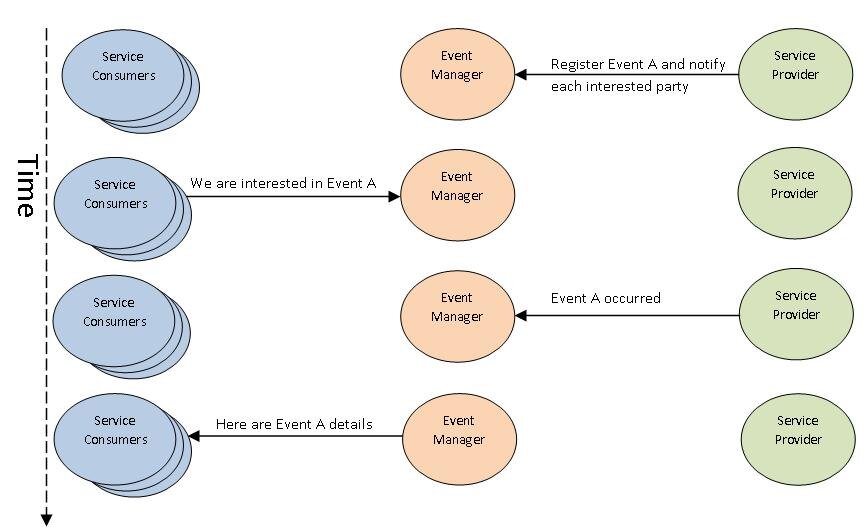
Events in C# are a way for an object to notify other objects or parts of a program that something of interest has occurred.
The event keyword solves this. By adding event to our delegate declaration, we create a safer, more robust communication channel. An event is essentially a wrapper around a delegate that enforces restricted access.
public class Processor
{
    // Now it's an event.
    public event Action<string> OnProcessComplete;

    public void Start()
    {
        Console.WriteLine("Processing started...");
        OnProcessComplete?.Invoke("Processing finished successfully.");
    }
}
With the event keyword, code outside the Processor class can only use the += and -= operators. It can no longer invoke the delegate or reassign it. This enforces the perfectly. The Processor is the publisher, and it alone controls when the event is raised. Other classes are subscribers, free to listen or stop listening as they please, without being able to interfere with the publisher or other subscribers.
The standard convention in .NET for events is to use the EventHandler<TEventArgs> delegate. This delegate's signature is fixed: it always takes two arguments. The first is object sender, which is a reference to the object that raised the event (the publisher). The second is a class that inherits from EventArgs, which carries any data related to the event.
// 1. Create a custom EventArgs class to hold our data.
public class ProcessCompleteEventArgs : EventArgs
{
    public string Message { get; }
    public DateTime CompletionTime { get; }

    public ProcessCompleteEventArgs(string message)
    {
        Message = message;
        CompletionTime = DateTime.Now;
    }
}

// 2. The publisher uses the standard EventHandler pattern.
public class Processor
{
    public event EventHandler<ProcessCompleteEventArgs> ProcessCompleted;

    public void Start()
    {
        // ... work ...
        var args = new ProcessCompleteEventArgs("Task finished.");
        OnProcessCompleted(args);
    }

    protected virtual void OnProcessCompleted(ProcessCompleteEventArgs e)
    {
        ProcessCompleted?.Invoke(this, e);
    }
}
This pattern is more structured and provides more context to subscribers, who can now access both the sender and the detailed event data.
// A subscriber method now matches the EventHandler signature.
public class Subscriber
{
    public void HandleProcessCompleted(object sender, ProcessCompleteEventArgs e)
    {
        Console.WriteLine($"Notification from: {sender.GetType().Name}");
        Console.WriteLine($"Message: {e.Message}");
        Console.WriteLine($"Time: {e.CompletionTime}");
    }
}
By mastering delegates and events, you unlock the ability to write flexible, loosely coupled systems that are easier to maintain, extend, and test.