Mastering 3D Worlds with Blender
Advanced Mesh Topology
Beyond the Block-Out
You've mastered the basics of pushing and pulling vertices to create shapes. Now, it's time to think about the underlying structure of those shapes. Good topology isn't just about making something look right; it's about making it move right. For character animation, the flow of your edges is everything. It dictates how a mesh will bend, stretch, and emote.
Think of topology as the skeleton and musculature of your digital character. A good structure allows for fluid, believable motion. A bad one leads to pinching, strange artifacts, and endless headaches in the animation phase.
The goal is to create a clean, efficient mesh primarily made of quadrilaterals, or "quads." This structure works seamlessly with animation systems and subdivision surfaces, which we'll cover shortly. The guiding principle is to make your topology follow the form and anticipated movement of the character.
The Logic of Loops
The most critical areas for good topology are the parts that deform the most: the face and the joints. To control these deformations, we use edge loops—continuous rings of edges that flow around a specific feature. In character modeling, these loops should mimic the underlying anatomy of the figure.
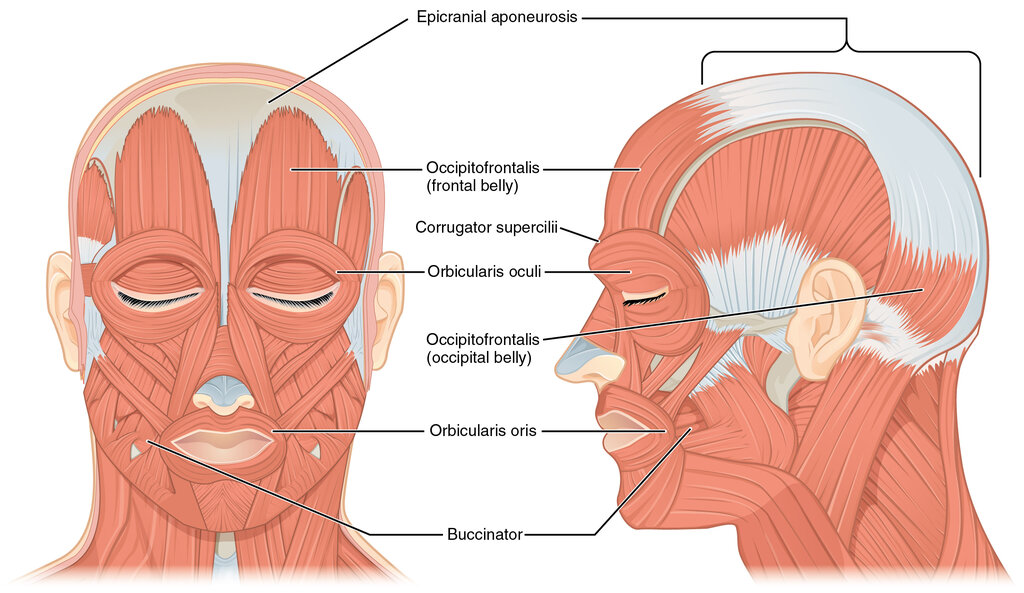
For faces, this means creating clear loops around the eyes and the mouth. These correspond to the circular muscles in the human face, like the (around the eye) and orbicularis oris (around the mouth). This structure allows for natural-looking expressions like blinking, smiling, and frowning. The edges should flow from the mouth loops outward into the cheeks and jawline, following the "smile line" or nasolabial fold.
Joints like elbows, knees, and fingers require at least three edge loops to deform smoothly. This setup ensures that when the joint bends, the central loop can crease while the outer two loops hold the volume, preventing the notorious "pinching" effect. For more complex joints like shoulders and hips, which rotate on multiple axes, the loops should radiate outward from the joint, following the deltoid or gluteal muscles to distribute the deformation across the torso.
The Subdivision Workflow
It's impractical to model every tiny surface detail by hand. Instead, we use the workflow. You create a simple, low-polygon "cage" mesh that defines the essential forms and edge flow, and then apply a modifier that algorithmically smoothes it into a high-resolution surface.
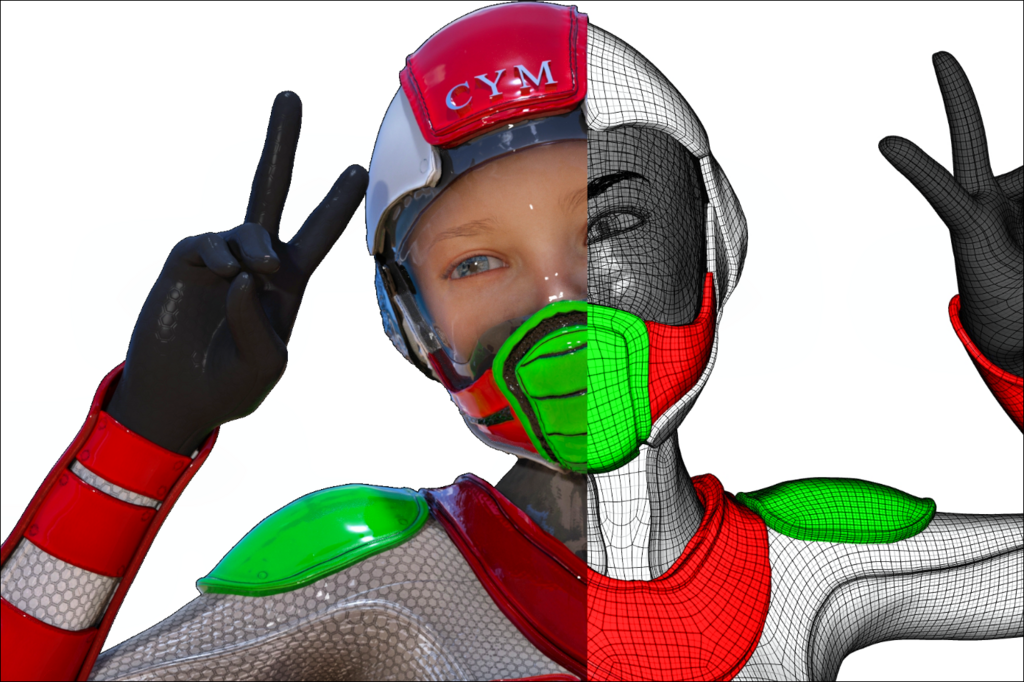
This approach is powerful because it's non-destructive. You can edit the simple cage at any time, and the high-poly result updates automatically. The key to controlling the final shape is the placement of "support loops" or "holding edges." These are edge loops placed close to an existing edge to tighten the surface and create a harder, more defined crease when subdivided. Without them, your model will look soft and undefined.
Clean topology means that your entire model is comprehensively interconnected; the mesh should support the design and wrap it cleanly, neatly, and logically.
Poles, Problems, and Purity
A perfect quad mesh would have every vertex connected to exactly four edges. But in practice, this isn't always possible or desirable. A vertex where the number of connecting edges is not four is called a .
| Vertex Type | Connecting Edges | Common Name | Use Case |
|---|---|---|---|
| Standard | 4 | - | Forms the bulk of a clean mesh. |
| Pole | 3 | N-Pole | Redirects edge flow; use sparingly. |
| Pole | 5 | E-Pole | Redirects edge flow; common and useful. |
| Pole | > 5 | High-Order Pole | Avoid; causes shading and subdivision issues. |
N-poles (3 edges) and E-poles (5 edges) are essential tools for redirecting edge flow. For example, you can terminate a dense series of loops in an E-pole to avoid carrying unnecessary detail across the entire model. The trick is to place them strategically in flat, non-deforming areas where they won't cause pinching or shading artifacts. Never place a pole in the middle of a high-deformation area like a joint's crease or the corner of the mouth.
Your primary enemies are triangles and N-gons (faces with more than four sides). While sometimes unavoidable, they break the predictable flow of quads, behave poorly with subdivision, and can cause strange rendering artifacts. Always strive for a 100% quad mesh. If you must use a triangle or N-gon, hide it in a place that is flat and will never be seen, like the bottom of a shoe.
Building clean, deformation-ready topology is a skill that blends technical knowledge with an artist's eye for form and movement. It takes practice, but by focusing on edge flow, managing your loops, and keeping your mesh clean, you build a solid foundation for any character you want to bring to life.
What is the primary reason for prioritizing good topology in character modeling?
When modeling a character's face, the edge loops around the eyes and mouth should ideally mimic the: