Master Your Digital Files
Understanding Digital File Management
What Is Digital File Management?
Digital file management is the process of organizing, storing, and tracking your digital files. Think of it as creating a library for your documents, photos, and projects. Instead of a random pile of books on the floor, you have a system with shelves, categories, and a clear logic. This system allows you to find exactly what you need, right when you need it.
Digital file management will look different for each organization but they should all reach the same goal: find what you need, when you need it.
It’s not just for large companies. Whether you’re managing project files for a team or just trying to keep your personal photos in order, having a system is crucial. Without one, you're left searching through cluttered desktops and confusingly named folders, wasting time and energy.
The Benefits of a Tidy System
Organizing your digital life pays off in several ways. The most immediate benefit is a boost in productivity. When you know exactly where a file is, you spend less time searching and more time doing actual work. This clarity reduces stress and lets you focus on the task at hand.
For teams, a shared organization system is even more critical. It improves collaboration by ensuring everyone can access the correct version of a file. It prevents confusion, reduces duplicate work, and creates a single source of truth for important documents. It also helps with security and compliance. When you know where your data lives, it's easier to protect sensitive information and adhere to any data management policies.
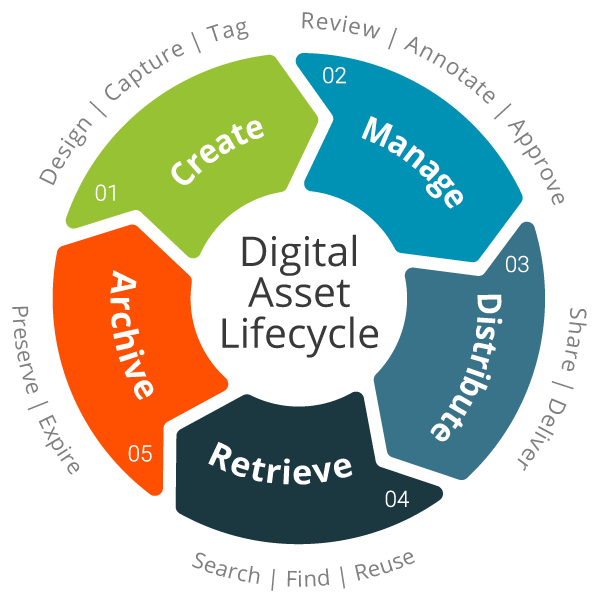
Tackling Digital Clutter
Most of us are familiar with digital clutter. It’s the collection of vaguely named files, duplicate documents, and forgotten downloads that accumulate on our computers and cloud storage. This mess doesn't just look untidy; it actively hinders our ability to work efficiently.
| Challenge | The Impact |
|---|---|
| Vague filenames | Impossible to know a file's content without opening it. |
| Duplicate files | Wastes storage space and creates version confusion. |
| Scattered storage | Files are spread across desktops, downloads, and cloud services. |
| No system for old files | Outdated information clutters up active workspaces. |
Without a plan, this clutter only grows, making it harder and harder to find what you're looking for. The key is to shift from a reactive approach—searching for files when you need them—to a proactive one where you have a system for organizing them from the start.
Basic Strategies for Success
Getting organized doesn’t require complex software or a complete overhaul of your workflow. It starts with a few foundational strategies.
First, centralize your files. Decide on one primary location for your digital life, whether it's a specific cloud service or a dedicated drive. This avoids the problem of having important files scattered across multiple devices.
Second, think about broad categories. Before you start making folders, consider the main types of files you work with. Are they client projects, financial records, personal photos, or something else? Grouping files into logical, high-level categories is the first step toward building a sensible structure.
Finally, make organization a habit. The most effective systems are the ones you use consistently. Take a few moments to file new documents as they arrive instead of letting them pile up on your desktop.
The goal isn't a perfect system overnight, but a functional one that you can maintain over time. Start simple, be consistent, and build from there.
Now that we've covered the basics, let's test your understanding.
What is the primary goal of digital file management?
According to the text, a direct benefit of a shared organization system for teams is improved collaboration.
Understanding these core ideas is the first step toward a more organized and productive digital life.