Markdown's Past Present and AI Future
Introduction to Markdown
Writing for the Web, Simplified
Imagine writing an email. You might use an asterisk to emphasize a point or a dash to start a list. You're already using the core idea behind Markdown. It’s a way to format plain text that's easy to read and write, without needing to know complex code like HTML.
Created by John Gruber in 2004, Markdown was designed to be as readable as possible. The syntax looks like something you'd naturally type, which means you can focus on your writing, not on formatting buttons or confusing tags. The goal is simple: your plain text file should be publishable as-is, without looking like it’s been marked up with instructions.
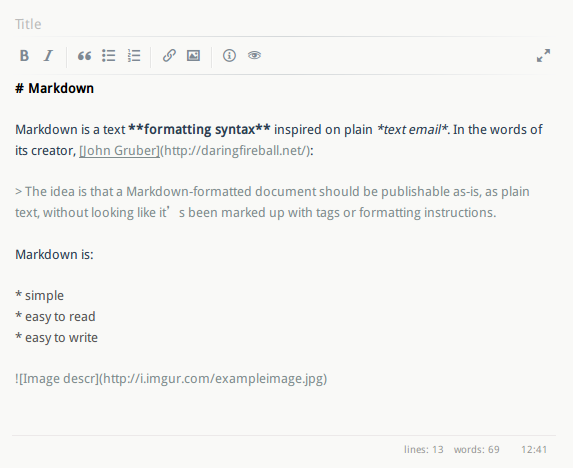
This simplicity is its superpower. You don't need a special editor to write Markdown; any plain text application will do. When you're ready, a Markdown processor can convert your text into beautifully formatted HTML for a webpage, a PDF, or other document types.
Markdown lets you write using an easy-to-read, easy-to-write plain text format, then convert it to structurally valid HTML.
Basic Building Blocks
Getting started with Markdown syntax is straightforward. Most of the formatting relies on just a few special characters placed around your text. Here are some of the most common ones you'll use every day.
| Style | Syntax | Example |
|---|---|---|
| Bold | **text** or __text__ | This is bold text |
| Italic | *text* or _text_ | This is italicized text |
| Header | # Header 1 | # Header 1 |
| Sub-header | ## Header 2 | ## Header 2 |
| Unordered List | - List item | - One item |
| Ordered List | 1. List item | 1. First item |
You can combine these formats, too. For example, to make text both bold and italic, you would wrap it in both sets of symbols, like this: ***Important!***.
# Main Title

This is a paragraph introducing a topic. We can make some words **bold** and others *italic* to draw attention.

Here is a list of items:
- First item in the list
- Second item
- A final, **very important** item

## A Sub-heading

And here is a numbered list for steps:
1. Open the file.
2. Make your changes.
3. Save the file.
The code above shows how these elements work together. The hashtags create headings of different sizes, asterisks handle emphasis, and hyphens or numbers create clean lists. The result is a document that's organized and easy to scan, both in its raw and final formatted versions.
Where You Will Find Markdown
Because it’s so simple and versatile, Markdown has become incredibly popular across the web. If you've ever written a project description on GitHub, commented on a Reddit post, or asked a question on Stack Overflow, you've likely used it already.
It's the standard for writing documentation, creating blog posts, and even taking personal notes in many applications. Its widespread adoption means that once you learn the basics, you can use that skill almost anywhere you need to write and format text online.
Let's check your understanding of these core concepts.
What was the primary design goal of Markdown?
How would you correctly format the words "Final Draft" as a top-level heading in Markdown?