Managed Cybersecurity Business Plan
Understanding Cybersecurity Basics
What Is Cybersecurity?
Cybersecurity is the practice of protecting your digital life. Think about all the important information you have on your computer, phone, and online accounts: your bank details, private messages, photos, and personal documents. Cybersecurity is the shield that keeps all of that safe from people who might want to steal or damage it.
In the past, you might have locked your front door or put valuables in a safe. In today's world, our most valuable information is often digital. Protecting it is just as important. Without good cybersecurity, you could face identity theft, financial loss, or the exposure of private information. It's not just for big companies or governments; it's for everyone who uses the internet.

Common Cyber Threats
To protect yourself, you need to know what you're up against. Cybercriminals use a variety of methods to gain access to your information. Here are a few of the most common threats you might encounter.
Malware
noun
Short for "malicious software," it's any software intentionally designed to cause damage to a computer, server, client, or computer network.
Malware is a catch-all term for viruses, spyware, and other nasty programs. It can sneak onto your device if you click a bad link or download an unsafe file. Once inside, it can do things like steal your passwords, spy on your activity, or even delete your files.
Phishing
noun
The fraudulent practice of sending emails or other messages pretending to be from reputable companies to trick individuals into revealing personal information.
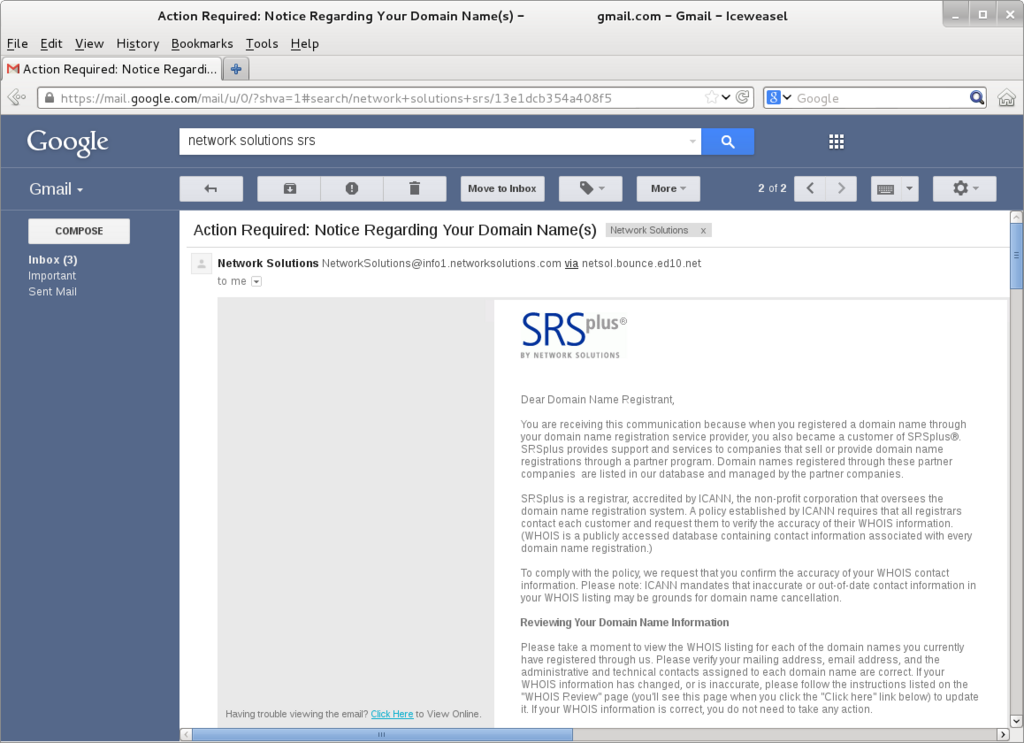
Phishing attacks are a form of social engineering. An attacker might send you an email that looks like it's from your bank, a popular social media site, or even your boss. It will often create a sense of urgency, telling you to click a link to update your password or claim a prize. The link leads to a fake website that looks real, designed to steal the login details you enter.
Ransomware
noun
A type of malware that threatens to publish the victim's personal data or perpetually block access to it unless a ransom is paid.
Imagine a thief breaks into your house, puts all your valuables in a box, and puts a lock on it that only they have the key for. That's essentially what ransomware does to your digital files. It encrypts your photos, documents, and other important data, making them completely unusable. The attacker then demands a payment, or ransom, to unlock them.
Your First Line of Defense
Knowing the threats is half the battle. The other half is setting up your defenses. Luckily, some of the most effective security measures are also the most basic. They work in the background to keep you safe without you having to think about it.
| Security Measure | What It Is | How It Helps |
|---|---|---|
| Firewall | A digital barrier between your device and the internet. | It monitors incoming and outgoing network traffic and can block malicious connections before they reach your system. |
| Antivirus Software | A program that detects and removes malware. | It scans files and programs for known threats and can quarantine or delete anything that looks suspicious. |
| Strong Passwords | Unique and complex passwords for each of your accounts. | It makes it much harder for attackers to guess or "brute-force" their way into your accounts, even if one password is stolen. |
Of these three, creating strong passwords is the one you have the most direct control over every day. A strong password is long (at least 12 characters), uses a mix of uppercase and lowercase letters, numbers, and symbols, and doesn't contain easily guessable information like your name or birthday.
The best practice is to use a unique password for every single online account. A password manager can help you generate and store these complex passwords securely.
By understanding these basic concepts, you're already on your way to a safer digital life. Now, let's review what you've learned.
What is the primary goal of cybersecurity?
You receive an email that looks like it's from your bank, claiming your account is locked and you must click a link immediately to fix it. This is a classic example of what?
These fundamentals are the building blocks of a secure digital presence. By staying aware of threats and using basic protective measures, you can significantly reduce your risk of becoming a victim of cybercrime.