Maharashtra HSC Computer Science Class 12
Operating Systems Basics
What is an Operating System?
Think of an operating system (OS) as the general manager of your computer. It’s the essential software that directs all the hardware and runs all your other programs. Without an OS, your laptop or phone would be a useless box of metal and plastic. It's the bridge connecting you to the machine's physical components.

When you click an icon to open a web browser, the OS finds the program on your hard drive, loads it into memory, and tells the processor to run it. It manages everything from your mouse and keyboard to your Wi-Fi connection. The main jobs of an OS are:
- Process Management: Juggling all the apps and tasks you're running.
- Memory Management: Deciding how to share the computer’s limited memory (RAM).
- File Management: Organizing your data into files and folders.
- Device Management: Controlling all the hardware, like printers and webcams.
The Face of the OS
You interact with the OS through a user interface. There are two main types: the graphical user interface (GUI) and the command-line interface (CLI).
Most people use a every day. It’s a visual environment with icons, windows, and menus that you navigate with a mouse or touchscreen. Windows, macOS, and Android all use GUIs. They are user-friendly and easy to learn because you can see what you're doing.
The is a text-only interface. You type commands to tell the computer what to do. It might look intimidating, like something from a hacker movie, but it's incredibly powerful and efficient for developers and system administrators. Instead of clicking through multiple menus, you can accomplish a complex task with a single line of text.
| Feature | Graphical User Interface (GUI) | Command-Line Interface (CLI) |
|---|---|---|
| Interaction | Visual (icons, menus, pointer) | Text-based (commands) |
| Ease of Use | Easy for beginners | Steeper learning curve |
| Resource Use | High (uses more memory and CPU) | Low (very lightweight) |
| Flexibility | Less flexible, limited to pre-set options | Highly flexible and scriptable |
| Example | Windows Desktop, Android home screen | Windows PowerShell, Linux Terminal |
A Tale of Two Systems
Just as there are different car brands, there are different operating systems. Two of the most influential families are Windows and GNU/Linux.
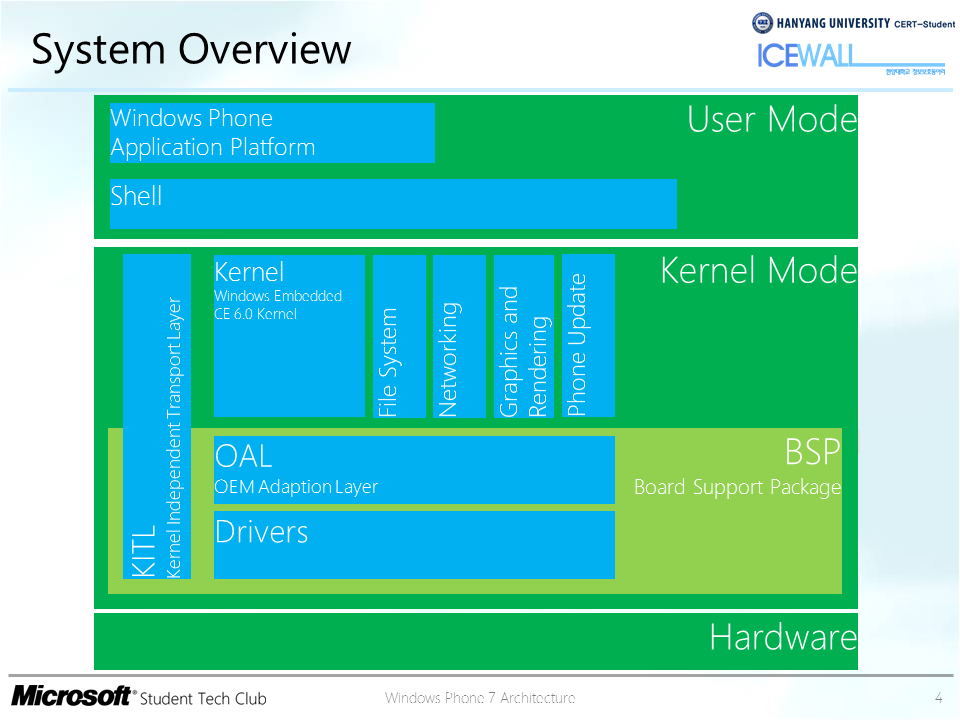
Windows NT Most modern versions of Windows, from Windows XP to Windows 11, are built on the Windows NT architecture. "NT" originally stood for "New Technology." It was designed from the ground up to be a robust, secure, and multitasking operating system. Key features include a strong security model that isolates user accounts and a hybrid kernel that combines the speed of a microkernel with the simplicity of a monolithic kernel. This structure makes it stable and reliable for both personal computers and corporate servers.
GNU/Linux GNU/Linux is a family of free and open-source operating systems. It was created from the combination of the Linux kernel (the core of the OS), started by Linus Torvalds, and system tools from the GNU Project. Because it's open source, anyone can view, modify, and distribute the code. This has led to hundreds of different versions, called distributions or "distros."
Ubuntu is one of the most popular in the world. It’s known for being user-friendly, with a polished GUI and a large software library, making it a great starting point for anyone new to Linux.
Managing the Workload
When you have multiple applications open, like a game, a web browser, and a music player, your OS is performing process management. A process is just a program that is currently running. Since most computers only have one CPU (or a few cores), the OS has to be clever about sharing that limited resource. It rapidly switches between processes, giving each one a tiny slice of CPU time. This happens so fast that it seems like everything is running at once.
Every process exists in one of three main states:
- Running: The process is currently being executed by the CPU.
- Ready: The process is ready to run but is waiting for the OS to assign it to the CPU.
- Blocked (or Waiting): The process can't run because it's waiting for something to happen, like data to arrive from the internet or a file to be read from the hard drive.
Juggling Memory and Files
Memory management is another critical OS function. Your computer's main memory, or RAM, is fast but limited. The OS has to decide how to allocate this space to all the running processes.
One common technique is paging. The OS divides a process's memory into fixed-size blocks called pages. It also divides the physical RAM into blocks of the same size, called frames. It can then load a program's pages into any available frames in RAM. This system is flexible and prevents a large program from needing one huge, continuous chunk of memory.
Virtual memory is a clever trick that extends this idea. It lets the OS use a part of your hard drive as an extension of RAM. If RAM gets full, the OS can move some inactive pages from RAM to a special file on the hard disk, freeing up space for active processes. When a needed page is on the disk, the OS swaps it back into RAM. This makes it seem like your computer has much more memory than it physically does, allowing you to run more applications at once.
Finally, the OS handles file systems. This is the structure that organizes how data is stored and retrieved. Early systems used tape-based storage, which was sequential. To get to a file, you had to wind the tape past all the data before it, like fast-forwarding a cassette. Modern systems use disk-based file systems (on hard drives or SSDs), which allow for random access. The OS can jump directly to any file's location, which is much faster.
Staying Secure
An important part of the OS's job is to protect your system from malicious software. Here are a few common threats:
- Viruses: A virus is a piece of code that attaches itself to a legitimate program. When you run that program, you also run the virus, which can then spread to other programs and corrupt your files.
- Worms: A is a standalone program that can replicate itself and spread to other computers, typically over a network. Unlike a virus, it doesn't need to attach to an existing program to cause damage.
- Trojan Horses: A Trojan appears to be useful software but secretly contains malicious code. It tricks you into installing it, and once it's on your system, it can steal data or give a hacker control of your computer.
Operating systems use features like user account controls, firewalls, and regular security updates to defend against these threats.
Now that you have a foundational understanding of what an operating system does, let's test your knowledge.
What is the primary role of an operating system?
If you are running a game, a web browser, and a music player at the same time, the OS is performing which key task by rapidly switching the CPU's attention between them?