Lossless Compression Explained
Introduction to Data Compression
Making Data Smaller
Every file on your computer, from a text document to a movie, is made of data. The more complex the file, the more data it contains, and the more space it takes up. Data compression is the process of encoding information using fewer bits, essentially making files smaller.
Think of it like packing a suitcase. You can carefully fold and roll your clothes to fit more into the same space. That's what compression does for data. This has two huge benefits:
- It saves storage space. Smaller files mean you can store more of them on your phone, computer, or server.
- It makes data transfer faster. Sending a smaller file over the internet takes less time and uses less bandwidth, which is why you can stream movies without waiting for hours.
Two Paths to Smaller Files
Compression methods fall into two main categories: lossless and lossy. The one you use depends entirely on what kind of data you're working with and whether you can afford to lose any of it.
Lossless compression is like a perfect vacuum-seal bag for your clothes. When you open it, everything comes out exactly as it went in, just a bit wrinkled. No socks are missing.
With lossless compression, every single bit of data from the original file is preserved. After the file is uncompressed, it is a perfect replica of the original. This is crucial for things like text documents, spreadsheets, or computer code. You wouldn't want your essay to be missing a few words, or a program to be missing a line of code. It has to be identical.
File formats like ZIP, PNG, and FLAC use lossless compression.
Lossy compression is like packing for a trip and deciding you don't really need five pairs of shoes. You leave some behind to make the suitcase lighter. You can't get them back, but your trip is still great.
Lossy compression works by permanently eliminating what it deems to be redundant or unnecessary information. Our eyes and ears can't perceive every tiny detail in an image or sound file, so lossy algorithms cleverly discard some of that data. The result is a much smaller file, but it's not an exact copy of the original. When you look at a highly compressed JPEG image, you might notice some blockiness or strange colors called artifacts. For most uses, this slight dip in quality is a worthwhile trade-off for the massive space savings.
Common lossy formats include JPEG for images, MP3 for audio, and MP4 for video.
| Feature | Lossless Compression | Lossy Compression |
|---|---|---|
| Data Quality | No data is lost. Original can be perfectly restored. | Some data is permanently lost. |
| File Size | Moderate reduction. | Significant reduction. |
| Best For | Text, code, data where 100% accuracy is critical. | Images, audio, video where perfect quality isn't needed. |
| Examples | ZIP, PNG, GIF, FLAC | JPEG, MP3, MP4, AAC |
Compression in the Wild
You interact with data compression every day, often without realizing it. It’s the engine that makes much of modern technology possible.
When you download a program, it often comes in a ZIP file. That uses lossless compression to make the download faster. The text and icons in a graphic or a screenshot are best saved as a PNG file, which uses lossless compression to keep lines and letters sharp and clear.
On the other hand, almost every photo you see online is a JPEG. The files are small enough to load quickly on a webpage. Lossy compression gets rid of subtle color details the human eye likely won't miss. The same is true for music and video. Streaming services like Spotify and Netflix rely on lossy compression to send huge amounts of audio and video data over your internet connection smoothly.
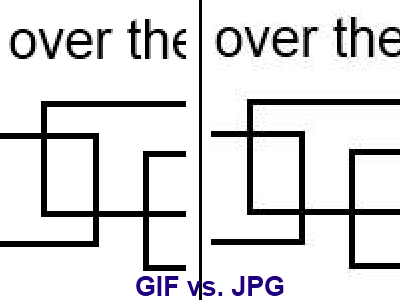
The key is choosing the right tool for the job. For anything that needs to be perfectly preserved, lossless is the only option. For media where