Linux Systems and Shell Mastery
Environment Configuration
Choosing Your Foundation
Before you can fine-tune your environment, you need a solid base. In the Linux world, that base is your distribution, or "distro." Distributions generally fall into two categories: stable release and rolling release. The choice between them is a fundamental trade-off between having the latest software and having a system that changes infrequently.
| Feature | Stable Release (e.g., Debian, Ubuntu LTS) | Rolling Release (e.g., Arch Linux, openSUSE Tumbleweed) |
|---|---|---|
| Updates | Major version upgrades every few months or years. | Continuous, small updates as they become available. |
| Software | Older, well-tested versions of software. | The latest, cutting-edge versions of software. |
| Stability | Extremely high. Less prone to bugs from new updates. | Generally stable, but new updates can occasionally introduce issues. |
| Maintenance | Low day-to-day effort, but major upgrades can be significant. | Requires regular, frequent updates to stay current. |
Stable releases are like a car model that gets a major refresh every few years. They are dependable and predictable, making them ideal for servers or for users who want a set-it-and-forget-it system. A is more like having a car that gets a new part installed the moment it leaves the factory. You always have the newest features, which is great for developers who need the latest tools or for enthusiasts who enjoy being on the bleeding edge.
The Shell's Grand Entrance
When you open a terminal, your shell doesn't just appear out of nowhere. It runs a series of startup scripts to configure your environment. Understanding this sequence is key to customizing your workflow. The files loaded depend on whether the shell is a login shell (when you first log in to the system) or an interactive, non-login shell (any subsequent terminal you open).
For bash, the sequence is generally:
- Login Shell: First, it executes
/etc/profilefor system-wide settings. Then, it looks for~/.bash_profile,~/.bash_login, and~/.profilein that order and runs the first one it finds. A common practice is to have~/.bash_profilesource~/.bashrc. - Interactive, Non-Login Shell: It loads
/etc/bashrcfor system-wide functions and aliases, and then~/.bashrcfor user-specific configurations.
Modern shells like follow a similar pattern but use different filenames, such as .zshrc and .zprofile. The key takeaway is to place your settings in the right file. Put environment variables in ~/.profile or ~/.bash_profile so they are set once at login. Place aliases and shell functions in ~/.bashrc so they are available in every new terminal you open.
Customizing Your Workspace
Now that you know where to put things, you can start customizing. The three most impactful customizations are managing your PATH, setting environment variables, and creating aliases.
Environment variables are dynamic values that affect how processes run on your system. They control everything from your default text editor to the directories searched for executable programs.
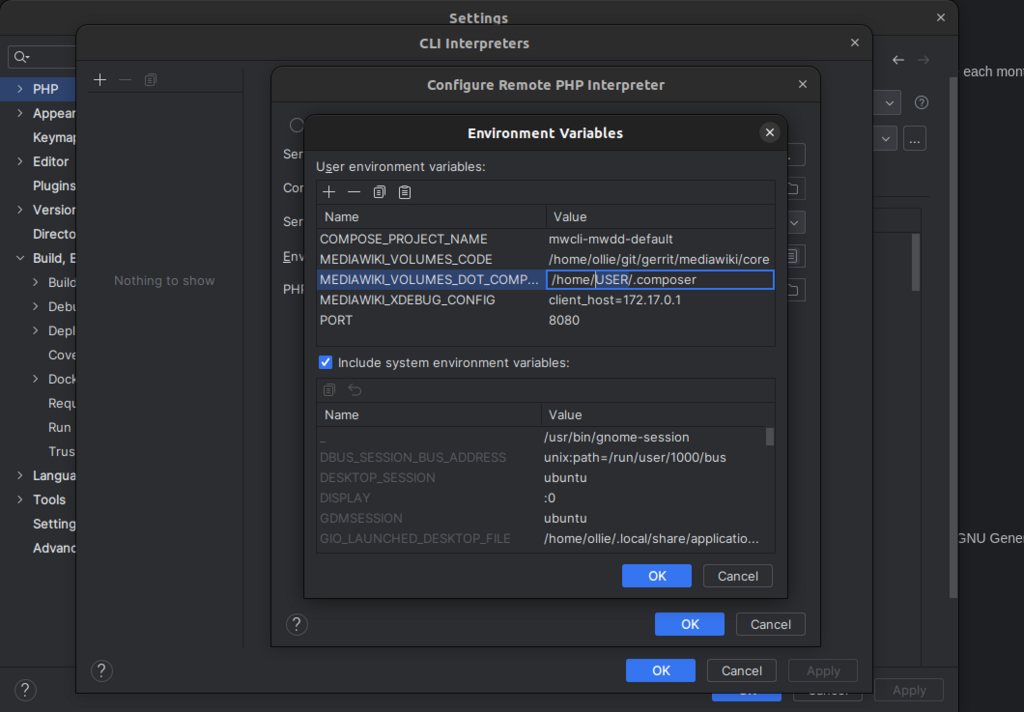
You can see all your current environment variables by running env. To set one temporarily, use export VAR_NAME="value". To make it permanent, add that line to your ~/.bash_profile or ~/.profile.
Perhaps the most important environment variable is the It's a colon-separated list of directories that your shell searches through for executable programs. When you type a command like ls, the shell looks for an executable named ls in each directory listed in your PATH.
To add a new directory, like a custom scripts folder, you should append it to the existing PATH. Overwriting it will break things.
# Add a directory for your custom scripts to the PATH
# This line should go in your ~/.profile or ~/.bash_profile
export PATH="$HOME/bin:$PATH"
Finally, aliases are shortcuts for longer commands. They are a huge productivity booster. You can turn a complex command you use often into a short, memorable alias.
# Add these lines to your ~/.bashrc or ~/.zshrc

# A shorter way to list files with details
alias ll='ls -alF'

# Go up one directory
alias ..='cd ..'

# Get your public IP address
alias myip='curl ifconfig.me'
After adding aliases or exporting new variables, you need to either open a new terminal or run source ~/.bashrc to apply the changes to your current session. A well-configured environment saves you thousands of keystrokes and makes your command-line work faster and more intuitive.
What is the fundamental trade-off when choosing between a stable release and a rolling release Linux distribution?
For a bash shell, where is the most appropriate place to define aliases so they are available in every new interactive terminal you open?