Linux Kernel Engineering and Upstream Contribution
Kernel Development Environment
A Safe Development Sandbox
Kernel development is different from userspace programming. A mistake in a standard application might cause it to crash, but a bug in the kernel can bring down the entire system. To work safely, you need an isolated environment. This is where virtualization comes in.
We'll use QEMU, a machine emulator and virtualizer. It lets you boot a full, virtual computer on your host machine. Any custom kernel you build can be tested inside this QEMU instance. If your experimental code panics the kernel, only the virtual machine dies. Your main operating system remains completely untouched. This creates a risk-free sandbox for development and debugging.
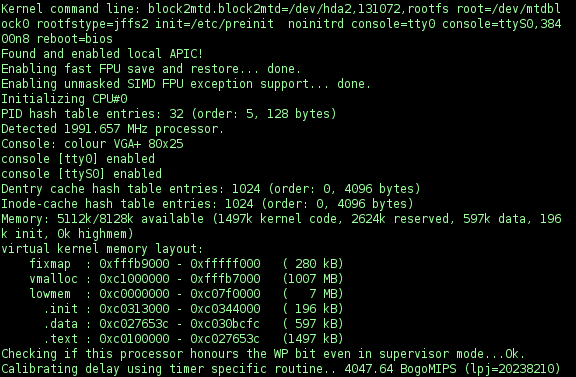
The typical cycle for kernel work is build, deploy, and test. You make a code change, compile the entire kernel, boot it in your virtual machine, and then run tests to see if your change worked and didn't break anything else. This process can be tedious to do manually. The kworkflow (or kw) tool automates this entire loop for you.
# Install dependencies (Debian/Ubuntu)
sudo apt-get install git build-essential libncurses-dev bison flex libssl-dev libelf-dev qemu-kvm

# Clone and install kworkflow
git clone https://github.com/joaoventura/kworkflow.git
cd kworkflow
sudo ./install.sh
Configuring and Building
The Linux kernel has tens of thousands of configuration options that enable or disable features, drivers, and subsystems. Managing this complexity is the job of the Kbuild and Kconfig systems. Kconfig defines the configuration options, while Kbuild uses that configuration to compile only the necessary parts of the kernel's 30-million-line codebase.
You'll interact with Kconfig through a text-based user interface. Running make menuconfig in the kernel source directory launches a menu where you can navigate and change configuration options.
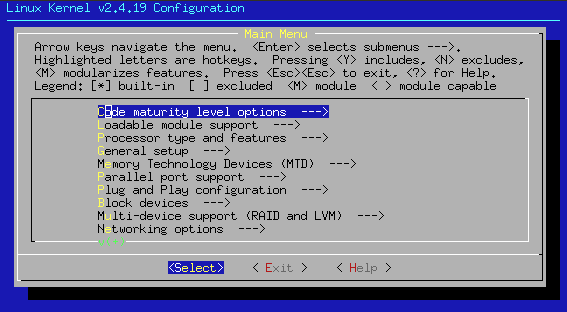
Once your configuration is set, kworkflow simplifies the rest. It wraps the standard build commands into a more streamlined process. For example, you can tell kw to build the kernel, set up a minimal root filesystem, and boot the new kernel in QEMU with a single command series.
# Navigate to your kernel source directory
cd /path/to/linux

# Configure the kernel (opens menuconfig)
kw config

# Build the kernel
kw build

# Run the newly compiled kernel in QEMU
kw run
The
kw runcommand automatically handles creating a small filesystem image (a 'rootfs') for your virtual machine to use, so you can focus on the kernel itself.
Navigating the Source
With millions of lines of code, finding your way around the kernel source tree is a major challenge. Standard text search tools like grep are useful but often insufficient. You need tools that understand the code's structure.
cscope is a powerful, terminal-based tool that indexes the source code. After building an index, you can instantly find things like a function's definition, all the places a function is called, or where a specific variable is used.
# Generate the compilation database needed for indexing
make CC=clang LD=ld.lld HOSTCC=clang HOSTLD=ld.lld COMPILED_SOURCE=1 cscope

# Launch cscope in the root of the kernel source
cscope -d
For those who prefer a web-based interface, the Linux Cross Reference project, often called Elixir, provides a browsable, hyperlinked version of the source code. You can navigate through the entire tree, and every identifier (function name, variable, struct) is a link to its definition. This is an excellent way to explore the relationships between different parts of the kernel without setting up any local tools.
With this setup, you have a complete, professional-grade development loop. You can safely experiment with kernel code in QEMU, streamline your build-test cycle with kworkflow, and efficiently navigate the source code with cscope and Elixir.