Linux Command Line Essentials
Introduction to Linux Filesystem
The Linux Filing Cabinet
Every operating system needs a way to organize information. In Linux, this system is a single, unified tree structure. Forget about C: or D: drives; in Linux, everything starts from one place called the root.
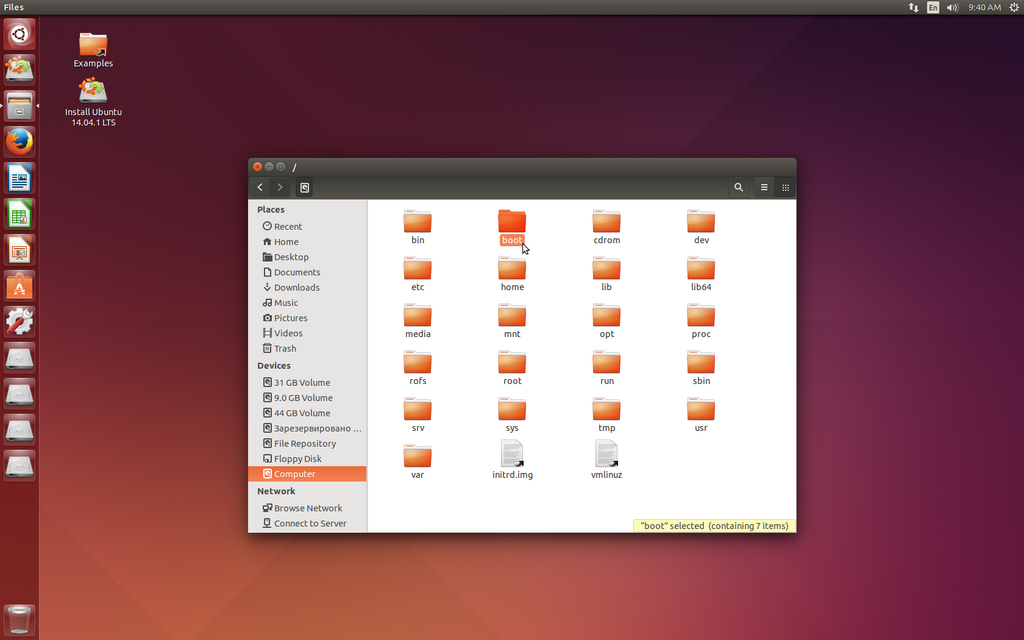
Imagine a massive filing cabinet. The entire cabinet is the file system. The very top of this cabinet, where all organization begins, is the root directory, represented by a single forward slash (/). Every single file and folder on your system lives somewhere inside this root directory.
This structure is hierarchical, meaning it branches out like a tree. The root is the trunk, and other directories are the branches.
To keep this structure consistent across different versions of Linux, there's a set of rules called the Filesystem Hierarchy Standard (FHS). It's a convention that defines the main directories and what they should contain. This makes it easy for both people and software to predict where to find things, no matter what Linux distribution they're using.
The Linux filesystem is logically structured, and each directory has a specific role.
Key Directories
While there are many directories, a few are essential to know. Think of them as the main sections of a library.
-
/(root): As we've covered, this is the starting point for the entire filesystem. Every other directory is a subdirectory of root. -
/home: This is your personal space. For every user on the system, a personal directory is created here (e.g.,/home/sally,/home/john). It's where you'll store your documents, photos, and other personal files. It's the only place a regular user is expected to write files without needing special permissions. -
/bin: This directory contains essential programs, or binaries, that are available to all users. These are the fundamental commands needed for the system to run, like the tools for copying files or listing directory contents. -
/etc: This is the system's configuration hub. It holds all the system-wide configuration files. If you want to change how a program or the system itself behaves, the settings are likely stored in a file inside/etc. It's best not to touch these files unless you know what you're doing.
Types of Files
In Linux, the saying goes that "everything is a file." This is a core philosophy. What you might think of as different things are all represented as files in the filesystem. There are three main types you'll encounter.
Regular Files: These are what you typically think of as files. They contain data, such as the text in a document, the code in a program, or the pixels in an image.
Directories: These are also files, but their job is to hold other files and directories. They're the folders that create the tree structure.
Device Files: This is where things get interesting. Linux represents hardware devices—like your hard drive, mouse, or printer—as files. This allows programs to interact with hardware in the same way they interact with regular files, which is a simple and powerful concept.
What is the primary purpose of the Filesystem Hierarchy Standard (FHS) in Linux?
Where are a regular user's personal files, such as documents and photos, typically stored?
Understanding this structure is the first step toward mastering Linux. It provides a mental map for navigating the system and finding what you need.