Laravel Professional Development Essentials
Architecture and Routing
The Request's Journey
When a user visits a URL in your Laravel application, they kick off a well-defined sequence of events called the request lifecycle. It's not like a simple PHP script where a request directly hits a specific .php file. Instead, every request is funneled through a single entry point: the public/index.php file.
This file loads the Composer-generated autoloader and then bootstraps the Laravel application. The request is handed over to the HTTP kernel, which acts like an air traffic controller. It sends the request through a series of 'middleware'—layers of code that can inspect or modify the request before it goes any further. Think of middleware as security checkpoints for tasks like checking if a user is logged in.
After passing through middleware, the kernel hands the request to the router. The router's job is to look at the requested URL and HTTP method (like GET or POST) and find the corresponding piece of code that should handle it.
The MVC Pattern
Laravel is built around the (MVC) architectural pattern. This isn't a Laravel-specific invention; it's a time-tested way to organize code that separates the application's logic from its presentation. This separation makes your code cleaner, easier to maintain, and simpler to test.
The pattern has three interconnected parts:
- Model: This represents your data and the business logic of your application. If you have an e-commerce site, you might have a
Productmodel that knows how to interact with theproductstable in your database. It handles retrieving, creating, updating, and deleting data. - View: This is the user interface. It's the HTML, CSS, and JavaScript that the user sees and interacts with. The view's job is to display the data it receives from the controller. It shouldn't contain any business logic.
- Controller: This is the intermediary. It receives the user's request from the router, interacts with the appropriate Model to fetch or modify data, and then passes that data to a View to be rendered and sent back to the user.
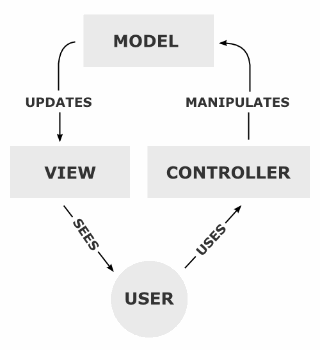
In Laravel, these components have dedicated homes. Controllers live in app/Http/Controllers, Models are typically in app/Models, and Views reside in resources/views. This clear structure helps you know exactly where to find and place your code as your application grows.
Defining Your Routes
Routes are the map of your application. They tell Laravel which controller method or logic to execute for a given URL. You'll define most of your application's routes in two files inside the routes/ directory:
web.php: For routes that are part of your web interface. These routes use web middleware like session state and CSRF protection.api.php: For stateless API routes. These are typically consumed by JavaScript frontends or other applications.
A basic route definition takes a URL and a closure (an anonymous function) that executes when that URL is requested.
// routes/web.php

use Illuminate\Support\Facades\Route;

// A route for the homepage
Route::get('/', function () {
    return view('welcome');
});

// A route for an about page
Route::get('/about', function () {
    return 'This is the about page.';
});
Often, you need to capture segments of the URL, like a user's ID or a blog post's slug. Laravel makes this easy with route parameters. You define them by wrapping a segment name in curly braces.
// routes/web.php

// A required parameter
Route::get('/posts/{id}', function (string $id) {
    return "Displaying post #{$id}";
});

// An optional parameter with a default value
Route::get('/user/{name?}', function (string $name = 'Guest') {
    return "Hello, {$name}";
});
You can also enforce constraints on your parameters using the where method, ensuring they match a specific regular expression. This is useful for making sure an ID is always a number.
// routes/web.php

Route::get('/posts/{id}', function (string $id) {
    // This code will only execute if {id} is one or more digits.
})->where('id', '[0-9]+');
Controllers and Actions
Placing all your logic inside closures in your route files works for small projects, but it quickly becomes messy. The better approach is to move this logic into dedicated controller classes.
A controller is just a class that groups related request-handling logic. Instead of a closure, you can point a route to a controller class and a specific public method within that class.
// app/Http/Controllers/PostController.php

namespace App\Http\Controllers;

class PostController extends Controller
{
    public function show(string $id)
    {
        // Logic to fetch and return a post
        return view('post.show', ['postId' => $id]);
    }
}

// routes/web.php
use App\Http\Controllers\PostController;

Route::get('/posts/{id}', [PostController::class, 'show']);
For controllers that only do one thing, you can use a Single Action Controller (SAC). This is a controller with just one method: __invoke. When you route to an SAC, you don't need to specify a method name.
// app/Http/Controllers/ShowUserProfile.php

namespace App\Http\Controllers;

class ShowUserProfile extends Controller
{
    public function __invoke(string $id)
    {
        return "Showing profile for user {$id}";
    }
}

// routes/web.php
use App\Http\Controllers\ShowUserProfile;

Route::get('/user-profile/{id}', ShowUserProfile::class);
This approach is great for keeping your code focused. If you find a controller is only ever going to have one responsibility, an SAC is a clean way to represent that.
Finally, it's a best practice to give your routes names. Naming a route creates a stable identifier for it. If you ever need to change the route's URL, you can do so without having to update every link to it throughout your application. You simply refer to it by its name.
// routes/web.php
use App\Http\Controllers\PostController;

Route::get('/posts/{id}', [PostController::class, 'show'])
     ->name('posts.show');

// Now, you can generate a URL to this route from anywhere:
// For example, in a Blade view template:
// <a href="{{ route('posts.show', ['id' => 1]) }}">View Post</a>

// Or if you need to redirect to it from another controller:
// return redirect()->route('posts.show', ['id' => 1]);
Using makes your application more resilient to change and your templates cleaner. It's a small step that pays big dividends in maintainability.
You're now familiar with how Laravel handles a request from start to finish. You understand its core architectural pattern and how to build a clear, maintainable map for your application using routes and controllers.
What is the initial entry point for all HTTP requests in a Laravel application?
In the Model-View-Controller (MVC) pattern, which component is responsible for interacting with the database and handling business logic?