Kubewall Cloud-Native Security Policies
Introduction to Kubernetes Security
Why Kubernetes Security Matters
Kubernetes automates how we run applications, but this power comes with new security challenges. In a traditional setup, you might have one big application running on a server, protected by a firewall. It's like a castle with a moat. Easy to defend.
Kubernetes, however, breaks applications into many small, independent pieces called microservices, each running in its own container. These containers often share the same underlying machine, or node. This means security isn't just about protecting the perimeter; it's about securing a bustling city full of interconnected buildings.
The dynamic nature of Kubernetes adds another layer of complexity. Containers are created and destroyed constantly to meet demand. This means security policies can't be tied to static IP addresses like they used to be. We need a more flexible approach that understands the logic of the application.
Pillars of Kubernetes Security
Securing a Kubernetes cluster involves focusing on three main areas. Think of them as layers of defense that work together to protect your applications.
- Network Security: Controlling who can talk to whom.
- Access Control: Managing who can do what.
- Runtime Security: Protecting applications while they are running.
Let's look at each one.
Network Security
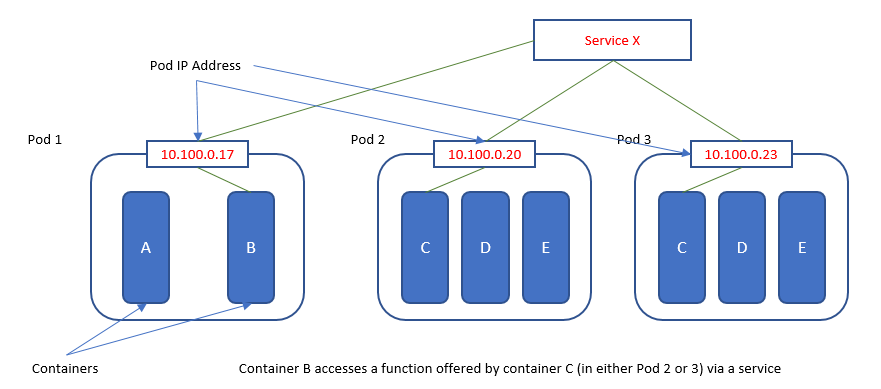
By default, any pod in a Kubernetes cluster can communicate with any other pod. This is convenient for getting started, but it's a huge security risk. If one container is compromised, it can immediately try to attack every other container in the cluster.
To solve this, we adopt a “zero-trust” mindset. We assume no traffic is safe, even if it’s coming from inside the cluster. We need to explicitly define which pods are allowed to communicate.
Kubernetes provides a built-in tool for this called Network Policies. These are like firewall rules for your pods. You can create a policy that says, for example, “Only pods from the frontend are allowed to talk to pods in the database.” This practice of segmentation drastically reduces the potential damage from a single compromised container.
Access Control
Next, we need to control who can access the Kubernetes cluster itself and what they can do. This includes human users, like developers and administrators, as well as automated systems that interact with the cluster's API.
The guiding principle here is the principle of least privilege. This means every user and every process should only have the absolute minimum permissions needed to do its job. A developer might need to deploy applications but shouldn't have permission to modify core cluster settings.
Kubernetes manages this using Role-Based Access Control (RBAC). With RBAC, you define Roles that list permissions (like “read pods” or “create deployments”) and then bind those Roles to specific users or groups. This ensures that access is granular and intentional, preventing both accidental mistakes and malicious actions.
Runtime Security
Finally, runtime security is about protecting an application while it's actively running. Even with perfect network rules and access control, a vulnerability in your application code could still be exploited. Runtime security is your last line of defense.
It focuses on detecting and preventing malicious activity inside a running container. What if an attacker breaks into a container and tries to install malware, access sensitive files, or connect to a command-and-control server? A good runtime security system monitors for this unusual behavior, such as unexpected processes being started (like a web server suddenly spawning a shell) or attempts to write to files that should be read-only.
By analyzing a container's behavior in real-time, you can detect a compromise as it happens and automatically stop the threat before it spreads.
Thinking in these three layers—network, access, and runtime—provides a strong foundation for securing your Kubernetes environment. Each one addresses a different type of risk, and together they create a robust defense.
What is the default behavior for pod-to-pod communication in a standard Kubernetes cluster without any Network Policies applied?
The principle of least privilege is the guiding concept behind which Kubernetes security feature?