Kubernetes Fundamentals
Introduction to Kubernetes
From Servers to Containers
Not long ago, running an application meant finding a physical server, installing an operating system, and then installing your app. This worked, but it was inefficient. If you ran multiple apps on one server, their dependencies might clash. If you gave each app its own server, you wasted resources, since most apps don't use a server's full power.
A solution emerged: containers. Think of a container as a standardized box that holds everything an application needs to run: the code, libraries, and other dependencies. This box can run on any machine, just like a shipping container can be loaded onto any ship or train. It keeps the application isolated and consistent, no matter where it's running.
The Problem with Many Containers
Containers solved the dependency problem, but they created a new one. Modern applications aren't just one container; they're often composed of many small services, each in its own container, that work together. Suddenly, teams had to manage hundreds or even thousands of them.
This raised a lot of questions. What happens if a container crashes in the middle of the night? How do you update an application without taking it offline? How do you scale up to handle a sudden spike in traffic and then scale back down? Doing all of this manually is a recipe for chaos.
This is the challenge Kubernetes was built to solve. Originally developed at Google, Kubernetes is an open-source platform that automates the management of containerized applications. It acts like an orchestra conductor for your containers, making sure they all work together in harmony.
Kubernetes, often shortened to K8s, automates the deployment, scaling, and operation of applications across clusters of hosts.
A Captain and a Crew
You can think of a Kubernetes setup, called a cluster, like a large ship. The ship has a captain on the bridge and a crew to carry out the work.
-
The Control Plane is the captain. It's the brains of the operation, making all the decisions. It watches over the cluster, handles scheduling, and responds to events, like a container failing. It works constantly to ensure the cluster matches the state you've described in your configuration.
-
Worker Nodes are the crew. These are the machines (virtual or physical) that do the actual work. They run the containers and report back to the control plane. The applications themselves run on the worker nodes.
In Kubernetes, you don't run containers directly. Instead, you deploy Pods. A Pod is the smallest unit in Kubernetes and can hold one or more containers that need to run together. The control plane decides which worker node is best suited to run a Pod and assigns it there.
Kubernetes and DevOps
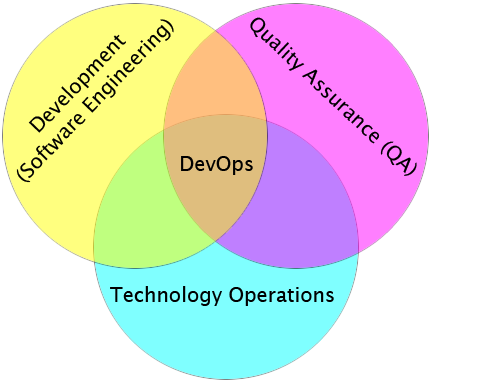
The rise of Kubernetes is closely tied to the DevOps movement. DevOps aims to shorten the software development lifecycle by combining development (Dev) and IT operations (Ops). The goal is to build, test, and release software faster and more reliably.
Kubernetes is a perfect tool for this. It automates much of the 'Ops' work. Developers can define how their application should run, and Kubernetes takes care of the rest: deploying it, keeping it healthy, and scaling it as needed. This frees up developers to focus on writing code and allows organizations to move much faster.
Now, let's review what we've learned about Kubernetes.
What fundamental problem did the widespread use of containers create, which Kubernetes was designed to solve?
In the common analogy of a Kubernetes cluster as a ship, what role does the Control Plane play?
By automating container management, Kubernetes provides a powerful foundation for building modern, scalable, and resilient applications.