Kubernetes Essentials
Introduction to Containers
Software in a Box
Imagine trying to ship goods across the ocean. In the old days, you'd have barrels, crates, and sacks of all different sizes. Loading and unloading was a chaotic, inefficient process. Then came the standardized shipping container. Suddenly, everything fit together perfectly, no matter what was inside. It revolutionized global trade.

In the software world, we have a similar concept: the container. A container is a standard unit of software that packages up code and all its dependencies so the application runs quickly and reliably from one computing environment to another. Think of it as a neat, tidy box for your application that includes everything it needs to run: the code, runtime, system tools, system libraries, and settings.
Containerization is a lightweight form of virtualization that isolates applications at the operating system (OS) level.
This solves the classic problem of, “But it worked on my machine!” By bundling the application and its environment together, developers can be confident that the software will behave the same way wherever the container is deployed, whether it's a developer's laptop, a testing server, or a production environment in the cloud.
Containers vs. Virtual Machines
You might be thinking this sounds a lot like a Virtual Machine (VM). A VM also creates a self-contained environment to run software. However, there's a key difference in how they work, which makes containers much more lightweight and efficient.
A VM virtualizes the hardware. It runs a full-blown “guest” operating system on top of a “host” operating system. Each VM has its own OS, which can take up gigabytes of space and requires significant time to boot up.
Containers, on the other hand, virtualize the operating system itself. They share the host system’s OS kernel. Instead of bundling a whole new OS, a container only includes the specific libraries and settings its application needs. This means containers are much smaller, often measured in megabytes, and can start almost instantly.
Because they don't carry the overhead of a guest OS, containers are faster to create, start, and stop. This allows for more applications to run on the same server, improving resource utilization.
Docker and the Container Ecosystem
When people talk about containers, the name Docker often comes up. Docker is an open-source platform that popularized container technology and made it easy for developers to use. It provides a simple set of tools to build, share, and run containers.
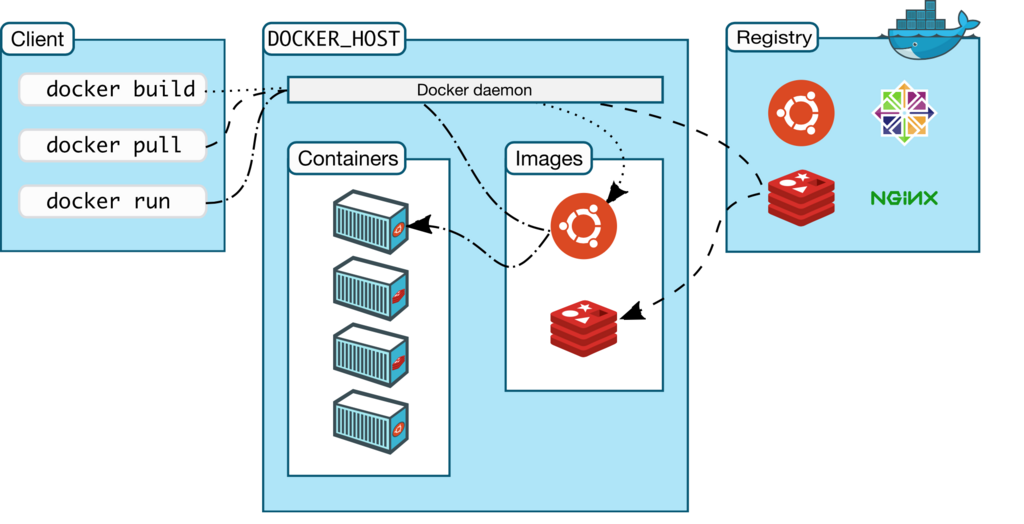
At the heart of Docker is the concept of an image. A Docker image is a read-only template with instructions for creating a container. Images are often based on other images, with some additional customization. For example, you might start with a base Ubuntu image, add a Python runtime, and then add your application code to create your final image.
These images are stored in a registry, like Docker Hub, which is a public library of thousands of container images you can use. Once you have an image, you can use Docker to run it as a container on any machine that has Docker installed.
While Docker is the most well-known container tool, it's not the only one. Other tools like containerd, Podman, and Buildah are also part of the wider container ecosystem, each with its own specific use cases and advantages. However, they all share the same goal: making software portable and easy to manage.
Let's review the main ideas we've covered.
Now, check your understanding.
What is the primary problem that containerization is designed to solve?
What is the key architectural difference between a container and a Virtual Machine (VM)?
By understanding containers, you've grasped a fundamental building block of modern software development. This knowledge is the first step toward learning how powerful systems like Kubernetes manage applications at a massive scale.