Kubernetes Architecture and Orchestration
Core Workload Components
The Building Blocks of a Workload
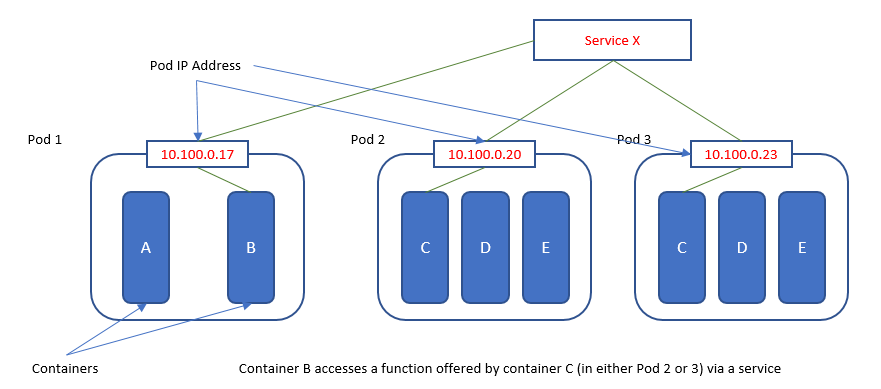
In Kubernetes, you don't manage individual containers directly. Instead, you work with a higher-level object called a . Think of a Pod as the smallest and simplest unit in the Kubernetes object model that you create or deploy. It represents a single instance of a running process in your cluster and can contain one or more tightly coupled containers.
Pods are considered ephemeral, or disposable. They are created, assigned a unique ID, and scheduled to run on a worker node. They remain there until they are terminated or deleted. If a node fails, the Pods on that node are lost.
Each Pod has a defined lifecycle. It starts in a Pending state, moves to Running if its containers start successfully, and can end in Succeeded or Failed states depending on the outcome. The Pod's restartPolicy attribute—which can be set to Always (the default), OnFailure, or Never—determines whether Kubernetes should try to restart the containers within that Pod if they fail.
Automating with Controllers
Managing individual Pods would be a nightmare. What happens if a Pod crashes? Or if you need to scale your application to handle more traffic? This is where controllers come in. A core controller is the ReplicaSet.
A ReplicaSet's primary job is to ensure that a specified number of Pod replicas are running at all times.
You tell the ReplicaSet your 'desired state'—for example, "I want 3 replicas of my application Pod running." The ReplicaSet then constantly checks the 'current state' of the cluster. If it finds only 2 replicas, it creates a new one. If it finds 4, it terminates one. This continuous loop of comparing the desired state (stored in ) with the current state is the foundation of Kubernetes' self-healing capabilities.
How does a ReplicaSet know which Pods to manage? It uses labels and selectors. A label is a key/value pair you attach to objects like Pods (e.g., app: my-web-server). A ReplicaSet's selector is configured to match that label, telling it, "Any Pod with the label 'app: my-web-server' belongs to me."
Declarative Updates with Deployments
While you can use ReplicaSets directly, you'll more commonly use a higher-level object called a Deployment. A Deployment owns and manages ReplicaSets, providing a powerful feature: declarative updates for your applications. Instead of manually orchestrating updates, you just tell the Deployment the new state you want (like a new container image), and it handles the rest.
Deployments manage ReplicaSets, which in turn manage Pods. This layering allows for sophisticated update and rollback capabilities. When you update a Deployment, it creates a new ReplicaSet with the new configuration and gradually scales it up while scaling the old ReplicaSet down. This process is governed by a deployment strategy.
| Strategy | Description | Use Case |
|---|---|---|
RollingUpdate | Gradually replaces old Pods with new ones, one by one. | Production environments where zero downtime is critical. |
Recreate | Kills all old Pods before creating any new ones. | Development environments or when a clean slate is required. |
The default strategy, RollingUpdate, is designed to update your application with no downtime. You can fine-tune its behavior with maxSurge, which controls how many extra Pods can be created during the update, and maxUnavailable, which dictates how many Pods can be offline at once. This gives you precise control over the update process.
apiVersion: apps/v1
kind: Deployment
metadata:
  name: nginx-deployment
spec:
  replicas: 3
  strategy:
    type: RollingUpdate # This is the default
    rollingUpdate:
      maxUnavailable: 1 # At most 1 pod can be unavailable
      maxSurge: 1       # At most 1 extra pod can be created
  selector:
    matchLabels:
      app: nginx
  template: # This is the Pod template
    metadata:
      labels:
        app: nginx
    spec:
      containers:
      - name: nginx
        image: nginx:1.14.2
        ports:
        - containerPort: 80
Keeping Applications Healthy
Just because a container is running doesn't mean it's working correctly. It might be stuck in a deadlock or unable to connect to a database. Kubernetes provides probes to check the health of your containers.
A Liveness Probe checks if a container is still running. If the probe fails, the kubelet (the agent on each node) will kill the container, and the Pod's restart policy will determine if it gets restarted. This helps recover from deadlocks.
A Readiness Probe checks if a container is ready to accept traffic. If the readiness probe fails, the container is not killed, but the Pod's IP address is removed from the endpoints of any Services it belongs to. This is useful for preventing traffic from being sent to a Pod that is still starting up or is temporarily overloaded.
Finally, when you define a Pod, you can specify its resource needs. Resource Requests tell the Kubernetes scheduler the minimum amount of CPU and memory the Pod needs to run. The scheduler uses this to find a node with enough available resources. Resource Limits set a maximum cap, preventing a container from consuming too many resources and impacting other applications on the same node.
By combining Deployments, ReplicaSets, and Pods with health probes and resource management, you have a robust system for running stateless applications at scale. These components form the foundation upon which more complex Kubernetes features are built.
What is the smallest and simplest unit in the Kubernetes object model that you create or deploy?
A container in your Pod is stuck in an infinite loop and has become unresponsive, but the process is still running. Which probe would help Kubernetes detect this situation and restart the container?