Juniper L3VPN BGP MPLS
Networking Basics
A Framework for Connection
Imagine trying to send a package from your home to a friend across the country. There's a whole system at play: you write the address, a postal worker picks it up, it gets sorted at a local facility, travels across states, gets sorted again, and is finally delivered. Each step follows specific rules to ensure the package arrives safely.
Computer networks operate in a similar way. For your computer to send a simple email to another computer, the data goes through several stages. To make sense of this complexity, engineers created the Open Systems Interconnection (OSI) model. It’s not a physical thing, but a conceptual framework that divides the process of network communication into seven distinct layers.
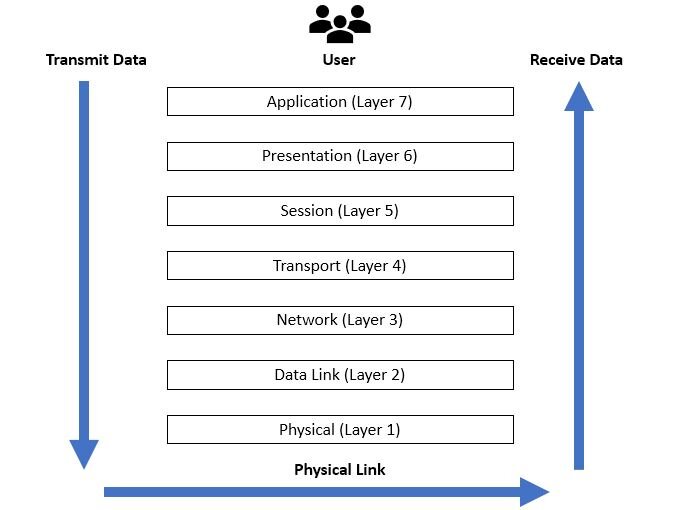
Thinking in layers helps us understand how different technologies work together. Each layer has a specific job and only talks to the layers directly above and below it. Let's start from the top, the layer closest to you.
| Layer | Name | What it Does |
|---|---|---|
| 7 | Application | Provides network services to user applications (e.g., your web browser, email client). |
| 6 | Presentation | Translates, encrypts, and compresses data so the application layer can understand it. |
| 5 | Session | Manages the connection and conversation between two devices. |
| 4 | Transport | Ensures data is delivered reliably and in the correct order (e.g., TCP, UDP). |
| 3 | Network | Handles logical addressing (IP addresses) and routing to find the best path across networks. |
| 2 | Data Link | Manages physical addressing (MAC addresses) and controls how data is placed on the media. |
| 1 | Physical | The actual hardware that transmits raw data bits (e.g., cables, Wi-Fi signals). |
For our purposes, we'll focus heavily on Layer 3, the Network Layer. This is where the magic of routing happens, figuring out how to get your data from point A to a distant point B.
Addresses on the Network
Just like the postal service needs a street address to deliver a package, the Network Layer needs an address to deliver data. This is the Internet Protocol (IP) address. It's a unique identifier assigned to every device on a network.
Think of an IP address as a unique street address for a computer, while a MAC address (from Layer 2) is like the name of the person living there. You need both to get a package to the right place and person.
The most common format you'll see is IPv4, which looks like four numbers separated by periods, like 192.168.1.1. Each number can range from 0 to 255. This system gives us billions of possible addresses, but with so many devices online, we needed a way to use them efficiently.
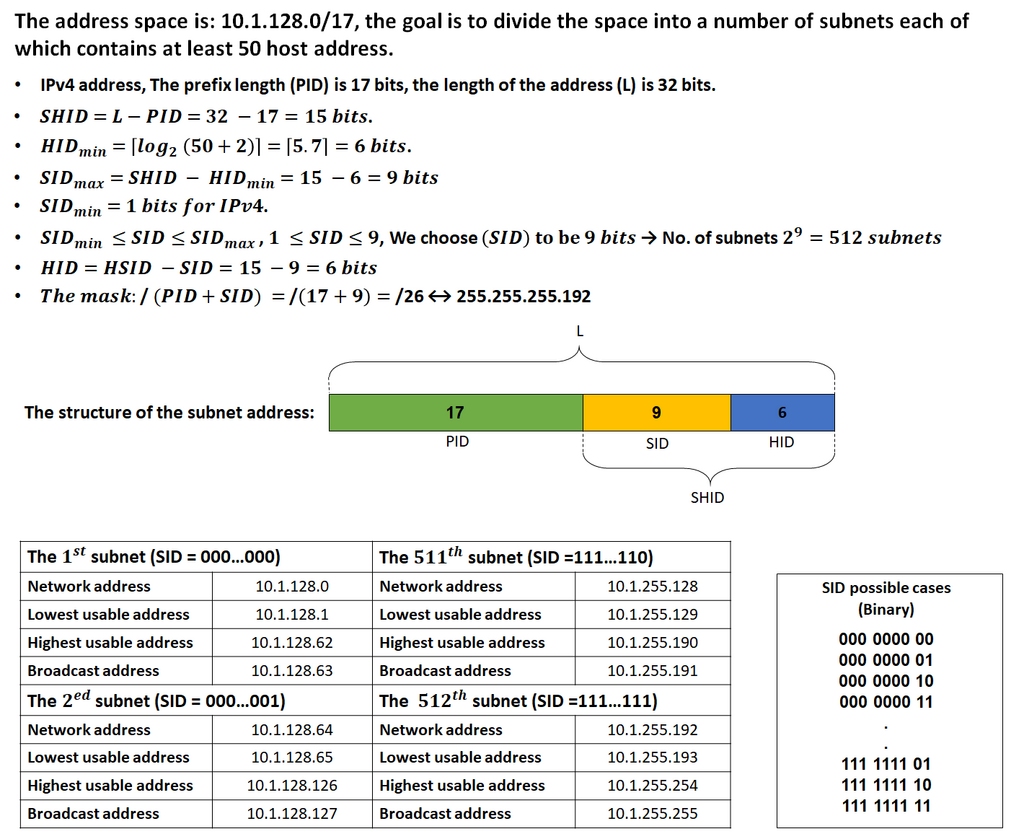
This is where subnetting comes in. Subnetting is the process of taking a large block of IP addresses and dividing it into smaller, more manageable groups, or sub-networks. It’s like taking the zip code for a large city and adding extra digits to specify a particular neighborhood. This helps organize the network, improve performance, and increase security by keeping traffic contained within its relevant subnet.
Choosing the Best Path
Once a device has an IP address, it can send and receive data. But how does the data know where to go, especially if the destination is on a completely different network halfway across the world? This is the job of routing.
Routing is the process of selecting a path for traffic to travel from a source to a destination. The devices that make these decisions are called routers. A router is like a traffic cop for data, standing at an intersection and directing packets of information to their next stop.
The Network Layer isn’t just about IP addresses and routing tables; it’s the foundational element upon which all modern network services are built.
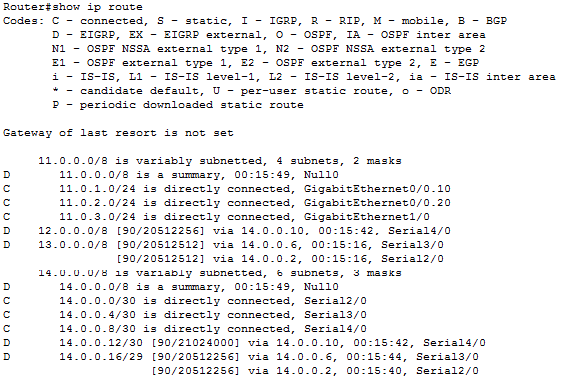
Routers maintain a routing table, which is essentially a map of the network. When a data packet arrives, the router inspects its destination IP address and consults its routing table to determine the best path to send it on its way. This decision happens millions of times a second on the internet.
Routing protocols are the languages routers use to talk to each other and share updates about the best paths. Some common protocols include OSPF (Open Shortest Path First) and BGP (Border Gateway Protocol). BGP is particularly important, as it's the protocol that essentially holds the global internet together by managing routing between the large, independent networks that form its backbone.
Companies like Juniper Networks build high-performance routers and switches that serve as the backbone for large enterprises and internet service providers. These devices are designed to handle massive amounts of traffic and make complex routing decisions quickly and reliably. Understanding the principles of IP addressing and routing is the first step to being able to configure and manage such powerful equipment.
Ready to test your knowledge on these core concepts?
What is the primary purpose of the OSI model in computer networking?
In the context of networking, what is a router's main function?
These building blocks, from the OSI model's layers to the logic of routing, are the foundation of all modern networking.