Jira Software Essentials
Introduction to Jira Software
What Is Jira Software?
Jira Software is a project management tool created by a company called Atlassian. At its core, it's designed to help teams of all sizes plan, track, and manage their work. While it's extremely popular in the software development world, its flexibility makes it useful for everything from marketing campaigns to hiring processes.
Think of it as a central hub for any project. Instead of relying on scattered emails, spreadsheets, and sticky notes, teams use Jira to organize all their tasks in one place. This makes it easy for everyone to see what needs to be done, who is doing it, and what the status of each task is.
Jira is a highly customizable and centralized project management platform.
Core Features
Jira's power comes from a few key building blocks. The most fundamental is the "issue."
Issue
noun
The basic unit of work in Jira, which can represent a task, bug, feature request, or any other action item.
Every piece of work your team needs to complete gets its own issue. This could be fixing a bug, designing a new feature, or writing a blog post. Each issue holds all the important information about that task: a description, who it's assigned to, its priority, and its due date.
Issues don't just sit in a list; they move through a workflow. A workflow is the path an issue takes from creation to completion. A simple workflow might just be To Do, In Progress, and Done. More complex projects might have additional steps like In Review, Testing, or Ready for Deployment.
This structured process is what makes Jira so effective. It creates a predictable, repeatable way for teams to get work done. Everyone on the team knows the status of every task just by looking at where it is in the workflow. This transparency is a huge benefit.
Visualizing Your Work
Jira offers powerful ways to visualize these workflows, primarily through boards. The two most common types are Kanban and Scrum boards. A Kanban board, shown below, is a simple, visual way to manage workflow. Columns represent the stages of your process, and cards (representing issues) move from left to right as work progresses.
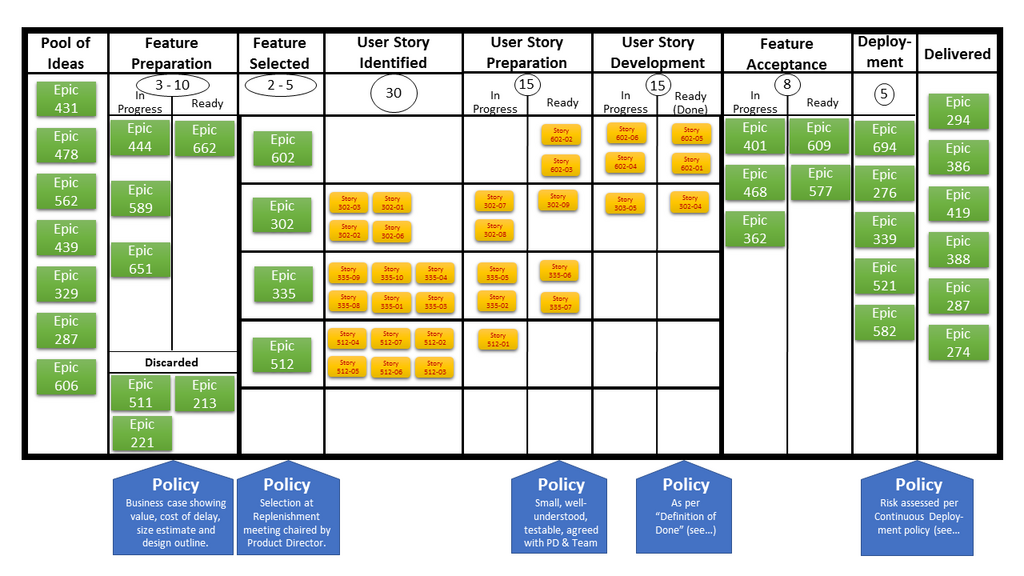
Boards provide an at-a-glance overview of the entire project. Team members can instantly see what's being worked on, what's coming up next, and if there are any bottlenecks where tasks are piling up. This visibility helps teams collaborate more effectively and keeps everyone aligned on priorities.
This approach reduces the need for constant status meetings because the board itself serves as a single source of truth for the project's progress.
By centralizing tasks, defining clear workflows, and providing powerful visualizations, Jira helps teams stay organized and focused. It brings structure to complex projects, making it easier to deliver work on time and with greater efficiency.
What is the primary purpose of Jira Software?
In Jira, the most fundamental unit of work (such as a bug fix, new feature, or a simple task) is called a(n) ______.